element14 Community
element14 Community
    Register Log In
  • Site
  • Search
  • Log In Register
  • Community Hub
    Community Hub
    • What's New on element14
    • Feedback and Support
    • Benefits of Membership
    • Personal Blogs
    • Members Area
    • Achievement Levels
  • Learn
    Learn
    • Ask an Expert
    • eBooks
    • element14 presents
    • Learning Center
    • Tech Spotlight
    • STEM Academy
    • Webinars, Training and Events
    • Learning Groups
  • Technologies
    Technologies
    • 3D Printing
    • FPGA
    • Industrial Automation
    • Internet of Things
    • Power & Energy
    • Sensors
    • Technology Groups
  • Challenges & Projects
    Challenges & Projects
    • Design Challenges
    • element14 presents Projects
    • Project14
    • Arduino Projects
    • Raspberry Pi Projects
    • Project Groups
  • Products
    Products
    • Arduino
    • Avnet & Tria Boards Community
    • Dev Tools
    • Manufacturers
    • Multicomp Pro
    • Product Groups
    • Raspberry Pi
    • RoadTests & Reviews
  • About Us
  • Store
    Store
    • Visit Your Store
    • Choose another store...
      • Europe
      •  Austria (German)
      •  Belgium (Dutch, French)
      •  Bulgaria (Bulgarian)
      •  Czech Republic (Czech)
      •  Denmark (Danish)
      •  Estonia (Estonian)
      •  Finland (Finnish)
      •  France (French)
      •  Germany (German)
      •  Hungary (Hungarian)
      •  Ireland
      •  Israel
      •  Italy (Italian)
      •  Latvia (Latvian)
      •  
      •  Lithuania (Lithuanian)
      •  Netherlands (Dutch)
      •  Norway (Norwegian)
      •  Poland (Polish)
      •  Portugal (Portuguese)
      •  Romania (Romanian)
      •  Russia (Russian)
      •  Slovakia (Slovak)
      •  Slovenia (Slovenian)
      •  Spain (Spanish)
      •  Sweden (Swedish)
      •  Switzerland(German, French)
      •  Turkey (Turkish)
      •  United Kingdom
      • Asia Pacific
      •  Australia
      •  China
      •  Hong Kong
      •  India
      • Japan
      •  Korea (Korean)
      •  Malaysia
      •  New Zealand
      •  Philippines
      •  Singapore
      •  Taiwan
      •  Thailand (Thai)
      • Vietnam
      • Americas
      •  Brazil (Portuguese)
      •  Canada
      •  Mexico (Spanish)
      •  United States
      Can't find the country/region you're looking for? Visit our export site or find a local distributor.
  • Translate
  • Profile
  • Settings
FPGA
  • Technologies
  • More
FPGA
Blog Creating a Custom Kria App - Part 1
  • Blog
  • Forum
  • Documents
  • Quiz
  • Events
  • Polls
  • Files
  • Members
  • Mentions
  • Sub-Groups
  • Tags
  • More
  • Cancel
  • New
Join FPGA to participate - click to join for free!
  • Share
  • More
  • Cancel
Group Actions
  • Group RSS
  • More
  • Cancel
Engagement
  • Author Author: albertabeef
  • Date Created: 30 Dec 2021 4:11 PM Date Created
  • Views 10889 views
  • Likes 3 likes
  • Comments 6 comments
  • firmware
  • kria
  • vvas
  • overlay
  • kv260
  • vitis-ai
  • app
  • dfx-mgr
  • kria app
  • smart_model_select
  • xmutil
Related
Recommended

Creating a Custom Kria App - Part 1

albertabeef
albertabeef
30 Dec 2021
Creating a Custom Kria App - Part 1

This blog is part of a series of blogs which describe the development steps for an in-depth project tutorial.

  • http://avnet.me/kv260-vvas-sms-2021-1-blog

This part of the tutorial provides a description of the Xilinx repositories that will be used.

image

Installing the Xilinx tools

The following tools will be used for this tutorial

Xilinx Tools

Version

Vitis Core Development Kit
https://www.xilinx.com/support/download/index.html/content/xilinx/en/downloadNav/vitis/2021-1.html

2021.1

Petalinux

https://www.xilinx.com/support/download/index.html/content/xilinx/en/downloadNav/embedded-design-tools/2021-1.html

2021.1

Petalinux eSDK update 1

https://xilinx.github.io/kria-apps-docs/main/build/html/docs/build_petalinux.html

2021.1 update 1

NOTE : The eSDK update 1 for use with Kria is not compatible with other platforms so should be kept separate, if working on other platforms as well.


Creating a base directory

This project tutorial can be placed in any location on your linux machine. 

To facilitate the flow of the tutorial, we will define an environment variable corresponding to this base directory for the project.

$ export PROJ_DIR=$(pwd)

$ cd $PROJ_DIR


Cloning the Xilinx repositories

The following repositories will be used for this tutorial.

Xilinx Repository

Branch

https://github.com/Xilinx/kv260-vitis

release-2021.1

https://github.com/Xilinx/kv260-firmware

release-2021.1

https://github.com/Xilinx/Vitis-AI

v1.4

https://github.com/Xilinx/VVAS

VVAS_REL_v1.0


On a linux machine, clone the following repositories to the same location:

$ cd $PROJ_DIR

$ git clone -b release-2021.1 https://github.com/Xilinx/kv260-vitis

$ git clone -b release-2021.1 https://github.com/Xilinx/kv260-firmware

$ git clone -b v1.4 https://github.com/Xilinx/Vitis-AI

$ git clone -b VVAS_REL_v1.0 https://github.com/Xilinx/VVAS


Downloading the Xilinx smart_model_select archives

We will also make use to the following pre-built solution for ZCU104:

  • https://www.xilinx.com/member/forms/download/xef.html?filename=vvas_smart_model_select_2021.1_zcu104.zip

We will also make use of the provided video files:

  • https://www.xilinx.com/member/forms/download/xef.html?filename=videos_smart_model_select.zip


Download and extract these archives to the same location as the previous repositories.


Downloading the modified source files and pre-built binaries

Throughout this tutorial, some of the source file will be modified, to create new binaries targeting the Kria KV260 Vision AI Starter Kit.

Although not required to complete the tutorial, the modified files and pre-built binaries are provided for reference:

  • Modified source files
    • http://avnet.me/kv260-vvas-sms-2021-1-files
      (2022-01-10 - md5sum : 095a29873297295b462dc881768b9f9b)
  • Pre-built binaries
    • http://avnet.me/kv260-vvas-sms-2021-1-prebuilt
      (2022-01-10 - md5sum : f3fa7059d657a2f0bd115cafb325ff41)


These archives can be extracted to the same location as the previous content.


Understanding the Vitis platforms and examples

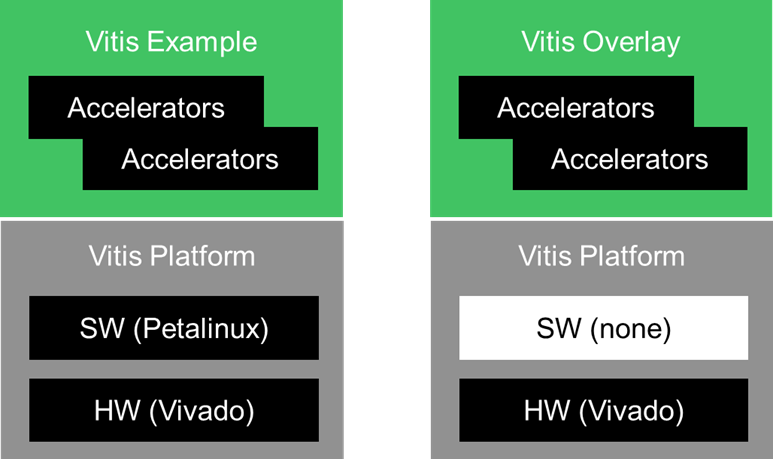
The Vitis Examples (VVAS) and Overlays (kv260-vitis) provided by Xilinx have the following architecture:
image

The Vitis Examples and Overlays are built on top of Vitis platforms.

The Vitis platforms are composed of:

  • Hardware – Vivado project
  • Software – Petalinux project, or other

An important observation is that the Vitis platforms may or may not include the petalinux project corresponding to the vivado project. 

For the ZCU104 platforms (VVAS), the petalinux projects are included. 

For the KV260 platforms (kv260-vitis), the petalinux project is not provided.  Instead, a common petalinux project will be used to dynamically load the “overlay”.  We can define that our custom Kria app will be a dynamically loaded “overlay”.

The Vitis platform is a wrapper, that defines the resources that are available, including:

  • Resources (LUTs, FFs, BRAMs, URAMs, DSPs, etc…)
  • Interconnect
  • Clocks
  • Resets
  • Interrupts


The Vitis Examples and Overlays define and instantiate one or more accelerators, which may include:

  • DPU
  • HLS-based functions from the Vitis Accelerated Libraries


The “VVAS” and “kv260-vitis” repositories both contain examples of this, as shown below:

Vitis Platform

Vitis Example / Overlay

VVAS/ivas-platforms/Embedded

  • zcu104_vcuDec_DP
  • zcu104_vcuDec_vmixHdmiTx

VVAS/ivas-examples/Embedded

  • smart_model_select
  • multichannel_ml

k260-vitis/platforms/

  • kv260_ispMipiRx_vcu_DP
  • kv260_vcuDecode_vmixDP
  • kv260_ispMipiRx_vmixDP
  • kv260_ispMipiRx_DP

k260-vitis/overlays

  • smartcam, benchmark
  • aibox-reid
  • defect-detect
  • nlp-smartvision


The “VVAS” repository includes two (2) platforms, and two (2) examples:

image

The smart_model_select and multichannel_ml examples both implement the following accelerators:

  • preprocess : multi-channel scaler with color space conversion and normalization
  • AI engine : B4096 DPU

Each of the VVAS vitis platforms include a combination of the following features:

  • vcuDec : VCU, in decode only configuration
  • DP : DisplayPort output
  • vmixHdmiTx : HDMI output with video mixer
    • zcu104_vcuDec_vmixHdmiTx has nine NV12 layers

Both examples target a ZCU104 platform with VCU (decode only).  

The smart_model_select example provides support for 16 different models from the Xilinx Model Zoo, executing one at a time, and using the DisplayPort as output.

The multichannel_ml example provides support for 4 different models, and uses the platform enabled with Video Mixer and HDMI TX to display up to 8 streams at the same time on the HDMI monitor.


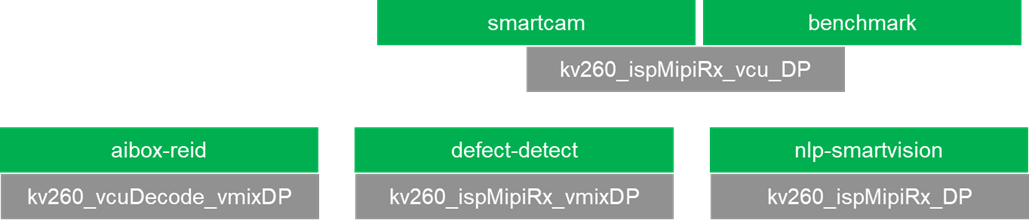
The “kv260-vitis” repository includes four (4) platforms, and five (5) overlays:
image

Each of the kv260 vitis platforms include a combination of the following features:

  • ispMipiRx : MIPI capture pipeline, for use with the AR1335 sensor module
  • vcu : VCU, in decode + encode configuration
  • vcuDecode : VCU, in decode only configuration
  • DP : DisplayPort output
  • vmixDP : DisplayPort output with video mixer
    • kv260_vcuDecode_vmixDP has one BGRA8 layer and four NV12 layers
    • kv260_ispMipiRx_vmixDP has one BGRA8 layer and four Y8 layers

We can see that the kv260_ispMipiRx_vcu_DP platform, which includes a MIPI capture pipeline and VCU in decode + encode configuration, is used for two different overlays.

The smartcam overlay implements the following accelerators:

  • preprocess : normalization and scaling
  • AI engine : B3136 DPU

The benchmark overlay implements the following accelerator:

  • AI engine : B4096 DPU


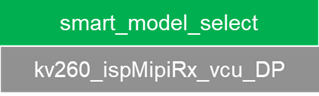
In this tutorial, we will combine the following two components together to create our custom Kria app:

  • Vitis Example/Overlay : smart_model_select, from VVAS repository
  • Vitis Platform : kv260_ispMipiRx_vcu_DP, from kv260-vitis repository
image

Next Steps

The following blogs will cover the remaining development steps for this in-depth project tutorial.

  • http://avnet.me/kv260-vvas-sms-2021-1-part2
  • http://avnet.me/kv260-vvas-sms-2021-1-part3
  • http://avnet.me/kv260-vvas-sms-2021-1-part4
  • http://avnet.me/kv260-vvas-sms-2021-1-part5
  • http://avnet.me/kv260-vvas-sms-2021-1-part6
  • http://avnet.me/kv260-vvas-sms-2021-1-part7

Revision History

Revision

Date

Description

1.0

2022/01/12

Initial Version, ready for publishing Blush

1.1

2022/02/24

Update part 1 to specify "VVAS_REL_v1.0" branch for VVAS repository.

  • Sign in to reply
  • john117
    john117 over 2 years ago

    hey, i have a doubt, in installing vitis core developement kit, what should i select, should i select vitis or petalinx?

    • Cancel
    • Vote Up 0 Vote Down
    • Sign in to reply
    • More
    • Cancel
  • albertabeef
    albertabeef over 3 years ago in reply to ralphjy

    Ralph,

    I updated the archive for the pre-built archive, and updated the md5sum.

    Use the same link:

    • Pre-built binaries
      • http://avnet.me/kv260-vvas-sms-2021-1-prebuilt
        (2022-01-10 - md5sum : f3fa7059d657a2f0bd115cafb325ff41)

    Very sorry about this inconvenience, and thank you very much for bring this to my attention.

    Regards,

    Mario.

    • Cancel
    • Vote Up 0 Vote Down
    • Sign in to reply
    • More
    • Cancel
  • albertabeef
    albertabeef over 3 years ago in reply to ralphjy

    Ralph,
    As always, thank you for your valuable feedback.
    You are correct, there is an issue with the prebuilt archive ... I am re-uploading, and will update the md5sum soon ... 
    Regards,
    Mario.

    • Cancel
    • Vote Up 0 Vote Down
    • Sign in to reply
    • More
    • Cancel
  • ralphjy
    ralphjy over 3 years ago in reply to albertabeef

    Hi Mario,

    I just tried to provide you feedback on problems that I have trying to extract the prebuilt archive, but it got flagged as spam.  Hope that it will clear moderation.

    Ralph

    • Cancel
    • Vote Up 0 Vote Down
    • Sign in to reply
    • More
    • Cancel
  • ralphjy
    ralphjy over 3 years ago in reply to albertabeef

    Hi Mario,

    I think that your prebuilt zip archive may not have built correctly.  The md5sum is correct but it won't extract in either Win10 or Ubuntu.  Could you verify that it will extract correctly.  Maybe something on my end.

    In Win10:

    image

    In Ubuntu the error message is more verbose:

    $ unzip kv260-vvas-sms-2021-1-prebuilt-20220110.zip
    Archive: kv260-vvas-sms-2021-1-prebuilt-20220110.zip
    End-of-central-directory signature not found. Either this file is not
    a zipfile, or it constitutes one disk of a multi-part archive. In the
    latter case the central directory and zipfile comment will be found on
    the last disk(s) of this archive.
    note: kv260-vvas-sms-2021-1-prebuilt-20220110.zip may be a plain executable, not an archive
    unzip: cannot find zipfile directory in one of kv260-vvas-sms-2021-1-prebuilt-20220110.zip or
    kv260-vvas-sms-2021-1-prebuilt-20220110.zip.zip, and cannot find kv260-vvas-sms-2021-1-prebuilt-20220110.zip.ZIP, period.

    I can see the two binaries but they won't extract.  I have been running the prebuilt image from your Hackster project, but decided to try the updated files.   

    • Cancel
    • Vote Up 0 Vote Down
    • Sign in to reply
    • More
    • Cancel
>
element14 Community

element14 is the first online community specifically for engineers. Connect with your peers and get expert answers to your questions.

  • Members
  • Learn
  • Technologies
  • Challenges & Projects
  • Products
  • Store
  • About Us
  • Feedback & Support
  • FAQs
  • Terms of Use
  • Privacy Policy
  • Legal and Copyright Notices
  • Sitemap
  • Cookies

An Avnet Company © 2025 Premier Farnell Limited. All Rights Reserved.

Premier Farnell Ltd, registered in England and Wales (no 00876412), registered office: Farnell House, Forge Lane, Leeds LS12 2NE.

ICP 备案号 10220084.

Follow element14

  • X
  • Facebook
  • linkedin
  • YouTube