element14 Community
element14 Community
    Register Log In
  • Site
  • Search
  • Log In Register
  • Community Hub
    Community Hub
    • What's New on element14
    • Feedback and Support
    • Benefits of Membership
    • Personal Blogs
    • Members Area
    • Achievement Levels
  • Learn
    Learn
    • Ask an Expert
    • eBooks
    • element14 presents
    • Learning Center
    • Tech Spotlight
    • STEM Academy
    • Webinars, Training and Events
    • Learning Groups
  • Technologies
    Technologies
    • 3D Printing
    • FPGA
    • Industrial Automation
    • Internet of Things
    • Power & Energy
    • Sensors
    • Technology Groups
  • Challenges & Projects
    Challenges & Projects
    • Design Challenges
    • element14 presents Projects
    • Project14
    • Arduino Projects
    • Raspberry Pi Projects
    • Project Groups
  • Products
    Products
    • Arduino
    • Avnet & Tria Boards Community
    • Dev Tools
    • Manufacturers
    • Multicomp Pro
    • Product Groups
    • Raspberry Pi
    • RoadTests & Reviews
  • About Us
  • Store
    Store
    • Visit Your Store
    • Choose another store...
      • Europe
      •  Austria (German)
      •  Belgium (Dutch, French)
      •  Bulgaria (Bulgarian)
      •  Czech Republic (Czech)
      •  Denmark (Danish)
      •  Estonia (Estonian)
      •  Finland (Finnish)
      •  France (French)
      •  Germany (German)
      •  Hungary (Hungarian)
      •  Ireland
      •  Israel
      •  Italy (Italian)
      •  Latvia (Latvian)
      •  
      •  Lithuania (Lithuanian)
      •  Netherlands (Dutch)
      •  Norway (Norwegian)
      •  Poland (Polish)
      •  Portugal (Portuguese)
      •  Romania (Romanian)
      •  Russia (Russian)
      •  Slovakia (Slovak)
      •  Slovenia (Slovenian)
      •  Spain (Spanish)
      •  Sweden (Swedish)
      •  Switzerland(German, French)
      •  Turkey (Turkish)
      •  United Kingdom
      • Asia Pacific
      •  Australia
      •  China
      •  Hong Kong
      •  India
      • Japan
      •  Korea (Korean)
      •  Malaysia
      •  New Zealand
      •  Philippines
      •  Singapore
      •  Taiwan
      •  Thailand (Thai)
      • Vietnam
      • Americas
      •  Brazil (Portuguese)
      •  Canada
      •  Mexico (Spanish)
      •  United States
      Can't find the country/region you're looking for? Visit our export site or find a local distributor.
  • Translate
  • Profile
  • Settings
FPGA
  • Technologies
  • More
FPGA
Blog Creating a Custom Kria App - Part 6
  • Blog
  • Forum
  • Documents
  • Quiz
  • Events
  • Polls
  • Files
  • Members
  • Mentions
  • Sub-Groups
  • Tags
  • More
  • Cancel
  • New
Join FPGA to participate - click to join for free!
  • Share
  • More
  • Cancel
Group Actions
  • Group RSS
  • More
  • Cancel
Engagement
  • Author Author: albertabeef
  • Date Created: 12 Jan 2022 12:49 PM Date Created
  • Views 3193 views
  • Likes 3 likes
  • Comments 5 comments
  • firmware
  • kria
  • vvas
  • overlay
  • kv260
  • vitis-ai
  • app
  • dfx-mgr
  • kria app
  • smart_model_select
  • xmutil
Related
Recommended

Creating a Custom Kria App - Part 6

albertabeef
albertabeef
12 Jan 2022
Creating a Custom Kria App - Part 6

This blog is part of a series of blogs which describe the development steps for an in-depth project tutorial.

  • http://avnet.me/kv260-vvas-sms-2021-1-blog

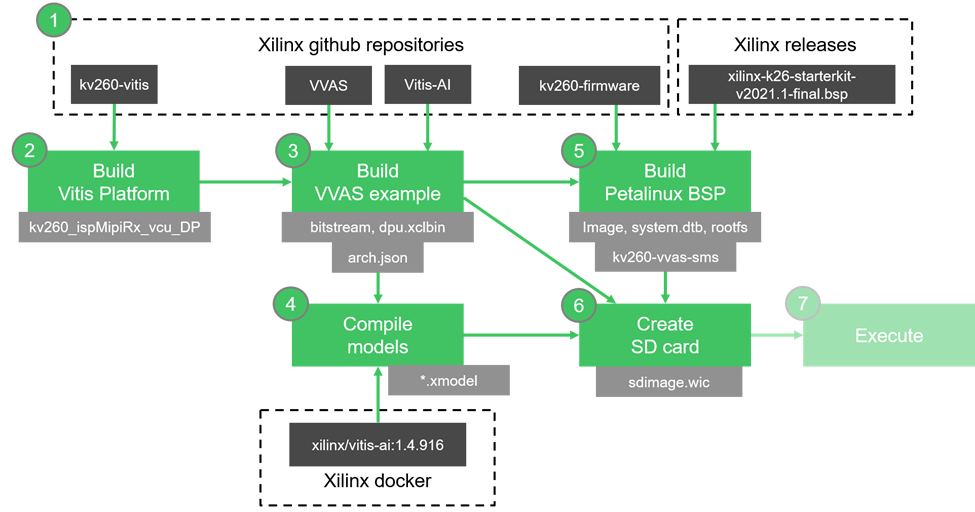
This part of the tutorial describes how to combine all the parts that we built in the previous sections, to create an SD card image.
image 

Creating the final package

In this section, we will re-create the pre-built binaries

Although not required to complete the tutorial, the modified files and pre-built binaries are provided for reference:

  • Pre-built binaries
    • http://avnet.me/kv260-vvas-sms-2021-1-prebuilt
      (2022-01-10 - md5sum : c0ba002bd340828b282b9f7549fe46dd)


This archive contains the following files:

kv260-vvas-sms-2021-1-prebuilt

├── rpm

│   ├── kv260-vvas-sms-1.0-r0.0.zynqmp_generic.rpm

│   ├── kv260-vvas-sms-dbg-1.0-r0.0.zynqmp_generic.rpm

│   ├── kv260-vvas-sms-dev-1.0-r0.0.zynqmp_generic.rpm

│   ├── kv260-vvas-sms-lic-1.0-r0.0.zynqmp_generic.rpm

│   ├── kv260-vvas-sms-models-1.0-r0.0.zynqmp_generic.rpm

│   ├── kv260-vvas-sms-models -dbg-1.0-r0.0.zynqmp_generic.rpm

│   ├── kv260-vvas-sms-models -dev-1.0-r0.0.zynqmp_generic.rpm

│   ├── kv260-vvas-sms-models -lic-1.0-r0.0.zynqmp_generic.rpm

│   ├── kv260-vvas-sms-app-1.0-r0.0.zynqmp_generic.rpm

│   ├── kv260-vvas-sms-app -dbg-1.0-r0.0.zynqmp_generic.rpm

│   ├── kv260-vvas-sms-app -dev-1.0-r0.0.zynqmp_generic.rpm

│   ├── kv260-vvas-sms-app -lic-1.0-r0.0.zynqmp_generic.rpm

│   ├── packagegroup-kv260-vvas-sms-1.0-r0.0.noarch.rpm

│   ├── packagegroup-kv260-vvas-sms-dbg-1.0-r0.0.noarch.rpm

│   ├── packagegroup-kv260-vvas-sms-dev-1.0-r0.0.noarch.rpm

│   ├── packagegroup-kv260-vvas-sms-lic-1.0-r0.0.noarch.rpm

│   └── packagegroup-kv260-vvas-sms-ptest-1.0-r0.0.noarch.rpm

└── sdimage

    ├── kv260-2021.1-sdimage.wic.gz

    └── kv260-vvas-sms-2021.1-sdimage.wic.gz


Create the main directory structure:

$ cd $PROJ_DIR

$ mkdir kv260-vvas-sms-2021-1-prebuilt


Create the “sdimage” sub-directory

$ mkdir kv260-vvas-sms-2021-1-prebuilt/sdimage

$ cp kv260-2021.1-sdimage.wic.gz kv260-vvas-sms-2021-1-prebuilt/sdimage/.

$ cp kv260-vvas-sms-2021.1-sdimage.wic.gz kv260-vvas-sms-2021-1-prebuilt/sdimage/.


Create the “rpm” sub-directory

$ mkdir kv260-vvas-sms-2021-1-prebuilt/rpm

$ cp xilinx-k26-starterkit-2021.1/build/tmp/work/zynqmp_generic-xilinx-linux/kv260-vvas-sms/1.0-r0/deploy-rpms/zynqmp_generic/*.rpm kv260-vvas-sms-2021-1-prebuilt/rpm/.

$ cp xilinx-k26-starterkit-2021.1/build/tmp/work/cortexa72-cortexa53-xilinx-linux/kv260-vvas-sms-models/1.0-r0/deploy-rpms/cortexa72-cortexa53/*.rpm kv260-vvas-sms-2021-1-prebuilt/rpm/.

$ cp xilinx-k26-starterkit-2021.1/build/tmp/work/cortexa72-cortexa53-xilinx-linux/kv260-vvas-sms-app/1.0-r0/deploy-rpms/cortexa72-cortexa53/*.rpm kv260-vvas-sms-2021-1-prebuilt/rpm/.

$ cp xilinx-k26-starterkit-2021.1/build/tmp/work/all-xilinx-linux/packagegroup-kv260-vvas-sms/1.0-r0/deploy-rpms/noarch/*.rpm kv260-vvas-sms-2021-1-prebuilt/rpm/.


Creating the SD card

Using the “kv260-vvas-sms-2021-1-prebuilt” directory we created in the previous section, we can now create our SD card image.

First, program the following image to a 16GB or greater micro SD card.

kv260-vvas-sms-2021-1-prebuilt/sdimage/kv260-2021.1-sdimage.wic.gz


Next, copy the “rpm” directory to the micro SD card’s second partition, under /home/root

$ cd $PROJ_DIR

$ sudo mkdir /media/{user}/root/home/root/kv260-vvas-sms-2021-1

$ sudo cp -r kv260-vvas-sms-2021-1-prebuilt/rpm /media/{user}/root/home/root/kv260-vvas-sms-2021-1/.

$ sync

Your SD card image is now ready to be used on the Kria KV260 Vision AI Starter Kit.

Next Steps

The following blogs cover the previous development steps for this in-depth project tutorial.

  • http://avnet.me/kv260-vvas-sms-2021-1-part1
  • http://avnet.me/kv260-vvas-sms-2021-1-part2
  • http://avnet.me/kv260-vvas-sms-2021-1-part3
  • http://avnet.me/kv260-vvas-sms-2021-1-part4
  • http://avnet.me/kv260-vvas-sms-2021-1-part5

The following blogs will cover the remaining development steps for this in-depth project tutorial.

  • http://avnet.me/kv260-vvas-sms-2021-1-part7
  • Sign in to reply
Parents
  • schneisw
    schneisw over 3 years ago

    Hi Mario,

    It looks like "prebuilt" became "rebuilt" in the second rpm copy.

    Thanks,

    Stu

    • Cancel
    • Vote Up 0 Vote Down
    • Sign in to reply
    • More
    • Cancel
  • albertabeef
    albertabeef over 3 years ago in reply to schneisw

    Stu,

    Thank you for the valuable feedback.
    I fixed the error in the blog.

    Regards,

    Mario.

    • Cancel
    • Vote Up 0 Vote Down
    • Sign in to reply
    • More
    • Cancel
Comment
  • albertabeef
    albertabeef over 3 years ago in reply to schneisw

    Stu,

    Thank you for the valuable feedback.
    I fixed the error in the blog.

    Regards,

    Mario.

    • Cancel
    • Vote Up 0 Vote Down
    • Sign in to reply
    • More
    • Cancel
Children
No Data
element14 Community

element14 is the first online community specifically for engineers. Connect with your peers and get expert answers to your questions.

  • Members
  • Learn
  • Technologies
  • Challenges & Projects
  • Products
  • Store
  • About Us
  • Feedback & Support
  • FAQs
  • Terms of Use
  • Privacy Policy
  • Legal and Copyright Notices
  • Sitemap
  • Cookies

An Avnet Company © 2025 Premier Farnell Limited. All Rights Reserved.

Premier Farnell Ltd, registered in England and Wales (no 00876412), registered office: Farnell House, Forge Lane, Leeds LS12 2NE.

ICP 备案号 10220084.

Follow element14

  • X
  • Facebook
  • linkedin
  • YouTube