element14 Community
element14 Community
    Register Log In
  • Site
  • Search
  • Log In Register
  • Community Hub
    Community Hub
    • What's New on element14
    • Feedback and Support
    • Benefits of Membership
    • Personal Blogs
    • Members Area
    • Achievement Levels
  • Learn
    Learn
    • Ask an Expert
    • eBooks
    • element14 presents
    • Learning Center
    • Tech Spotlight
    • STEM Academy
    • Webinars, Training and Events
    • Learning Groups
  • Technologies
    Technologies
    • 3D Printing
    • FPGA
    • Industrial Automation
    • Internet of Things
    • Power & Energy
    • Sensors
    • Technology Groups
  • Challenges & Projects
    Challenges & Projects
    • Design Challenges
    • element14 presents Projects
    • Project14
    • Arduino Projects
    • Raspberry Pi Projects
    • Project Groups
  • Products
    Products
    • Arduino
    • Avnet & Tria Boards Community
    • Dev Tools
    • Manufacturers
    • Multicomp Pro
    • Product Groups
    • Raspberry Pi
    • RoadTests & Reviews
  • About Us
    About the element14 Community
  • Store
    Store
    • Visit Your Store
    • Choose another store...
      • Europe
      •  Austria (German)
      •  Belgium (Dutch, French)
      •  Bulgaria (Bulgarian)
      •  Czech Republic (Czech)
      •  Denmark (Danish)
      •  Estonia (Estonian)
      •  Finland (Finnish)
      •  France (French)
      •  Germany (German)
      •  Hungary (Hungarian)
      •  Ireland
      •  Israel
      •  Italy (Italian)
      •  Latvia (Latvian)
      •  
      •  Lithuania (Lithuanian)
      •  Netherlands (Dutch)
      •  Norway (Norwegian)
      •  Poland (Polish)
      •  Portugal (Portuguese)
      •  Romania (Romanian)
      •  Russia (Russian)
      •  Slovakia (Slovak)
      •  Slovenia (Slovenian)
      •  Spain (Spanish)
      •  Sweden (Swedish)
      •  Switzerland(German, French)
      •  Turkey (Turkish)
      •  United Kingdom
      • Asia Pacific
      •  Australia
      •  China
      •  Hong Kong
      •  India
      •  Japan
      •  Korea (Korean)
      •  Malaysia
      •  New Zealand
      •  Philippines
      •  Singapore
      •  Taiwan
      •  Thailand (Thai)
      •  Vietnam
      • Americas
      •  Brazil (Portuguese)
      •  Canada
      •  Mexico (Spanish)
      •  United States
      Can't find the country/region you're looking for? Visit our export site or find a local distributor.
  • Translate
  • Profile
  • Settings
Test & Tools
  • Technologies
  • More
Test & Tools
Blog FSK Demodulation with R&S FPC Spectrum Analyzers, or How I Achieved an Optimal Room Temperature
  • Blog
  • Forum
  • Documents
  • Files
  • Members
  • Mentions
  • Sub-Groups
  • Tags
  • More
  • Cancel
  • New
Join Test & Tools to participate - click to join for free!
  • Share
  • More
  • Cancel
Group Actions
  • Group RSS
  • More
  • Cancel
Engagement
  • Author Author: shabaz
  • Date Created: 20 Jan 2026 9:01 PM Date Created
  • Views 558 views
  • Likes 15 likes
  • Comments 26 comments
  • rohde & schwarz
  • cc1101
  • E07-900MM10S
  • r&s
  • modulation
  • ebyte
  • fpc
  • fpc1000
  • ask
  • rf
  • fpc1500
  • E07-400MM10S
  • demodulation
  • fsk
Related
Recommended

FSK Demodulation with R&S FPC Spectrum Analyzers, or How I Achieved an Optimal Room Temperature

shabaz
shabaz
20 Jan 2026

Introduction

I wrote a review (and created a video) for a Rohde & Schwarz FPC series spectrum analyzer eight years ago, and although I explored some of the demodulation capability back then, I never used it for a real-life scenario. Fast-forward to the cold winter of 2025, and I had a need! This short blog post shows how useful that capability can be.

What was the Problem to Solve?

I have a pretty awful heating system controller at home; it never regulates the temperature all too well, and its user interface is buggy and difficult to use.

The controller relies on a radio transmission to switch the boiler on or off, and I fancied overriding the controller with my own custom system. This would involve reverse-engineering the radio protocol.

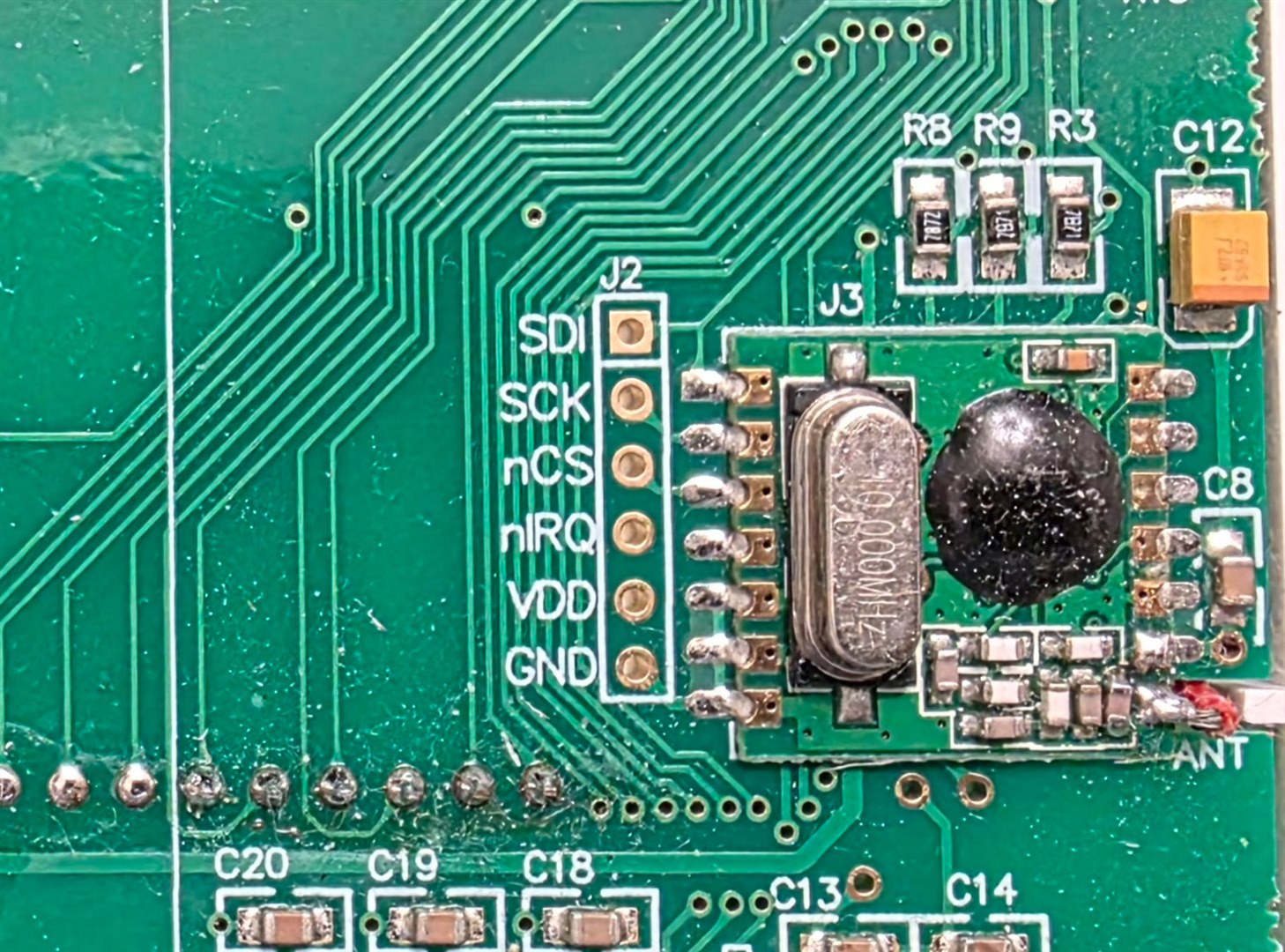
I was able to partially figure it out by probing around inside the transmitter, but the transmitter module was a black box (an unlabelled blob). I managed to narrow it down to possibly a Silicon Labs (Silabs) chipset range - perhaps Si443x series, and capture some of the bitstream using a logic analyzer.
image

It was a weird system, it used an out-of-band SPI interface for configuration, but the actual transmission was controlled through a kind of direct signal used for modulation on-the-fly (i.e. not a packet-oriented transfer from the microcontroller to the transmitter chip), at around 9600 bits per second, for a duration of about 176 bits. You can see this in the screenshot below, where firstly some of the purple data (configuration data) is sent together with the blue SPI clock signal, but then a load of purple data is sent without the blue clock signal changing. That clock-less portion of purple data is the direct signal that modulates the transmission, and that period length was measured to be 176 bits long, if the speed is 9600 bits/sec. The yellow signal appears to be an interrupt from the transmitter IC, paced at 9600 Hz, to act as a handshake to let the microcontroller know when it can apply the next data bit.

I didn’t manage to narrow down the SPI content to any specific chip, so I had no idea what frequency or modulation scheme was set up.

image

FPC Configuration

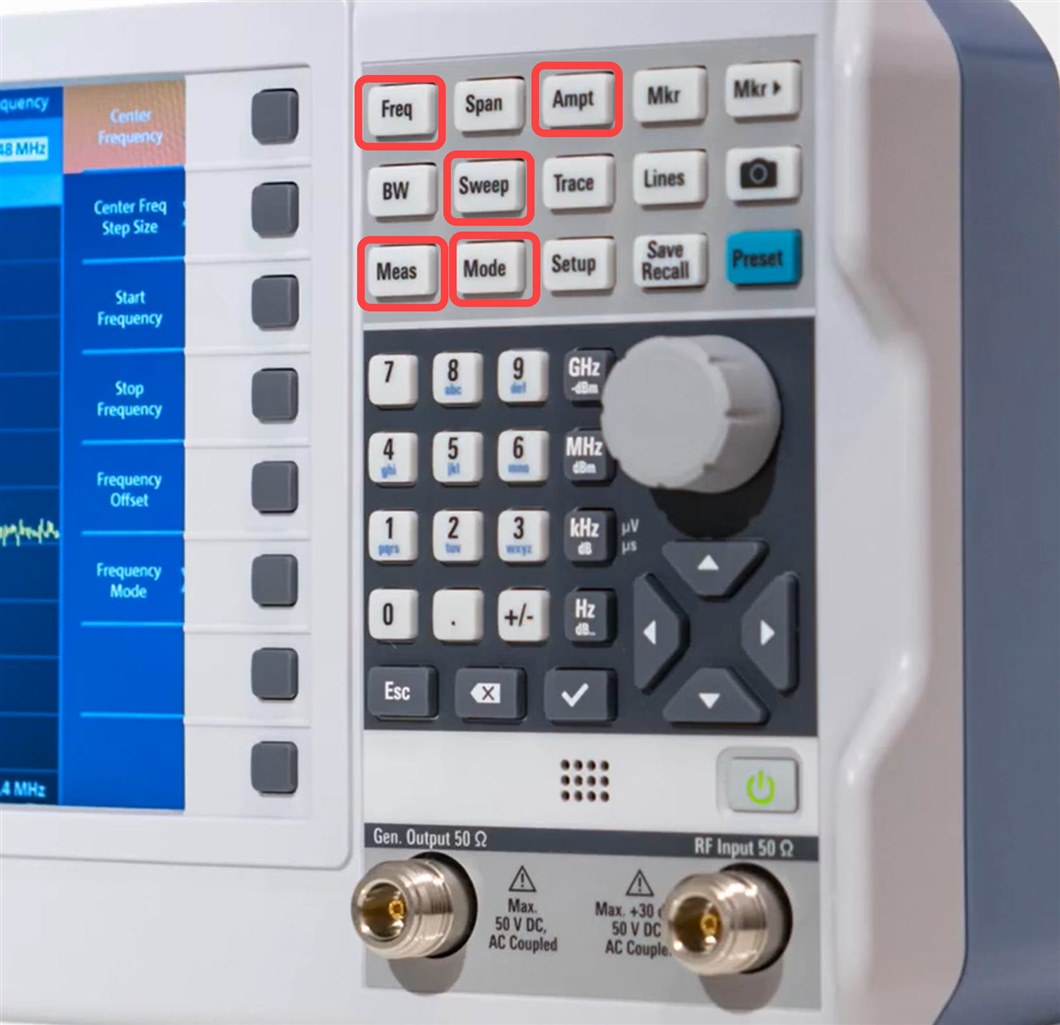
I decided to capture the transmission using the FPC1500 using its Digital Demodulation functionality. Here’s how I did it. The photo below shows in red all the buttons used.
image

I took a guess at the frequency being ballpark 868 MHz (easy to see from the length of the antenna wire inside the transmitter, but if you're unsure, just observe a span of spectrum until you see activity) and pressed Freq and set the FPC1500 center frequency to that value.

I pressed Ampt (Amplitude) and set the reference level to -20 dBm. Next, I pressed the Mode button and selected Digital Demodulation. Then I pressed the Meas button, and selected FSK (Frequency Shift Keying; I could have selected ASK [Amplitude Shift Keying] too). Within the Meas menu, you can configure demodulation parameters. I set the Symbol Rate to 9600, and Frequency Deviation to 5 kHz (since I expected it to be around that ballpark), and then set Number of Symbols to 176.

The FPC1500 needs to be told when to trigger to capture the data; to do that, I pressed Sweep, then selected Trigger, then selected IQ Power and set it to -30 dBm, again this was just a guess, it’s not too critical.

To view the captured data, I clicked on Meas again, then clicked on Symbols, for the binary data display whenever the trigger power level occurs.

Capturing the Data

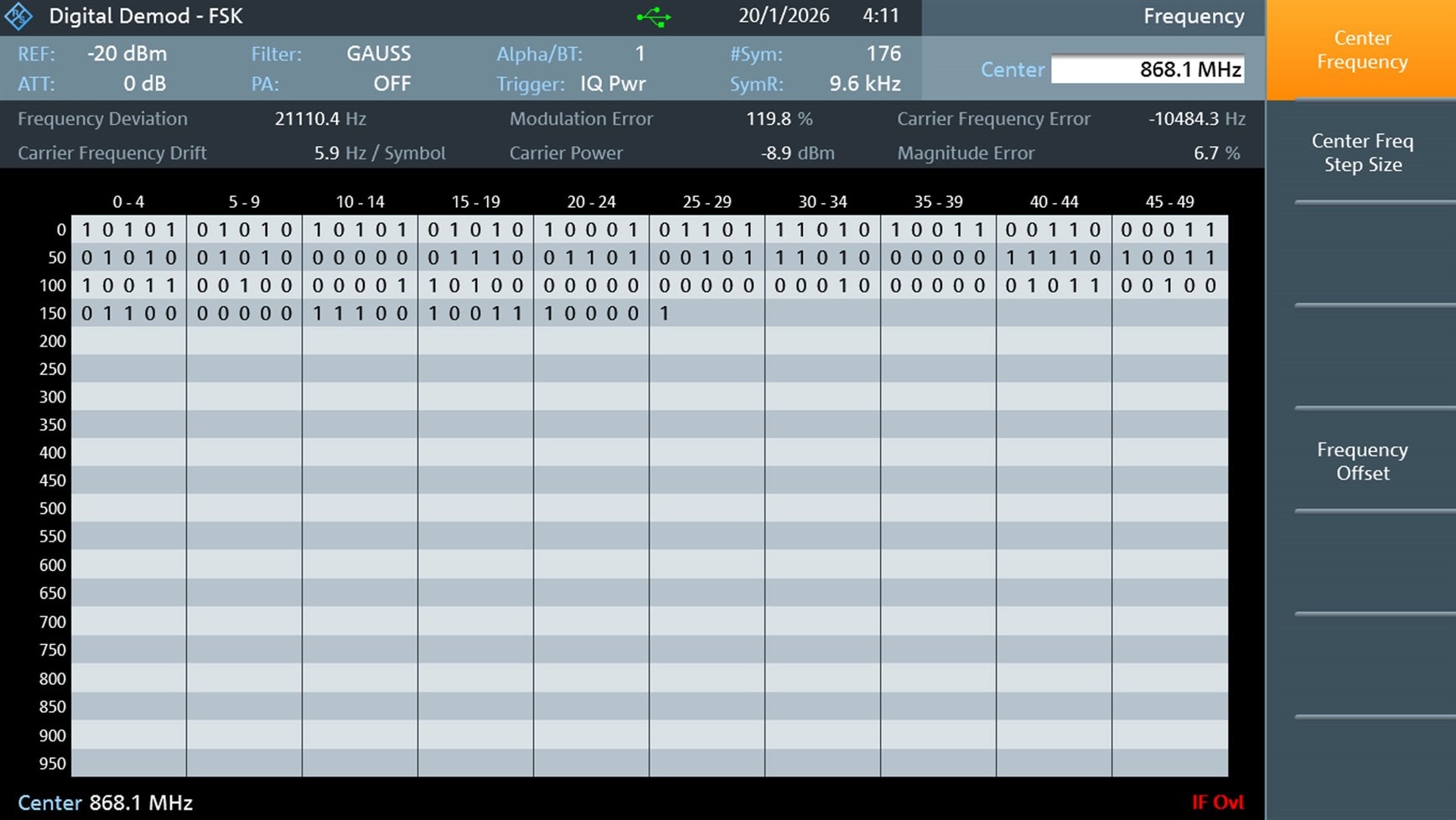
I connected the FPC's RF input to a small 868 MHz antenna and placed it near the transmitter, and voila! The FPC1500 triggered and displayed all the binary data. If you look at the binary symbols in the screenshot, you'll see the signature of a healthy transmission, because it begins with an alternating pattern of ones and zero's, which is almost always a "preamble" sequence to train the receiver to get ready to receive the rest of the bits of data.
image

I manually typed the bit values into my PC (there may be a way to export it, but it’s not a lot of data), and then I was able to match it to the earlier logic analyzer capture. There was a slippage of 6 bits, but that’s not a big deal; I let AI (ChatGPT) figure that out.

Next Steps

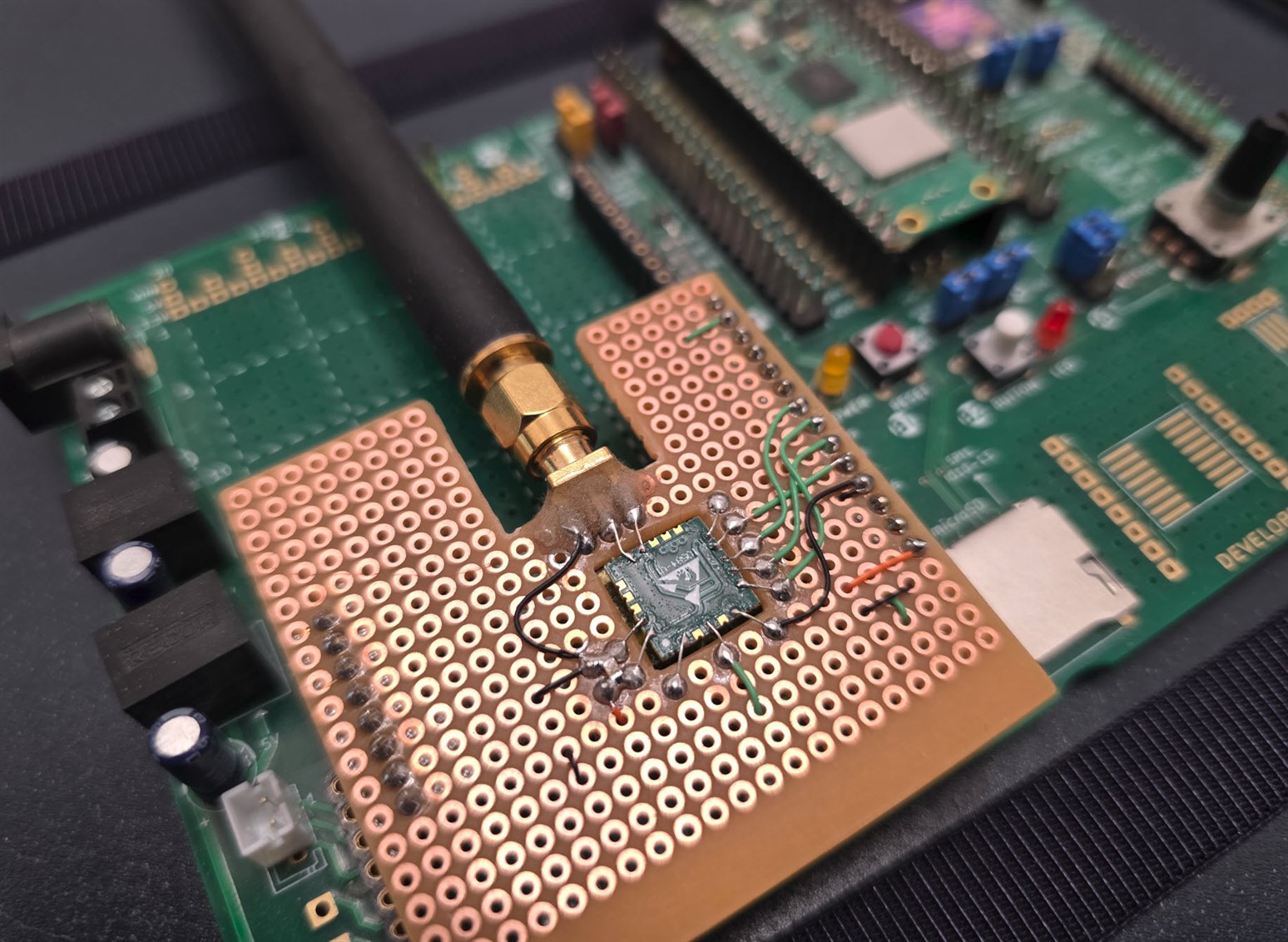
Now that I knew the approximate frequency and modulation details, it would be possible to replicate things with a custom transmitter circuit. I decided to use a Texas Instruments CC1101 chip, since that’s super-flexible (and overkill admittedly). I purchased an EBYTE E07-900MM10S module (which contains a CC1101 inside) because it’s low-cost and has pads that are easyish to solder.

I attached the EBYTE module to a Pi Pico module, and wrote code to replicate the transmission. I used the R&S FPC Digital Demodulation functionality to troubleshoot the code, until the symbols looked similar, and then verified that it did indeed control the boiler. That still needs documenting, and so it is a write-up for another day. The photo below shows the EBYTE module dead-bugged onto a Pico-Eurocard board.
image

Circuit Diagram:

image

Summary

The R&S FPC Spectrum Analyzer can trigger on a received radio transmission, and directly convert digital modulation schemes such as ASK and FSK into a decoded bit sequence, and it's just a few button presses to configure it. This can be very helpful when reverse-engineering a radio transmission, or when writing code for a transmitter and using the FPC to check that the transmission is correct. If you don’t have an FPC instrument, an alternative method would be to use a software-defined radio (SDR), but usually there’s a significant learning curve with that. The FPC was far easier to use. It solved my problem and gave me control of my heating system.

Thanks for reading.

  • Sign in to reply

Top Comments

  • shabaz
    shabaz 2 months ago in reply to kmikemoo +1
    Thanks! I wasn't entirely confident the reverse-engineering would work, nor the replication, since I wasn't 100% sure of what I was supposed to be replicating.. I just plugged away at it for a few evenings…
Parents
  • Andrew J
    Andrew J 2 months ago

    Astounding. I guess that’s what 10,000 hours of experience gets you - I’m always amazed at the projects you and others come up with here.  Now, if you could just tell me how to stop my heat pump overheating my house, that would be great!

    • Cancel
    • Vote Up 0 Vote Down
    • Sign in to reply
    • More
    • Cancel
  • shabaz
    shabaz 2 months ago in reply to Andrew J

    Thanks!

    I don't get it, it can't be just us that have temperature issues. I've never in my life experienced a home heating system that didn't make me too cold, or too hot. I'm forever manually adjusting the controls or ventilation etc. Also a pain in offices because the wall controls are only a vague signal to the building management system.

    • Cancel
    • Vote Up 0 Vote Down
    • Sign in to reply
    • More
    • Cancel
  • Andrew J
    Andrew J 2 months ago in reply to shabaz

    Typically, it’s because no design is done, they just bang in a boiler, whack the flow temp up and declare the job a good ‘un.  In my heat pump case they over-estimated the heat loss and thus oversized the radiators, so whilst they did design the system, they got it wrong.  But to add to that, they design for different room temps, e.g. lounge at 21c, bedrooms and hallway at 18c etc.  So the theory is that at any particular desired temp other rooms will be at a proportionate temp.  Doesn’t work because the other rooms are then heated purely based on the heat loss of the room with the thermostat in: some underheat and some overheat.  It also doesn’t work because who wants to leave a 21c room to stay in one 3 degrees cooler? Notwithstanding a heat pump shouldn’t be thermostatically controlled but just flow temp controlled in any case.  So the answer is to spend weeks tuning things to get it right: nothings changed!

    • Cancel
    • Vote Up 0 Vote Down
    • Sign in to reply
    • More
    • Cancel
  • beacon_dave
    beacon_dave 2 months ago in reply to shabaz

    Wow ! I would have thought you would have sensors and motorised valves all over the place with finely tuned PID algorithms. Slight smile

    I find that a lot of people struggle with the concept of latency when it comes to controlling heating so am glad when the controls are finally taken away from them.

    Comfort is not just down to the basic room temperature though so you have the individual's perception of heat (and humidity) to contend with.

    My current office is at the end of the heating circuit, so in winter time it can be anything between around 7degC and 18degC depending on the outside temperature and how much demand the other offices are drawing. Will be interesting to see if the new heat pump due to come come online next year makes any difference or not. I suspect my office will manage to end up in the 5% not covered by the projected '39GWh of low carbon heat'...

    • Cancel
    • Vote Up 0 Vote Down
    • Sign in to reply
    • More
    • Cancel
  • shabaz
    shabaz 2 months ago in reply to beacon_dave

    Hi!

    Funnily enough, I had a CTO role for a startup at one point, for a solution to better manage temperature for office environments, because as you've noticed, what's important is the perceived warmth of occupants, and not the point temperature of a location in the room (like a cold wall). It's not great if one is relying on a thermistor somewhere, when the occupants might be next to a freezing window, or wearing thin or thick clothes, and so on.

    With the code as it stands now, since it's connected to the network, I've still got the opportunity install sensors and actuators anywhere for an end result like any other existing system may be able to do, (could also interface to off-the-shelf battery-powered LoRaWAN sensors or actuators since I have a gateway at home), but I would struggle to tune it all, and would still never be optimal for the reasons mentioned by you and Andrew.

    What I'm curious about, is what if I could express my issues in plain language (rather than express them with algorithms and temperature and timer settings with traditional controllers) and provide my problem list, along with any API- and sensor-derived data to an LLM, and let it generate a set of instructions for the boiler and any actuators. I think it would be easy to compare the duty cycle with a simpler non-AI decision (like I have now) and allow AI to override if it's not an extreme discrepancy. I quite like the idea of getting the controller to whinge on my behalf to the LLM, rather than people having to hear me always complain about how much the manufacturer control system sucks.. Anyway, it's just an idea, but theoretically not too difficult to primitively prototype up.

    One thing I really like currently in the code (and was unintentional), is that the PWM period happens to be sync'd to real time. Simply because it was easier to code that way, whereas traditional controllers would not sync that with real time. It means I can look at the time, and know that on the hour, or on the half-hour (or say at 0/15/30/45 min, or 0/20/40 min positions on the clock dial, if I configure it like that), the heating will definitely kick in depending on temperature. It's actually quite reassuring knowing if I'm feeling a little cold, when the boiler is very likely to turn on by just looking at my watch.. saves turning the boiler on/off manually to override things unless essential, in which case it's time to tweak the algorithm I guess.
    The sync is occurring because I grab the time from an API (and free-run if there is an API failure, until it can later reconnect), and happen to use the minutes value in the PWM function.

    All this is just an experiment of course, I don't know how long I will run this versus trying something off-the-shelf one day, but it's for sure made me re-appreciate what a hard challenge it is to make people feel right and not overly cold or hot. I've also been experimenting with how to provide more feedback: as well as knowing by clock time when the boiler is likely to kick in, I'm pulsing the LED in a few ways to provide reassurance from a distance that the system is indeed healthy and running and not crashed : ) and whether the boiler is off or on, all from a single LED so one doesn't need to get up and look closely at a panel. I should also try to send logs or stats, but probably want to do that in some standard manner, rather than reinvent the wheel. Maybe SNMP. Currently I can look at my ubiquiti mobile app, to see network activity, so I know the device is healthy and the API's are working well. It's intermittent in the screenshot below, because I was taking it offline for some experimentation. The "iHome Smart Plug" description is meaningless, it's just an incorrect device name assumption by the app.

    image

    • Cancel
    • Vote Up 0 Vote Down
    • Sign in to reply
    • More
    • Cancel
Comment
  • shabaz
    shabaz 2 months ago in reply to beacon_dave

    Hi!

    Funnily enough, I had a CTO role for a startup at one point, for a solution to better manage temperature for office environments, because as you've noticed, what's important is the perceived warmth of occupants, and not the point temperature of a location in the room (like a cold wall). It's not great if one is relying on a thermistor somewhere, when the occupants might be next to a freezing window, or wearing thin or thick clothes, and so on.

    With the code as it stands now, since it's connected to the network, I've still got the opportunity install sensors and actuators anywhere for an end result like any other existing system may be able to do, (could also interface to off-the-shelf battery-powered LoRaWAN sensors or actuators since I have a gateway at home), but I would struggle to tune it all, and would still never be optimal for the reasons mentioned by you and Andrew.

    What I'm curious about, is what if I could express my issues in plain language (rather than express them with algorithms and temperature and timer settings with traditional controllers) and provide my problem list, along with any API- and sensor-derived data to an LLM, and let it generate a set of instructions for the boiler and any actuators. I think it would be easy to compare the duty cycle with a simpler non-AI decision (like I have now) and allow AI to override if it's not an extreme discrepancy. I quite like the idea of getting the controller to whinge on my behalf to the LLM, rather than people having to hear me always complain about how much the manufacturer control system sucks.. Anyway, it's just an idea, but theoretically not too difficult to primitively prototype up.

    One thing I really like currently in the code (and was unintentional), is that the PWM period happens to be sync'd to real time. Simply because it was easier to code that way, whereas traditional controllers would not sync that with real time. It means I can look at the time, and know that on the hour, or on the half-hour (or say at 0/15/30/45 min, or 0/20/40 min positions on the clock dial, if I configure it like that), the heating will definitely kick in depending on temperature. It's actually quite reassuring knowing if I'm feeling a little cold, when the boiler is very likely to turn on by just looking at my watch.. saves turning the boiler on/off manually to override things unless essential, in which case it's time to tweak the algorithm I guess.
    The sync is occurring because I grab the time from an API (and free-run if there is an API failure, until it can later reconnect), and happen to use the minutes value in the PWM function.

    All this is just an experiment of course, I don't know how long I will run this versus trying something off-the-shelf one day, but it's for sure made me re-appreciate what a hard challenge it is to make people feel right and not overly cold or hot. I've also been experimenting with how to provide more feedback: as well as knowing by clock time when the boiler is likely to kick in, I'm pulsing the LED in a few ways to provide reassurance from a distance that the system is indeed healthy and running and not crashed : ) and whether the boiler is off or on, all from a single LED so one doesn't need to get up and look closely at a panel. I should also try to send logs or stats, but probably want to do that in some standard manner, rather than reinvent the wheel. Maybe SNMP. Currently I can look at my ubiquiti mobile app, to see network activity, so I know the device is healthy and the API's are working well. It's intermittent in the screenshot below, because I was taking it offline for some experimentation. The "iHome Smart Plug" description is meaningless, it's just an incorrect device name assumption by the app.

    image

    • Cancel
    • Vote Up 0 Vote Down
    • Sign in to reply
    • More
    • Cancel
Children
  • beacon_dave
    beacon_dave 2 months ago in reply to shabaz

    I was curious if small low power IR panel heaters could be used at desk locations to help perceive comfort levels. 

    I recall there being some research with thermally reflective wallpaper which gave the perception of more warmth even when the room temperature had been lowered by several degrees C.

    I've experienced something similar when a radiator finally cools to match room temperature, it feels like there has been a sudden drop in temperature, even though the room temperature has remained pretty constant. A small amount of radiated heat appears to make quite a difference to comfort levels.

    • Cancel
    • Vote Up 0 Vote Down
    • Sign in to reply
    • More
    • Cancel
  • shabaz
    shabaz 2 months ago in reply to beacon_dave

    That sounds like it could be true.. I used to keep a little heater under the desk in the office, just to feel a bit of additional heat. An on-desk little heater might do the job, at lower power too.

    • Cancel
    • Vote Up 0 Vote Down
    • Sign in to reply
    • More
    • Cancel
  • beacon_dave
    beacon_dave 2 months ago in reply to shabaz

    I'm sitting here just now with two t-shirts on, the room thermometer is saying 17°C the Winter sunlight is making it into the room either side and I'm feeling pretty comfortable.

    By the evening though, even though the room thermometer is still saying 17°C, I'll likely be wearing a thin fleece layer to feel the same level of comfort but will still notice the lack of radiated heat from the windows.

    Using my funky e14 solar power meter (thanks e14 !) , I'm seeing readings of about 2W/m² and 4W/m² from either side of me, whilst sat at the desk.

    So having a couple of small IR panel heaters either side that activate when sat at the desk, might be able to compensate for this.

    • Cancel
    • Vote Up 0 Vote Down
    • Sign in to reply
    • More
    • Cancel
element14 Community

element14 is the first online community specifically for engineers. Connect with your peers and get expert answers to your questions.

  • Members
  • Learn
  • Technologies
  • Challenges & Projects
  • Products
  • Store
  • About Us
  • Feedback & Support
  • FAQs
  • Terms of Use
  • Privacy Policy
  • Legal and Copyright Notices
  • Sitemap
  • Cookies

An Avnet Company © 2026 Premier Farnell Limited. All Rights Reserved.

Premier Farnell Ltd, registered in England and Wales (no 00876412), registered office: Farnell House, Forge Lane, Leeds LS12 2NE.

ICP 备案号 10220084.

Follow element14

  • X
  • Facebook
  • linkedin
  • YouTube