


MAX30208EVSYS Evaluation Kit: Hardware, Sensor Specifications, and GUI Software
The MAX30208EVSYS evaluation system from Analog Devices provides a hardware and software platform for evaluating the MAX30208 digital temperature sensor. The sensor is designed for applications such as wearable temperature monitors, healthcare patches, and human-body thermometers.
The system consists of three main hardware elements:
- MAX30208 sensor flex PCB: A flexible printed circuit board carrying the MAX30208 sensor in a 10-pin LGA package.
- MAX3020x interface board: Provides accessible test points, configuration jumpers, and connections between the sensor and the microcontroller board.
- MAX32630FTHR microcontroller board: Runs the firmware required to communicate with the PC GUI and supplies power to the interface board.

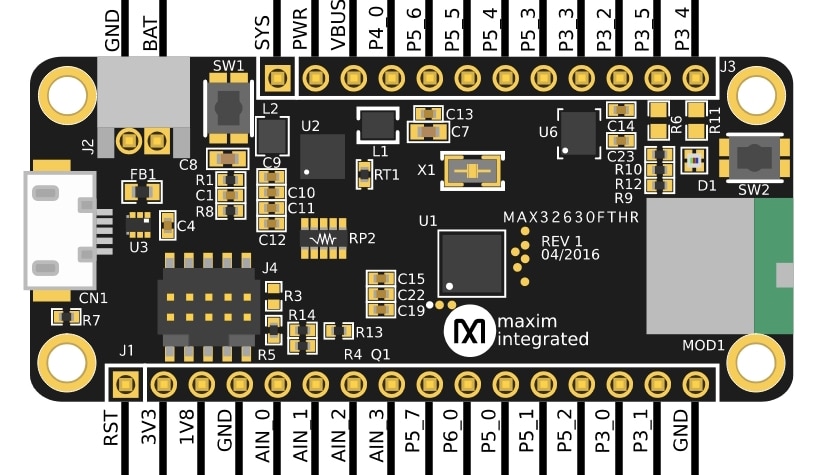
The system connects to a Windows PC through the micro-USB connector on the MAX32630FTHR board. The supplied firmware enables the evaluation software to configure the sensor, acquire temperature measurements, and access device registers.
The flexible sensor PCB has a low thermal mass, which supports a fast thermal response and allows the sensor to be positioned away from the main interface electronics. However, the measured temperature still depends on thermal contact, mounting, environmental conditions, and the measurement procedure. The flex PCB does not, by itself, guarantee accurate skin-temperature or clinical body-temperature measurements.
Technical Specifications of the MAX30208 Sensor
Temperature accuracy: ±0.1°C from +30°C to +50°C; ±0.15°C from 0°C to +70°C, according to the sensor datasheet.
Operating temperature range: 0°C to +70°C. The datasheet also specifies that the device can withstand a wider temperature range of −40°C to +85°C without damage; this should not be interpreted as the specified measurement-accuracy range.
Resolution: 16-bit, corresponding to 0.005°C per digital output step. Resolution is not the same as measurement accuracy.
FIFO: A 32-sample buffer for temperature readings, allowing the host controller to retrieve stored samples.
Communication interface: I²C, supporting four address configurations using the GPIO pin states at the I²C start condition.
GPIO0: Can be configured as an interrupt output for selected status conditions, including programmable high- and low-temperature alarms.
GPIO1: Can be configured as an external temperature-conversion trigger.
The sensor's ±0.1°C specification describes component-level performance under the conditions defined by the manufacturer. It does not, on its own, demonstrate that a complete thermometer meets clinical accuracy requirements or complies with medical-device standards.
MAX30208 EV Kit GUI Software
Analog Devices provides a Windows application for evaluating the MAX30208 without requiring the user to develop custom firmware for the initial tests.
According to the evaluation-system documentation, the GUI provides the following functions:
1. Temperature Monitoring
The application displays temperature readings from the connected sensor and provides controls for relevant device settings. The documentation does not describe a built-in real-time temperature-trend graph or a dashboard of minimum, maximum, and average statistics.
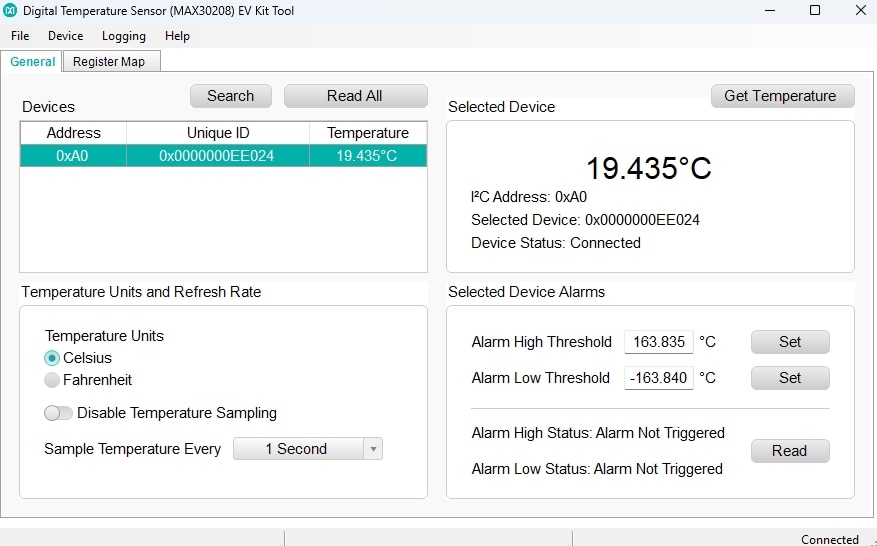
2. Data Logging
The GUI supports exporting measurement samples to a comma-separated values (CSV) file. This allows recorded data to be analyzed using tools such as Microsoft Excel, MATLAB, or Python.
The evaluation system also supports logging to a microSD card when configured for standalone operation with a compatible card and battery.
3. Register Map
The Register Map tab allows users to read individual MAX30208 registers, read all registers, and modify register bit settings. This is useful for exploring sensor configuration, measurement control, status flags, and other device functions.
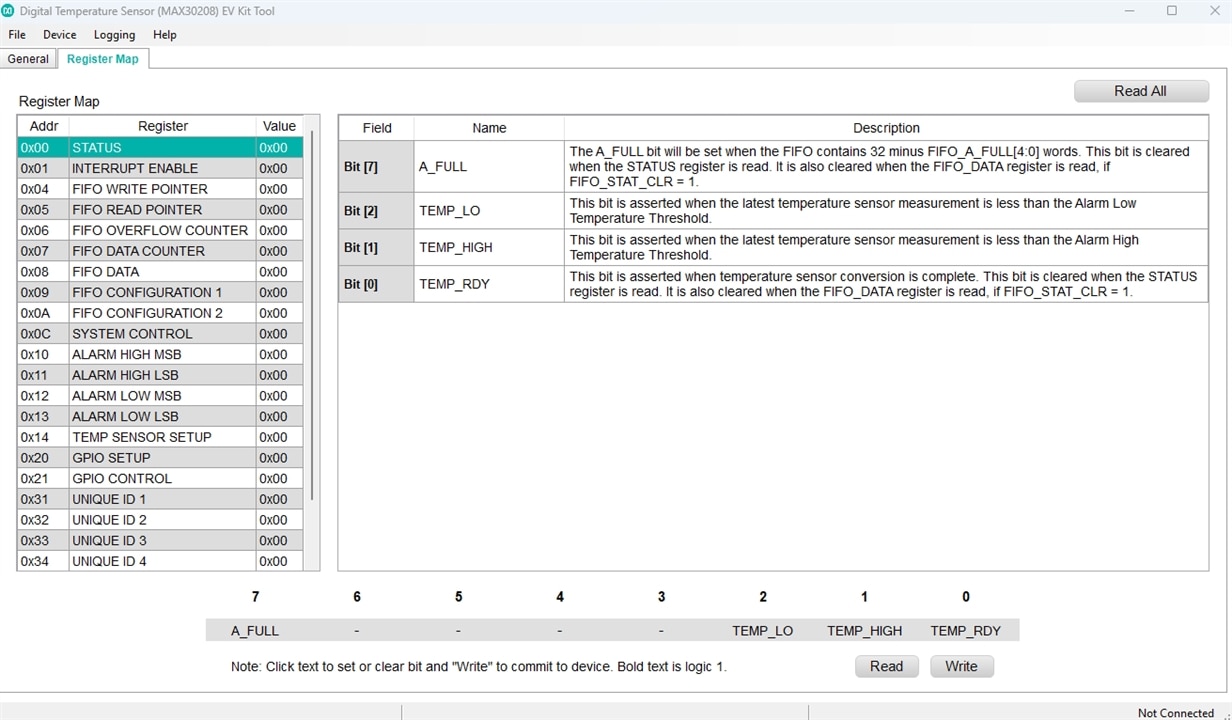
4. Temperature Alarms and Interrupt Configuration
The MAX30208 supports programmable high- and low-temperature thresholds. When the relevant status and interrupt settings are enabled, the GPIO0 pin can signal a selected alarm condition. These functions can be configured through the device registers; the exact controls available in the GUI should be confirmed against the installed software version.
Relevance to the VitalSense Project
For VitalSense, the MAX30208EVSYS provides a useful starting point for characterizing temperature measurements, recording sensor data, exploring register-level configuration, and developing a custom acquisition and analysis application.
Further work should evaluate repeatability, response time, thermal contact, sensor placement, and agreement with a suitable reference thermometer. The results should be reported as experimental measurements rather than assumed clinical performance.
Troubleshooting the MAX30208EVSYS GUI: A Possible Regional Decimal-Separator Issue
During evaluation of the MAX30208EVSYS kit, I encountered a software issue involving the interaction between the hardware and the PC application. The GUI launches successfully when the sensor is disconnected, but crashes shortly after the sensor is connected.
The exception reported is:
System.FormatException: Input string was not in a correct format
One possible explanation is a regional number-formatting mismatch in the GUI software. In Windows configurations that use a comma as the decimal separator, such as the default Polish regional format, an application that parses a decimal value using incompatible formatting assumptions may fail. For example, the strings 24.57 and 24,57 can be interpreted differently depending on the parsing method and culture settings.
The fact that the application starts without the sensor but crashes when the sensor is connected suggests that the error may occur during device initialization or temperature-data processing. However, the exception alone does not establish the exact root cause.
Workaround to test
-
Close the MAX30208 EV Kit application.
-
Open Windows Settings → Time & language → Language & region (or the equivalent Regional Settings panel in your Windows version).
-
Temporarily select English (United States) as the regional format, or change the decimal-symbol setting to a period if Windows allows this independently.
-
Restart the application, connect the evaluation system, and check whether the crash still occurs.
-
Restore your preferred regional settings after testing if necessary.
If the application works under the alternative regional format and fails again under the original settings, this would support the decimal-separator hypothesis.
The issue would then appear to be related to the PC software's handling of regional number formats rather than necessarily indicating a fault in the MAX30208 sensor itself. A permanent software fix would be to parse numeric values using an explicitly defined culture that matches the data format, with appropriate validation and error handling.
Reference: Analog Devices, MAX30208 Evaluation System documentation and MAX30208 ±0.1°C Accurate, I²C Digital Temperature Sensor datasheet.
