1. Introduction
The MAX30208EVSYS evaluation system combines the MAX30208 digital temperature sensor with a flexible sensor PCB, an interface board, and a MAX32630FTHR microcontroller platform. It provides a convenient environment for evaluating temperature measurements, configuring the sensor, and collecting experimental data.
However, the usefulness of the evaluation system depends not only on the sensor itself, but also on the reliability of the communication path between the hardware and the PC application.
The communication architecture provides an interesting case study in embedded-system design. It connects a PC-based graphical user interface (GUI) to a microcontroller, which communicates with the temperature sensor over an I²C bus. In the software version examined for this analysis, the host-to-device interface uses text-based commands rather than requiring the user to construct binary protocol frames manually.
This article examines the communication architecture, serial-interface configuration, command syntax, response parsing, and potential software issues identified during the evaluation process. Details of the text protocol are based on analysis of the particular application version examined and should not be assumed to apply to every firmware or GUI release.
2. System Architecture
The communication path can be represented as follows:
PC application → USB virtual serial port → MAX32630FTHR firmware → I²C bus → MAX30208 sensor
The main elements are:
- PC/host layer: Runs the manufacturer's GUI or a custom diagnostic application.
- USB serial interface: Provides the communication channel between the PC and the microcontroller board.
- MAX32630FTHR: Runs the firmware that handles host commands and communicates with the sensor.
- MAX30208 interface board: Provides the electrical connections between the microcontroller and the sensor flex PCB.
- MAX30208 sensor: Measures temperature and provides digital measurement data through I²C.
The MAX32630FTHR is more than a passive USB-to-I²C converter: its firmware implements the device-side communication and control functions required by the evaluation software.
The MAX30208 itself uses a standard I²C interface. Its main features include 16-bit temperature output, a 32-sample FIFO, programmable temperature alarms, and configurable I²C addressing.
3. Serial Interface Configuration
In the application version examined, the host software initializes a virtual serial connection through the .NET SerialPort interface.
The configuration is:
| Parameter | Observed setting |
|---|---|
| Baud rate | 115200 bit/s |
| Data bits | 8 |
| Parity | None |
| Stop bits | 1 |
| Handshaking | None |
| DTR | Enabled |
| RTS | Enabled |
| Read timeout | 5000 ms |
| Write timeout | 5000 ms |
These settings correspond to a conventional 115200-8-N-1 serial configuration.
The analyzed application also appears to identify the evaluation board using Windows device information and USB identifiers. The values observed in the tested setup were:
VID: 0B6A
PID: 0042
These identifiers should be treated as observations from the tested hardware and software configuration, not as guaranteed identifiers for every revision of the evaluation system. Windows device enumeration and the exact identification method may vary with the firmware, driver, or board configuration.
4. Text-Based Command Interface
In the analyzed application, commands are transmitted from the host to the microcontroller as text strings terminated by a carriage return (\r). The firmware interprets the commands and performs the corresponding operations, including sensor discovery, temperature acquisition, register access, and logging configuration.
The following table summarizes the commands identified during the software analysis. The syntax and semantics should be verified against the firmware version used for testing.
| Command or example | Observed purpose |
|---|---|
s\r |
Search for connected devices |
t 0\r |
Request a temperature reading from device index 0 |
t 0 F\r |
Request readings for a specified device range or group, according to the analyzed implementation |
r 0 10\r |
Read a register from device index 0 |
w 0 10 5A\r |
Write a value to a register |
g 0 0\r |
Read a register array or group of registers |
i 10\r |
Configure a logging or sampling interval |
d 0\r |
Configure the device-selection mask used for logging |
f\r |
Query microSD-card status |
The exact argument order, numeric bases, whitespace requirements, and response formats are implementation-specific. In particular, register addresses and values may be represented in hexadecimal even when device indices or other fields use decimal notation.
A text-based interface is useful for debugging because commands can be inspected without a dedicated binary-protocol analyzer. Where the firmware supports direct terminal access, a serial terminal can be used to send commands and inspect responses. The serial settings and command syntax must match the firmware currently loaded on the board.
5. Response Framing and Host-Side Parsing
The analyzed software receives responses from the microcontroller as text and processes the returned fields in the host application. The response-handling code uses delimiters and regular expressions to extract values from the received strings.
This regular expression matches text enclosed in square brackets. It can be used to extract fields from responses such as:
[0] [24.570] [0]
The example above illustrates a possible temperature-response structure:
[0] — device index;
[24.570] — temperature value in degrees Celsius;
[0] — status or result field.
The precise meaning and number of fields must be confirmed against the actual response generated by the tested firmware. Whitespace, delimiters, and additional fields should not be inferred solely from a single example.
5.1 Device Discovery
The analyzed host application sends the s command to discover connected devices. The response is then parsed to obtain device-related information used to initialize software objects.
The code examined appears to process fields representing a logical device index, an address or identifier, and a value labelled as a ROM code.
Care is required when interpreting these fields. The MAX30208 has a configurable 7-bit I²C address in the range 0x50 to 0x53 under its standard address configurations. A reported value such as decimal 90 (hexadecimal 0x5A) would not be a valid standard MAX30208 7-bit I²C address. It should therefore not be labelled as the sensor's physical I²C address without further verification.
Similarly, the MAX30208 supports a unique ROM ID, but the precise structure and representation of that ID in the GUI's response must be confirmed from the implementation. A field described as a ROM code should not automatically be interpreted as a standard Dallas/Maxim 64-bit ROM identifier without evidence from the relevant firmware or source code.
5.2 Temperature Acquisition
The analyzed application requests temperature data using a command such as t 0\r.
A returned value like 24.570 is an example of a temperature represented as text in degrees Celsius. If the firmware uses a period as the decimal separator, the host application must parse that string using a compatible numeric format.
This is especially important on systems configured for locales that normally use a comma as the decimal separator, including the default Polish Windows regional format.
6. Regional Number Formatting and the FormatException Issue
During evaluation, the PC application was observed to start when the sensor was disconnected but to crash after the sensor was connected. The reported exception was:
System.FormatException: Input string was not in a correct format
One possible cause is a mismatch between the numeric format transmitted by the firmware and the format expected by the host application.
For example, the same decimal value can be represented as 24.570 or 24,570, depending on the locale. If the firmware sends a period-delimited decimal string but the application parses it using incompatible culture settings, conversion to a floating-point value may fail.
In .NET, a robust implementation should explicitly define the expected number format when parsing protocol data. If the firmware protocol specifies a period as the decimal separator, the host application can use CultureInfo.InvariantCulture, together with appropriate input validation and exception handling.
For example:
using System.Globalization;

string rawTemperature = "24.570";

if (double.TryParse(
        rawTemperature,
        NumberStyles.Float,
        CultureInfo.InvariantCulture,
        out double temperature))
{
    // Use the parsed temperature value.
}
else
{
    // Report invalid or unexpected protocol data.
}
This example demonstrates the recommended parsing approach; it does not establish that the same code change has been applied to the manufacturer's GUI.
Changing the Windows regional format to English (United States) may be a useful diagnostic workaround. If the application works with that setting and fails under Polish regional settings, the result would support the decimal-separator hypothesis. It would not, by itself, exclude other parsing or device-initialization problems.
A permanent fix should make the protocol's numeric representation explicit, validate received fields, and handle malformed or incomplete responses without terminating the application.
7. Engineering Value of the Protocol
A text-based command interface can make an embedded evaluation platform easier to inspect and debug. It allows engineers to examine individual operations, test register access, and build custom data-acquisition tools without first implementing a binary protocol decoder.
For the VitalSense project, this architecture offers several practical opportunities:
- Custom Python diagnostics: Send supported commands, collect temperature readings, and save measurements to CSV.
- Custom Qt application: Implement a desktop interface for live data display, logging, configuration, and experimental analysis.
- Protocol validation: Check response framing, malformed data, timeouts, and error reporting.
- Sensor characterization: Record repeatability, response time, and the influence of sensor placement and thermal contact.
- Regional-format testing: Verify that the host application behaves consistently across Windows locale settings.
Any custom implementation should preserve the command syntax and response format expected by the firmware and should not assume that all commands listed here are supported by every firmware revision.
8. Conclusion
The MAX30208EVSYS evaluation system illustrates how a sensor with a standard I²C interface can be integrated into a PC-based evaluation workflow through a microcontroller and a USB serial communication channel.
Examining the host software and the text-based command interface can help engineers understand the data path, develop custom diagnostic tools, and identify potential integration problems. The reported FormatException also highlights an important general principle: communication protocols should define numeric formats explicitly, and host applications should parse incoming data independently of the operating system's regional settings.
For VitalSense, this provides a useful starting point for developing a custom acquisition and analysis application. The next step is to validate the observed protocol against actual device responses and the corresponding firmware version before relying on it for automated measurements or long-term data logging.
References
- Analog Devices, MAX30208 Digital Temperature Sensor Datasheet.
- Analog Devices, MAX30208 Evaluation System User Guide.
- Observations from the specific MAX30208EVSYS hardware, firmware, and PC application version examined during this project.
MAX30208EVSYS Python Reader Script
Description: This script implements a direct communication protocol with the MAX30208EVSYS evaluation kit, bypassing the official Windows GUI. It establishes a serial connection through the USB-to-UART bridge (MAX32630FTHR) and communicates using text-based commands terminated with a carriage return ('\r'). Key Features: - Initializes the serial port according to firmware requirements (115200 baud, 8 data bits, no parity, 1 stop bit, DTR/RTS enabled). - Sends control commands like 's' (search devices) and 't0' (read temperature) - Uses regular expressions to parse bracket-notated data frames received from the microcontroller (e.g., [0] [24.570] [0])
import re
import time
import serial


class MAX30208Reader:

  def __init__(self, port_name, baud_rate=115200):
    self.port_name = port_name
    self.baud_rate = baud_rate
    self.serial_port = None

  def connect(self):
    """Initialization and opening of the serial port according to firmware parameters."""
    try:
      self.serial_port = serial.Serial(
          port=self.port_name,
          baudrate=self.baud_rate,
          bytesize=serial.EIGHTBITS,
          parity=serial.PARITY_NONE,
          stopbits=serial.STOPBITS_ONE,
          timeout=5,  # 5-second timeout for read and write operations[cite: 3]
      )

      self.serial_port.dtr = True
      self.serial_port.rts = True

      time.sleep(0.015)  # Equivalent to Thread.Sleep(15) after opening port in C#[cite: 3]
      self.serial_port.reset_input_buffer()
      print(f"Successfully connected to port {self.port_name}")
      return True
    except Exception as e:
      print(f"Error while opening port {self.port_name}: {e}")
      return False

  def disconnect(self):
    """Closing the serial connection[cite: 3]."""
    if self.serial_port and self.serial_port.is_open:
      self.serial_port.close()
      print("Disconnected from device.")

  def _send_command(self, command):
    """Sending a text command terminated with a carriage return (\r)[cite: 3]."""
    if self.serial_port and self.serial_port.is_open:
      full_command = command + "\r"
      self.serial_port.write(full_command.encode("utf-8"))

  def _read_response(self):
    """Reading the response line and clearing it of control characters[cite: 3]."""
    if self.serial_port and self.serial_port.is_open:
      line = self.serial_port.readline().decode("utf-8", errors="ignore")
      return line.replace("\r", "").replace("\n", "")
    return ""

  def find_devices(self):
    """Searching for devices on the I2C bus ('s' command) and clearing buffer lines[cite: 3]."""
    self._send_command("s")
    header_response = self._read_response()
    print(f"Controller response: {header_response}")

    # Read additional lines returned by the controller for each found device
    match = re.search(r"(\d+)", header_response)
    if match:
      num_devices = int(match.group(1))
      for _ in range(num_devices):
        dev_line = self._read_response()
        print(f"  -> Device info line: {dev_line}")

  def get_temperature(self, device_index=0):
    """Reading temperature for the indicated device index ('t' command)[cite: 3]."""
    self._send_command(f"t{device_index}")
    response = self._read_response()

    # Parsing the protocol response based on square brackets[cite: 3]
    # Example response format: [0] [24.570] [0]
    match_collection = re.findall(r"\[(.*?)\]", response)

    if len(match_collection) == 3:
      dev_idx = int(match_collection[0], 16)
      temperature = float(match_collection[1])
      status = int(match_collection[2])
      return {"device_index": dev_idx, "temperature_c": temperature, "status": status}

    return None


# --- Example script usage ---
if __name__ == "__main__":
  PORT_COM = "COM21"

  sensor_reader = MAX30208Reader(PORT_COM)

  if sensor_reader.connect():
    # Scan for devices (correctly flushes descriptive lines from the buffer)
    sensor_reader.find_devices()

    # Short pause before reading temperature
    time.sleep(0.5)

    # Continuous temperature reading from device index 0 in a loop
    try:
      print("\nStarting temperature reading (press Ctrl+C to abort)...")
      while True:
        data = sensor_reader.get_temperature(0)
        if data:
          print(
              f"Device: {data['device_index']} | Temperature:"
              f" {data['temperature_c']} °C | Status: {data['status']}"
          )
        else:
          print("Warning: Failed to read a valid data frame.")
        time.sleep(1)
    except KeyboardInterrupt:
      print("\nInterrupted by user.")
    finally:
      sensor_reader.disconnect()
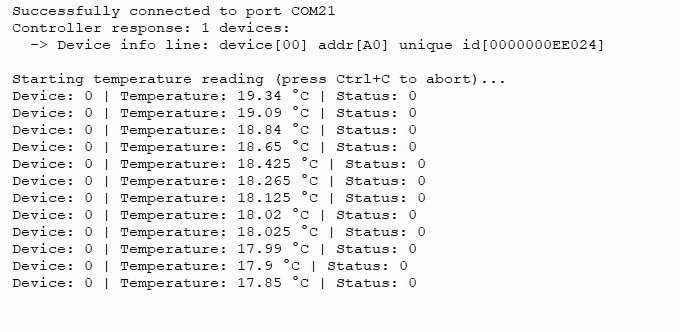
The result of this script's execution is as follows: