element14 Community
element14 Community
    Register Log In
  • Site
  • Search
  • Log In Register
  • Community Hub
    Community Hub
    • What's New on element14
    • Feedback and Support
    • Benefits of Membership
    • Personal Blogs
    • Members Area
    • Achievement Levels
  • Learn
    Learn
    • Ask an Expert
    • eBooks
    • element14 presents
    • Learning Center
    • Tech Spotlight
    • STEM Academy
    • Webinars, Training and Events
    • Learning Groups
  • Technologies
    Technologies
    • 3D Printing
    • FPGA
    • Industrial Automation
    • Internet of Things
    • Power & Energy
    • Sensors
    • Technology Groups
  • Challenges & Projects
    Challenges & Projects
    • Design Challenges
    • element14 presents Projects
    • Project14
    • Arduino Projects
    • Raspberry Pi Projects
    • Project Groups
  • Products & Partners
    Products & Partners
    • Arduino
    • Avnet & Tria Boards Community
    • Dev Tools
    • Manufacturers
    • Multicomp Pro
    • Product Groups
    • Raspberry Pi
    • RoadTests & Reviews
  • About Us
    About the element14 Community
  • Store
    Store
    • Visit Your Store
    • Choose another store...
      • Europe
      •  Austria (German)
      •  Belgium (Dutch, French)
      •  Bulgaria (Bulgarian)
      •  Czech Republic (Czech)
      •  Denmark (Danish)
      •  Estonia (Estonian)
      •  Finland (Finnish)
      •  France (French)
      •  Germany (German)
      •  Hungary (Hungarian)
      •  Ireland
      •  Israel
      •  Italy (Italian)
      •  Latvia (Latvian)
      •  
      •  Lithuania (Lithuanian)
      •  Netherlands (Dutch)
      •  Norway (Norwegian)
      •  Poland (Polish)
      •  Portugal (Portuguese)
      •  Romania (Romanian)
      •  Russia (Russian)
      •  Slovakia (Slovak)
      •  Slovenia (Slovenian)
      •  Spain (Spanish)
      •  Sweden (Swedish)
      •  Switzerland(German, French)
      •  Turkey (Turkish)
      •  United Kingdom
      • Asia Pacific
      •  Australia
      •  China
      •  Hong Kong
      •  India
      •  Japan
      •  Korea (Korean)
      •  Malaysia
      •  New Zealand
      •  Philippines
      •  Singapore
      •  Taiwan
      •  Thailand (Thai)
      •  Vietnam
      • Americas
      •  Brazil (Portuguese)
      •  Canada
      •  Mexico (Spanish)
      •  United States
      Can't find the country/region you're looking for? Visit our export site or find a local distributor.
  • Translate
  • Profile
  • Settings
Smart Home & Healthcare Challenge
  • Challenges & Projects
  • Design Challenges
  • Smart Home & Healthcare Challenge
  • More
  • Cancel
Smart Home & Healthcare Challenge
Forum VitalSense – Part 9 : MAXREFDES117 – JSON Data Acquisition via USB-CDC in LabVIEW
  • News
  • Projects
  • Forum
  • Details
  • Leaderboard
  • Files
  • Members
  • DC
  • More
  • Cancel
  • New
Join Smart Home & Healthcare Challenge to participate - click to join for free!
Actions
  • Share
  • More
  • Cancel
Forum Thread Details
  • Replies 1 reply
  • Subscribers 18 subscribers
  • Views 53 views
  • Users 0 members are here
Related

VitalSense – Part 9 : MAXREFDES117 – JSON Data Acquisition via USB-CDC in LabVIEW

jelektro
jelektro 2 days ago

Table of Contents
Part 1: System Concept and Architecture
Part 2 : Sponsored Kit Overview
Part 3 : Alternatives for Heart Rate, SpO₂, and Temperature Sensing
Part 4 : MAX30208EVSYS Evaluation System – Technical Overview & Operation
Part 5 : Reverse-Engineering the MAX30208EVSYS Communication Protocol
Part 6 : Communicating with the MAX30208EVSYS in LabVIEW
Part 7 : Building a Cross-Platform Qt6 Desktop Application for the MAX30208EVSYS Temperature Sensor
Part 8 : STM32 Pulse Oximeter & Heart Rate Monitor (MAXREFDES117 + USB CDC)
Part 9 : MAXREFDES117 – JSON Data Acquisition via USB-CDC in LabVIEW
Part 10 : Building a Real-Time Sensor Data Visualizer for MAXREFDES117 / USB CDC
Part 11 : Research Workstation System Architecture
Part 12 : Combined Pulse Oximeter & Temperature Monitoring System in LabVIEW
Part 13 : Dual-Port Biomedical Telemetry Dashboard - Integrating STM32 (MAXREFDES117) and MAX30208EVSYS in C++ and Qt

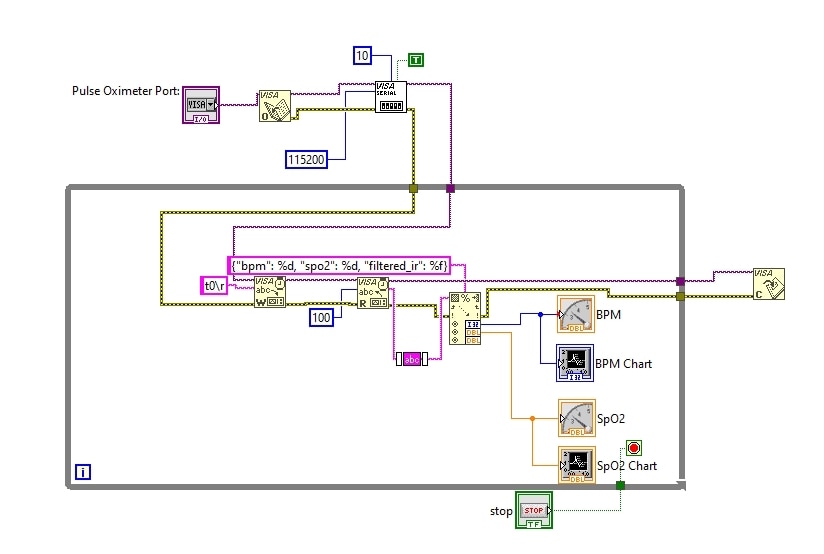
This section describes the implementation of serial communication and data parsing for retrieving sensor telemetry from an STM microcontroller. The firmware transmits structured data frames via USB-CDC using a JSON format (e.g., {"bpm": 73, "spo2": 98, "filtered_ir": 4425.22}).

  • VISA Serial Configuration: Opens and configures the virtual COM port with a baud rate of 115,200 bps, 8 data bits, 1 stop bit, and no flow control.

  • Data Stream Cleaning: Incoming raw strings from VISA Read are processed through the Trim Whitespace function to strip out hidden carriage return and line feed characters (\r\n), ensuring stable parsing.

  • String Scanning: LabVIEW extracts numerical parameters (bpm, spo2, and filtered_ir) to feed real-time indicators and logging modules.
image

You don't have permission to edit metadata of this video.
Edit media
x
image
Upload Preview
image

Handling Status Messages and Sensor States

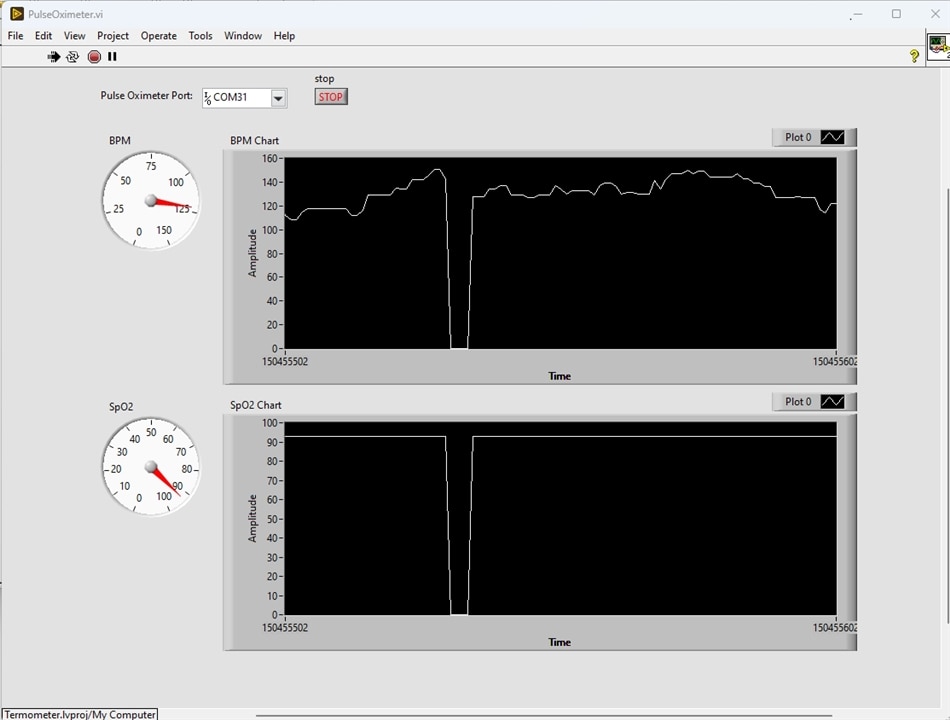
To prevent parsing errors (such as Error 85: Scan failed) when the sensor sends status updates instead of numeric values (e.g., when no finger is detected on the sensor, resulting in {"status": "Missing finger on the sensor"}), specific error-mitigation strategies are applied:

  • Stream Robustness: Modernizing the firmware to output standardized numeric frames (e.g., zeros) during idle or error states ensures continuous and uninterrupted data parsing in LabVIEW.

  • Alternative Conditional Routing: Using string-matching functions (Match Pattern) allows the application to dynamically detect status strings and safely route them to user interface warning messages without crashing the main acquisition loop.

Real-Time Telemetry Visualization

The user interface leverages native LabVIEW display elements optimized for biomedical signal monitoring:

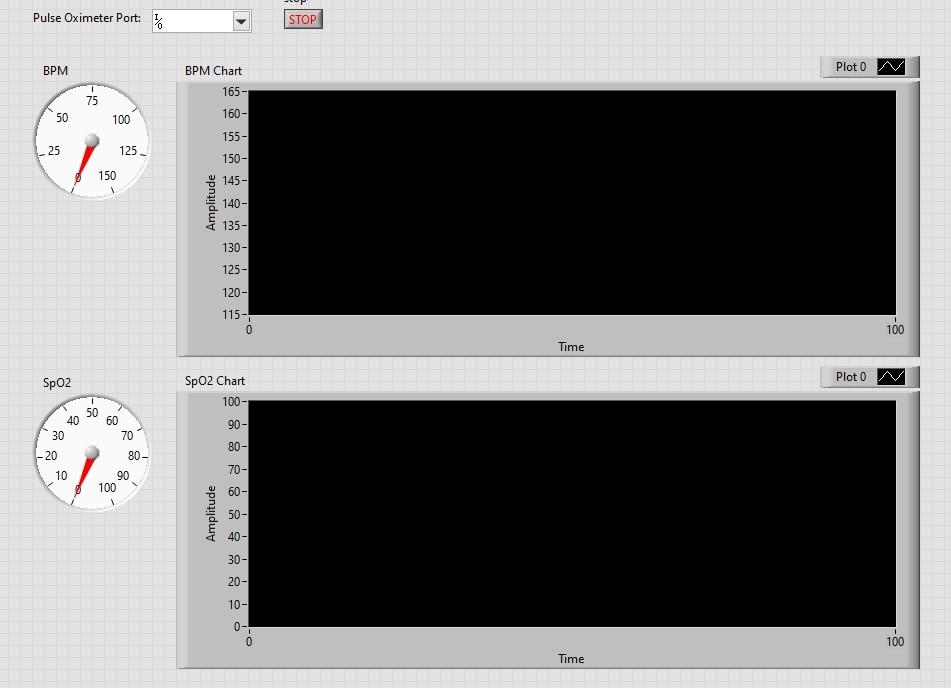
  • PPG Waveform Monitoring: The floating-point filtered_ir signal is routed directly into a Waveform Chart, providing a continuous, scrolling historical plot of the photoplethysmogram (PPG) heart pulse wave.

  • Vital Signs Indicators:

    • Heart Rate (BPM): Displayed via numeric indicators or custom gauge meters for immediate numerical feedback.

    • Blood Oxygen Saturation (SpO2): Configured with a strict numerical range scaled from 0 to 100 (Maximum = 100) to accurately reflect standard percentage-based clinical boundaries.

image

image

  • Sign in to reply
  • Cancel
  • Qbit
    Qbit 1 day ago

    Excellent walkthrough on the clean setup!

    • Cancel
    • Vote Up 0 Vote Down
    • Sign in to reply
    • Cancel
element14 Community

element14 is the first online community specifically for engineers. Connect with your peers and get expert answers to your questions.

  • Members
  • Learn
  • Technologies
  • Challenges & Projects
  • Products
  • Store
  • About Us
  • Feedback & Support
  • FAQs
  • Terms of Use
  • Privacy Policy
  • Legal and Copyright Notices
  • Sitemap
  • Cookies

An Avnet Company © 2026 Premier Farnell Limited. All Rights Reserved.

Premier Farnell Ltd, registered in England and Wales (no 00876412), registered office: Farnell House, Forge Lane, Leeds LS12 2NE.

Follow element14

  • X
  • Facebook
  • linkedin
  • YouTube