


Proof of Concept

The Control Center is the core engine of the entire Super Smart Home. It is based on a Raspberry Pi 4B 4Gb configured as a desktop with many other features onboard. The Control Center Desktop covers two important roles: keeps the real-time contact with the other nodes and collect data as well as alarms by one side and shows an interactive UI on the monitor by the other. Most of the tasks of the Control Center are accomplished in the background, including the communication with the Cypress PSoC6 WiFi BT Pioneer board that is the gateway with the important task to connect to the AWS Cloud for monitoring and controlling the Super Smart Home from remote. Going ahead with the design and development of the parts, the design of the nodes become more clear, as well as the kind of communication they should maintain with the Control Center.
We should note that a node of the Super Smart Home is not a simple device but is an autonomous structure acquiring local information and generating automatic feedback, as well as connecting to the Control Center to update the global status of its activity.
The UI Development Lifecycle
There are many ways to develop a UI for Linux; it is possible to use the GTK libraries (those used to develop the Linux widgets of the X-Window desktop GUI), also available for Python development, as well as the PyGame library. In the past, I have used Kivi that is also a good option but when I used it the Raspbian environment was not yet supporting the most recent features. The choice of the environment to develop UI interface, in my opinion, should answer some essential questions:
- Is it easy to manage and design?
- Can it be maintained independently by the sources of the engine application?
- Is it platform-independent?
- Can it be compliant with good ergonomic requirements?
- Can it be designed with an efficient graphic editor?
- Is it lightweight?
While for the answer to some of the above questions, like the portability, we can accept some compromises and limitations, for the other aspects I think we should be rigid. Especially when the interface is not just a decoration or an accessory of the application but is one of the most important aspects of it.
By a software point of view, I am following the approach to developing the high-level parts of the application in Python3 organized in categorized classes, strongly object-oriented (Python is one of the best languages for this programming style) while the low-level parts are developed in C, C++ or C-like Bash Shell scripts. Under this perspective, the UI is a container that receives and sends information and the entire system is a state-machine event-driven. Events can be generated automatically on a time-base, by the remote nodes or by the user interaction through the desktop graphics interface.
Qt for the UI design
Designing the User Interface with Qt has a lot of advantages. First of all, the Qt development environment is totally platform-independent so it is possible to install the Qt IDE on any operating system. In the Qt IDE, which supports C++ language, the QML javascript language, and other features, we don't need to care too much about our programming language knowledge because what we will use is the Qt Designer. This feature is very efficient and makes easy to design UI but it is not the only feature it is useful. The visually designed user interface creates an XML file, reflecting all the characteristics of the UI where all the widgets refer automatically to the corresponding APIs of the Qt libraries.
Below: the Qt open source version download page

Qt is available for all the platforms in two versions: Open Source and Commercial. The Open Source version is released under an LGPL (GNU Lesser) license so - if an entire application is developed with Qt - the developer has the obligation to include the libraries and mention the use of Qt in the same application. Some other minor limitations are related to paid license components we are not interested in this context. After downloading the universal installer it is sufficient to launch the standard installation to have the IDE - including the Qt designer - and all the essential Qt libraries to be able to design a UI and also compile the project to show immediately the effect.
Note that Qt uses the local platform components for the interface rendering; depending on the desktop characteristics of the computer you are using the interface aspect may change a little. It is possible to avoid this feature customizing all the aspects of every widget but it is not the case.
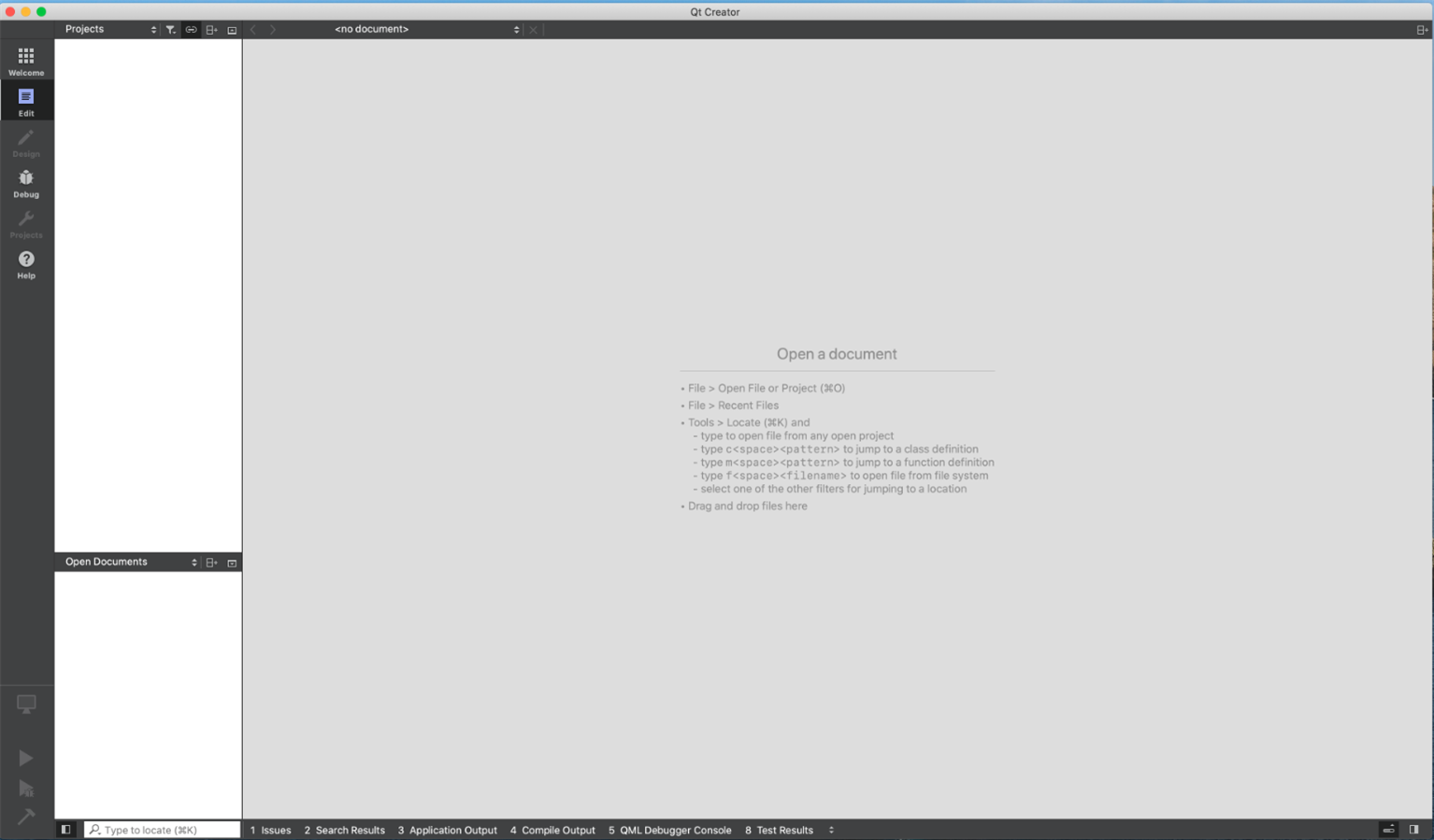
Above: the Qt Creator IDE where we should crate the projects and design the UI
Who has experienced the use of different development environments, especially on the Windows operating system knows how sometimes it is difficult to have on the same machine many different environments as some of them uses concurrently drivers and resources; the problems arise when installing an IDE another previously installed become unusable due to some component conflict. Qt instead is self-contained: after the installation of Qt Creator the libraries, compiler, meta compiler, and the IDE application are all included in a single "Qt" folder that can be moved everywhere in the computer without problems. When you run the Qt IDE all the environment settings are temporarily changed to create a good development environment without impacting other applications installed on the same machine.
It is sufficient to create a new project of type Desktop main application to have all the basic components set and ready to support our MainWindow UI design.
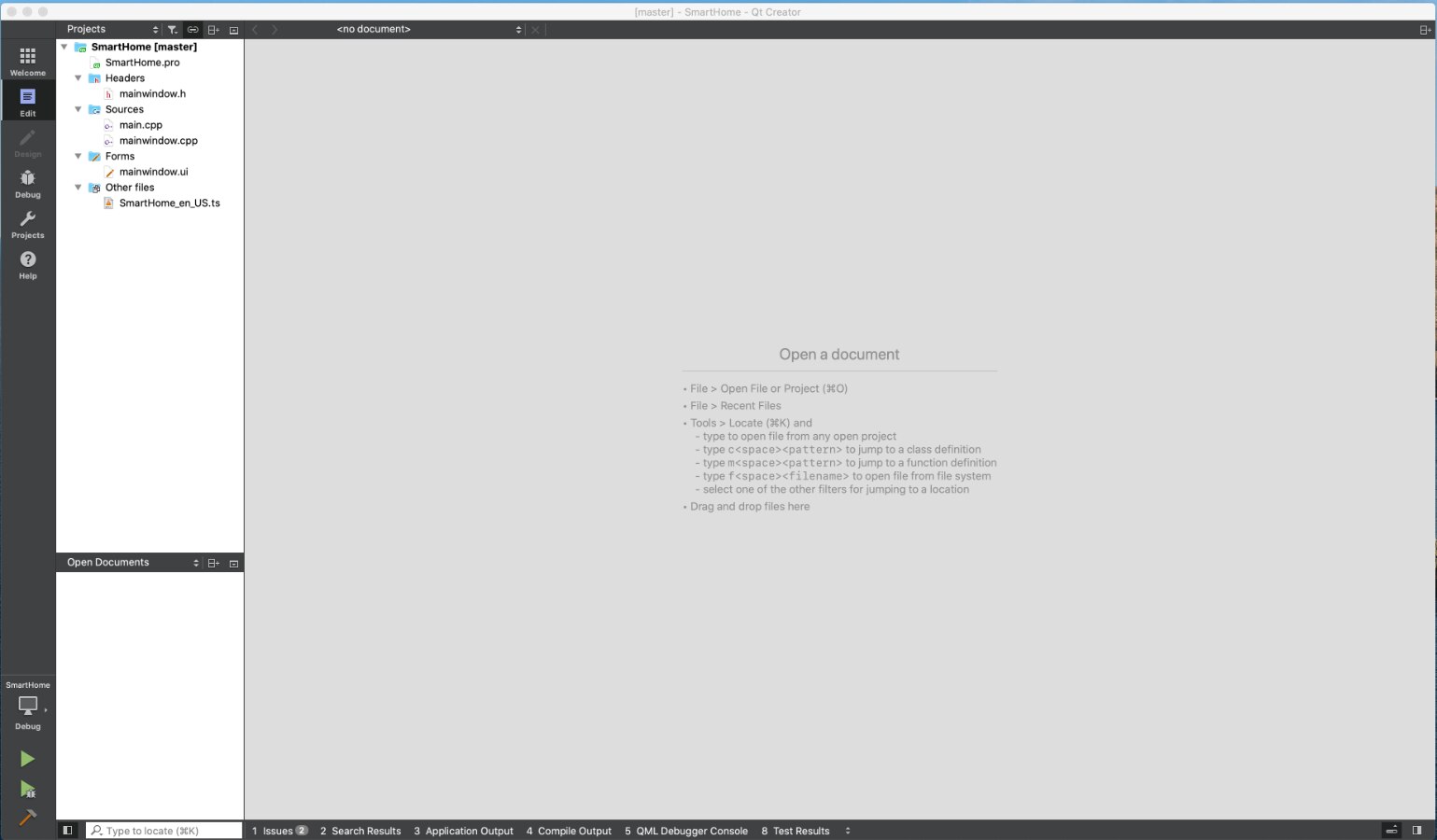
Above: the Qt Creator with the basic files created automatically when the Super Smart Home MainWindow project has been generated.
At this point, we can open the file "mainwindow.ui" and we automatically access to the UI designer. The image below shows the interface designed for the Desktop Control Center.
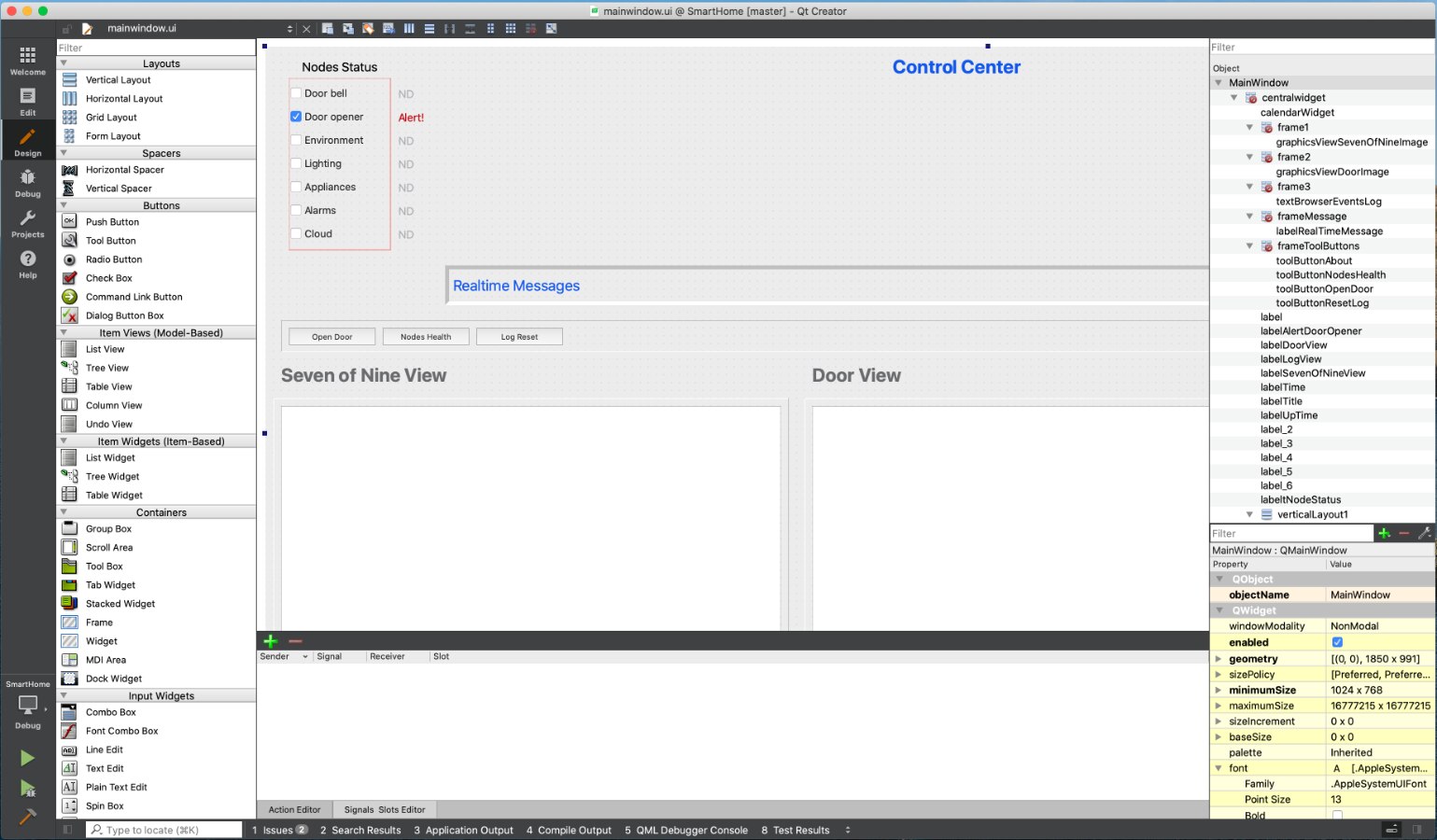
Note that despite we are interested in the interface design only, this file is part of a basic application whose sources have been created by the Qt Creator; this means we can immediately test the interface aspect in every moment simply running the project from the IDE. The image below shows the UI in the Max OSX environment.

Note that, as mentioned before, where possible Qt inherit the characteristics of the host operating system (fonts, window decorations, etc.) so the same interface may have a different aspect when running on a different platform.
What is in the "mainwindow.ui" File?
The files with extension "ui" can be opened by Qt only in the Qt Designer (part of the Qt Creator IDE). But if we open with a common editor the mainwindow.ui file we see how the file has been converted when it is saved.
<?xml version="1.0" encoding="UTF-8"?>
<ui version="4.0">
 <class>MainWindow</class>
 <widget name="MainWindow">
  <property name="enabled">
   <bool>true</bool>
  </property>
  <property name="geometry">
   <rect>
    <x>0</x>
    <y>0</y>
    <width>1850</width>
    <height>991</height>
   </rect>
  </property>
  <property name="minimumSize">
   <size>
    <width>1024</width>
    <height>768</height>
   </size>
  </property>
  <property name="windowTitle">
   <string>SuperSmartHome</string>
  </property>
  <property name="windowOpacity">
   <double>1.000000000000000</double>
  </property>
  <widget name="centralwidget">
   <widget name="calendarWidget">
    <property name="geometry">
     <rect>
      <x>1470</x>
      <y>50</y>
      <width>361</width>
      <height>221</height>
     </rect>
    </property>
    <property name="font">
     <font>
      <weight>75</weight>
      <bold>true</bold>
     </font>
    </property>
   </widget>
The code above shows the first few lines of the about 1000 lines describing the design of the Control Center mainwindow.ui file. The Qt project of the Control Center Desktop interface is available on GitHub. As we will see later we can update the interface accordingly to the application on the Raspberry Pi side simply replacing the UI file to the Python environment.
Making the Interface Design Usable in Python

Above: the UI designed with the Qt Designer on Mac OSX rendered on the desktop screen of the Raspberry Pi 4B.
The next step in the UI creation workflow consists of making the interface available as a Python class in the Raspberry Pi environment. This is possible using PySide, a Qt-Python framework that can also compile the XML format or the UI files creating a Python class. A detailed tutorial on how to install the PySide framework on the Raspberry Pi is described here.
Warning on the Raspberry Pi 4B the standard repository includes the PySide UI files compiles mentioned above. Use the command
$>sudo apt-get install pyside-uic
To convert the Qt Ui file the process is easy; copy the mainwindow.ui file to the Raspberry Pi folder where you are developing the application and launch the command
$>pyside-uic mainwindow.ui > ui_mainwindow.py
That's all. The Python code below shows the Control Center interface Python class.
# -*- coding: utf-8 -*-
# Form implementation generated from reading ui file 'mainwindow.ui'
#
# Created: Mon Apr 20 10:29:17 2020
#      by: pyside-uic 0.2.15 running on PySide 1.2.2
#
# WARNING! All changes made in this file will be lost!

from PySide import QtCore, QtGui

class Ui_MainWindow(object):
    def setupUi(self, MainWindow):
        MainWindow.setObjectName("MainWindow")
        MainWindow.setEnabled(True)
        MainWindow.resize(1850, 991)
        MainWindow.setMinimumSize(QtCore.QSize(1024, 768))
        MainWindow.setWindowOpacity(1.0)
        self.centralwidget = QtGui.QWidget(MainWindow)
        self.centralwidget.setObjectName("centralwidget")
        self.calendarWidget = QtGui.QCalendarWidget(self.centralwidget)
        self.calendarWidget.setGeometry(QtCore.QRect(1470, 50, 361, 221))
        font = QtGui.QFont()
        font.setWeight(75)
        font.setBold(True)
        self.calendarWidget.setFont(font)
        self.calendarWidget.setObjectName("calendarWidget")
        self.frame1 = QtGui.QFrame(self.centralwidget)
        self.frame1.setGeometry(QtCore.QRect(10, 450, 660, 500))
        self.frame1.setFrameShape(QtGui.QFrame.Panel)
        self.frame1.setFrameShadow(QtGui.QFrame.Raised)
        self.frame1.setObjectName("frame1")
        self.graphicsViewSevenOfNineImage = QtGui.QGraphicsView(self.frame1)
        self.graphicsViewSevenOfNineImage.setGeometry(QtCore.QRect(10, 10, 640, 480))
        self.graphicsViewSevenOfNineImage.setObjectName("graphicsViewSevenOfNineImage")
        self.frame2 = QtGui.QFrame(self.centralwidget)
        self.frame2.setGeometry(QtCore.QRect(690, 450, 660, 500))
        self.frame2.setFrameShape(QtGui.QFrame.Panel)
        self.frame2.setFrameShadow(QtGui.QFrame.Raised)
        self.frame2.setObjectName("frame2")
        self.graphicsViewDoorImage = QtGui.QGraphicsView(self.frame2)
        self.graphicsViewDoorImage.setGeometry(QtCore.QRect(10, 10, 640, 480))
        self.graphicsViewDoorImage.setObjectName("graphicsViewDoorImage")
        self.labelSevenOfNineView = QtGui.QLabel(self.centralwidget)
        self.labelSevenOfNineView.setGeometry(QtCore.QRect(20, 400, 331, 41))
        font = QtGui.QFont()
        font.setPointSize(24)
        font.setWeight(75)
        font.setBold(True)
        self.labelSevenOfNineView.setFont(font)
        self.labelSevenOfNineView.setObjectName("labelSevenOfNineView")
        self.labelDoorView = QtGui.QLabel(self.centralwidget)
        self.labelDoorView.setGeometry(QtCore.QRect(700, 400, 271, 41))
        font = QtGui.QFont()
        font.setPointSize(24)
        font.setWeight(75)
        font.setBold(True)
        self.labelDoorView.setFont(font)
        self.labelDoorView.setObjectName("labelDoorView")
        self.labelLogView = QtGui.QLabel(self.centralwidget)
        self.labelLogView.setGeometry(QtCore.QRect(1370, 400, 121, 41))
        font = QtGui.QFont()
        font.setPointSize(24)
        font.setWeight(75)
        font.setBold(True)
        self.labelLogView.setFont(font)
        self.labelLogView.setObjectName("labelLogView")
        self.frame3 = QtGui.QFrame(self.centralwidget)
        self.frame3.setGeometry(QtCore.QRect(1360, 450, 471, 500))
        self.frame3.setFrameShape(QtGui.QFrame.Panel)
        self.frame3.setFrameShadow(QtGui.QFrame.Raised)
        self.frame3.setObjectName("frame3")
        self.textBrowserEventsLog = QtGui.QTextBrowser(self.frame3)
        self.textBrowserEventsLog.setGeometry(QtCore.QRect(10, 10, 451, 481))
        font = QtGui.QFont()
        font.setPointSize(10)
        self.textBrowserEventsLog.setFont(font)
        self.textBrowserEventsLog.setObjectName("textBrowserEventsLog")
        self.labelTime = QtGui.QLabel(self.centralwidget)
        self.labelTime.setGeometry(QtCore.QRect(1470, 10, 351, 31))
        font = QtGui.QFont()
        font.setPointSize(20)
        font.setWeight(75)
        font.setBold(True)
        self.labelTime.setFont(font)
        self.labelTime.setAcceptDrops(False)
        self.labelTime.setLayoutDirection(QtCore.Qt.RightToLeft)
        self.labelTime.setObjectName("labelTime")
        self.labelTitle = QtGui.QLabel(self.centralwidget)
        self.labelTitle.setGeometry(QtCore.QRect(740, 10, 291, 31))
        font = QtGui.QFont()
        font.setPointSize(20)
        self.labelTitle.setFont(font)
        self.labelTitle.setObjectName("labelTitle")
        self.verticalLayoutWidget = QtGui.QWidget(self.centralwidget)
        self.verticalLayoutWidget.setGeometry(QtCore.QRect(30, 40, 131, 221))
        self.verticalLayoutWidget.setObjectName("verticalLayoutWidget")
        self.verticalLayout1 = QtGui.QVBoxLayout(self.verticalLayoutWidget)
        self.verticalLayout1.setContentsMargins(0, 0, 0, 0)
        self.verticalLayout1.setObjectName("verticalLayout1")
        self.checkBoxDoorBellStatus = QtGui.QCheckBox(self.verticalLayoutWidget)
        self.checkBoxDoorBellStatus.setMouseTracking(False)
        self.checkBoxDoorBellStatus.setToolTip("")
        self.checkBoxDoorBellStatus.setCheckable(False)
        self.checkBoxDoorBellStatus.setObjectName("checkBoxDoorBellStatus")
        self.verticalLayout1.addWidget(self.checkBoxDoorBellStatus)
        self.checkBoxDoorOpenerStatus = QtGui.QCheckBox(self.verticalLayoutWidget)
        self.checkBoxDoorOpenerStatus.setMouseTracking(False)
        self.checkBoxDoorOpenerStatus.setToolTip("")
        self.checkBoxDoorOpenerStatus.setCheckable(True)
        self.checkBoxDoorOpenerStatus.setChecked(True)
        self.checkBoxDoorOpenerStatus.setObjectName("checkBoxDoorOpenerStatus")
        self.verticalLayout1.addWidget(self.checkBoxDoorOpenerStatus)
        self.checkBoxEnvironmentStatus = QtGui.QCheckBox(self.verticalLayoutWidget)
        self.checkBoxEnvironmentStatus.setMouseTracking(False)
        self.checkBoxEnvironmentStatus.setToolTip("")
        self.checkBoxEnvironmentStatus.setCheckable(False)
        self.checkBoxEnvironmentStatus.setObjectName("checkBoxEnvironmentStatus")
        self.verticalLayout1.addWidget(self.checkBoxEnvironmentStatus)
        self.checkBoxLightingStatus = QtGui.QCheckBox(self.verticalLayoutWidget)
        self.checkBoxLightingStatus.setMouseTracking(False)
        self.checkBoxLightingStatus.setToolTip("")
        self.checkBoxLightingStatus.setCheckable(False)
        self.checkBoxLightingStatus.setObjectName("checkBoxLightingStatus")
        self.verticalLayout1.addWidget(self.checkBoxLightingStatus)
        self.checkBoxAppliancesStatus = QtGui.QCheckBox(self.verticalLayoutWidget)
        self.checkBoxAppliancesStatus.setMouseTracking(False)
        self.checkBoxAppliancesStatus.setToolTip("")
        self.checkBoxAppliancesStatus.setCheckable(False)
        self.checkBoxAppliancesStatus.setObjectName("checkBoxAppliancesStatus")
        self.verticalLayout1.addWidget(self.checkBoxAppliancesStatus)
        self.checkBoxAlarmsStatus = QtGui.QCheckBox(self.verticalLayoutWidget)
        self.checkBoxAlarmsStatus.setMouseTracking(False)
        self.checkBoxAlarmsStatus.setToolTip("")
        self.checkBoxAlarmsStatus.setCheckable(False)
        self.checkBoxAlarmsStatus.setObjectName("checkBoxAlarmsStatus")
        self.verticalLayout1.addWidget(self.checkBoxAlarmsStatus)
        self.checkBoxCloudConnectionStatus = QtGui.QCheckBox(self.verticalLayoutWidget)
        self.checkBoxCloudConnectionStatus.setMouseTracking(False)
        self.checkBoxCloudConnectionStatus.setToolTip("")
        self.checkBoxCloudConnectionStatus.setCheckable(False)
        self.checkBoxCloudConnectionStatus.setObjectName("checkBoxCloudConnectionStatus")
        self.verticalLayout1.addWidget(self.checkBoxCloudConnectionStatus)
        self.frameToolButtons = QtGui.QFrame(self.centralwidget)
        self.frameToolButtons.setGeometry(QtCore.QRect(20, 350, 1811, 41))
        self.frameToolButtons.setFrameShape(QtGui.QFrame.Panel)
        self.frameToolButtons.setFrameShadow(QtGui.QFrame.Sunken)
        self.frameToolButtons.setObjectName("frameToolButtons")
        self.toolButtonOpenDoor = QtGui.QToolButton(self.frameToolButtons)
        self.toolButtonOpenDoor.setGeometry(QtCore.QRect(10, 10, 111, 22))
        self.toolButtonOpenDoor.setFocusPolicy(QtCore.Qt.StrongFocus)
        self.toolButtonOpenDoor.setObjectName("toolButtonOpenDoor")
        self.toolButtonResetLog = QtGui.QToolButton(self.frameToolButtons)
        self.toolButtonResetLog.setGeometry(QtCore.QRect(250, 10, 111, 22))
        self.toolButtonResetLog.setFocusPolicy(QtCore.Qt.StrongFocus)
        self.toolButtonResetLog.setObjectName("toolButtonResetLog")
        self.toolButtonNodesHealth = QtGui.QToolButton(self.frameToolButtons)
        self.toolButtonNodesHealth.setGeometry(QtCore.QRect(130, 10, 111, 22))
        self.toolButtonNodesHealth.setFocusPolicy(QtCore.Qt.StrongFocus)
        self.toolButtonNodesHealth.setObjectName("toolButtonNodesHealth")
        self.toolButtonAbout = QtGui.QToolButton(self.frameToolButtons)
        self.toolButtonAbout.setGeometry(QtCore.QRect(1690, 10, 111, 22))
        self.toolButtonAbout.setFocusPolicy(QtCore.Qt.StrongFocus)
        self.toolButtonAbout.setObjectName("toolButtonAbout")
        self.labeltNodeStatus = QtGui.QLabel(self.centralwidget)
        self.labeltNodeStatus.setGeometry(QtCore.QRect(30, 11, 130, 30))
        font = QtGui.QFont()
        font.setPointSize(16)
        self.labeltNodeStatus.setFont(font)
        self.labeltNodeStatus.setObjectName("labeltNodeStatus")
        self.frameMessage = QtGui.QFrame(self.centralwidget)
        self.frameMessage.setGeometry(QtCore.QRect(230, 280, 1221, 51))
        palette = QtGui.QPalette()
        brush = QtGui.QBrush(QtGui.QColor(246, 250, 10))
        brush.setStyle(QtCore.Qt.SolidPattern)
        palette.setBrush(QtGui.QPalette.Active, QtGui.QPalette.Button, brush)
        brush = QtGui.QBrush(QtGui.QColor(255, 255, 255))
        brush.setStyle(QtCore.Qt.SolidPattern)
        palette.setBrush(QtGui.QPalette.Active, QtGui.QPalette.Base, brush)
        brush = QtGui.QBrush(QtGui.QColor(246, 250, 10))
        brush.setStyle(QtCore.Qt.SolidPattern)
        palette.setBrush(QtGui.QPalette.Active, QtGui.QPalette.Window, brush)
        brush = QtGui.QBrush(QtGui.QColor(246, 250, 10))
        brush.setStyle(QtCore.Qt.SolidPattern)
        palette.setBrush(QtGui.QPalette.Active, QtGui.QPalette.AlternateBase, brush)
        brush = QtGui.QBrush(QtGui.QColor(246, 250, 10))
        brush.setStyle(QtCore.Qt.SolidPattern)
        palette.setBrush(QtGui.QPalette.Inactive, QtGui.QPalette.Button, brush)
        brush = QtGui.QBrush(QtGui.QColor(255, 255, 255))
        brush.setStyle(QtCore.Qt.SolidPattern)
        palette.setBrush(QtGui.QPalette.Inactive, QtGui.QPalette.Base, brush)
        brush = QtGui.QBrush(QtGui.QColor(246, 250, 10))
        brush.setStyle(QtCore.Qt.SolidPattern)
        palette.setBrush(QtGui.QPalette.Inactive, QtGui.QPalette.Window, brush)
        brush = QtGui.QBrush(QtGui.QColor(246, 250, 10))
        brush.setStyle(QtCore.Qt.SolidPattern)
        palette.setBrush(QtGui.QPalette.Inactive, QtGui.QPalette.AlternateBase, brush)
        brush = QtGui.QBrush(QtGui.QColor(246, 250, 10))
        brush.setStyle(QtCore.Qt.SolidPattern)
        palette.setBrush(QtGui.QPalette.Disabled, QtGui.QPalette.Button, brush)
        brush = QtGui.QBrush(QtGui.QColor(246, 250, 10))
        brush.setStyle(QtCore.Qt.SolidPattern)
        palette.setBrush(QtGui.QPalette.Disabled, QtGui.QPalette.Base, brush)
        brush = QtGui.QBrush(QtGui.QColor(246, 250, 10))
        brush.setStyle(QtCore.Qt.SolidPattern)
        palette.setBrush(QtGui.QPalette.Disabled, QtGui.QPalette.Window, brush)
        brush = QtGui.QBrush(QtGui.QColor(246, 250, 10))
        brush.setStyle(QtCore.Qt.SolidPattern)
        palette.setBrush(QtGui.QPalette.Disabled, QtGui.QPalette.AlternateBase, brush)
        self.frameMessage.setPalette(palette)
        self.frameMessage.setFrameShape(QtGui.QFrame.Panel)
        self.frameMessage.setFrameShadow(QtGui.QFrame.Sunken)
        self.frameMessage.setLineWidth(5)
        self.frameMessage.setObjectName("frameMessage")
        self.labelRealTimeMessage = QtGui.QLabel(self.frameMessage)
        self.labelRealTimeMessage.setEnabled(True)
        self.labelRealTimeMessage.setGeometry(QtCore.QRect(10, 10, 1201, 31))
        palette = QtGui.QPalette()
        brush = QtGui.QBrush(QtGui.QColor(246, 250, 10))
        brush.setStyle(QtCore.Qt.SolidPattern)
        palette.setBrush(QtGui.QPalette.Active, QtGui.QPalette.Button, brush)
        brush = QtGui.QBrush(QtGui.QColor(172, 173, 8))
        brush.setStyle(QtCore.Qt.SolidPattern)
        palette.setBrush(QtGui.QPalette.Inactive, QtGui.QPalette.Button, brush)
        brush = QtGui.QBrush(QtGui.QColor(246, 250, 10, 128))
        brush.setStyle(QtCore.Qt.SolidPattern)
        palette.setBrush(QtGui.QPalette.Disabled, QtGui.QPalette.Button, brush)
        self.labelRealTimeMessage.setPalette(palette)
        font = QtGui.QFont()
        font.setPointSize(19)
        self.labelRealTimeMessage.setFont(font)
        self.labelRealTimeMessage.setObjectName("labelRealTimeMessage")
        self.label = QtGui.QLabel(self.centralwidget)
        self.label.setEnabled(False)
        self.label.setGeometry(QtCore.QRect(170, 50, 58, 21))
        font = QtGui.QFont()
        font.setPointSize(16)
        self.label.setFont(font)
        self.label.setObjectName("label")
        self.labelAlertDoorOpener = QtGui.QLabel(self.centralwidget)
        self.labelAlertDoorOpener.setEnabled(True)
        self.labelAlertDoorOpener.setGeometry(QtCore.QRect(170, 80, 58, 21))
        font = QtGui.QFont()
        font.setPointSize(16)
        self.labelAlertDoorOpener.setFont(font)
        self.labelAlertDoorOpener.setObjectName("labelAlertDoorOpener")
        self.labelUpTime = QtGui.QLabel(self.centralwidget)
        self.labelUpTime.setGeometry(QtCore.QRect(1520, 280, 301, 41))
        palette = QtGui.QPalette()
        brush = QtGui.QBrush(QtGui.QColor(22, 175, 129))
        brush.setStyle(QtCore.Qt.SolidPattern)
        palette.setBrush(QtGui.QPalette.Active, QtGui.QPalette.WindowText, brush)
        brush = QtGui.QBrush(QtGui.QColor(22, 175, 129))
        brush.setStyle(QtCore.Qt.SolidPattern)
        palette.setBrush(QtGui.QPalette.Inactive, QtGui.QPalette.WindowText, brush)
        brush = QtGui.QBrush(QtGui.QColor(0, 0, 0, 63))
        brush.setStyle(QtCore.Qt.SolidPattern)
        palette.setBrush(QtGui.QPalette.Disabled, QtGui.QPalette.WindowText, brush)
        self.labelUpTime.setPalette(palette)
        font = QtGui.QFont()
        font.setPointSize(12)
        self.labelUpTime.setFont(font)
        self.labelUpTime.setObjectName("labelUpTime")
        self.label_2 = QtGui.QLabel(self.centralwidget)
        self.label_2.setEnabled(False)
        self.label_2.setGeometry(QtCore.QRect(170, 110, 58, 21))
        font = QtGui.QFont()
        font.setPointSize(16)
        self.label_2.setFont(font)
        self.label_2.setObjectName("label_2")
        self.label_3 = QtGui.QLabel(self.centralwidget)
        self.label_3.setEnabled(False)
        self.label_3.setGeometry(QtCore.QRect(170, 140, 58, 21))
        font = QtGui.QFont()
        font.setPointSize(16)
        self.label_3.setFont(font)
        self.label_3.setObjectName("label_3")
        self.label_4 = QtGui.QLabel(self.centralwidget)
        self.label_4.setEnabled(False)
        self.label_4.setGeometry(QtCore.QRect(170, 170, 58, 21))
        font = QtGui.QFont()
        font.setPointSize(16)
        self.label_4.setFont(font)
        self.label_4.setObjectName("label_4")
        self.label_5 = QtGui.QLabel(self.centralwidget)
        self.label_5.setEnabled(False)
        self.label_5.setGeometry(QtCore.QRect(170, 200, 58, 21))
        font = QtGui.QFont()
        font.setPointSize(16)
        self.label_5.setFont(font)
        self.label_5.setObjectName("label_5")
        self.label_6 = QtGui.QLabel(self.centralwidget)
        self.label_6.setEnabled(False)
        self.label_6.setGeometry(QtCore.QRect(170, 230, 58, 21))
        font = QtGui.QFont()
        font.setPointSize(16)
        self.label_6.setFont(font)
        self.label_6.setObjectName("label_6")
        MainWindow.setCentralWidget(self.centralwidget)
        self.statusbar = QtGui.QStatusBar(MainWindow)
        self.statusbar.setObjectName("statusbar")
        MainWindow.setStatusBar(self.statusbar)
        self.actionSystem = QtGui.QAction(MainWindow)
        self.actionSystem.setObjectName("actionSystem")
        self.actionConsole = QtGui.QAction(MainWindow)
        self.actionConsole.setObjectName("actionConsole")
        self.actionLog = QtGui.QAction(MainWindow)
        self.actionLog.setObjectName("actionLog")

        self.retranslateUi(MainWindow)
        QtCore.QMetaObject.connectSlotsByName(MainWindow)

    def retranslateUi(self, MainWindow):
        MainWindow.setWindowTitle(QtGui.QApplication.translate("MainWindow", "SuperSmartHome", None, QtGui.QApplication.UnicodeUTF8))
        self.labelSevenOfNineView.setText(QtGui.QApplication.translate("MainWindow", "<html><head/><body><p><span style=\" color:#6b6c6f;\">Seven of Nine View</span></p></body></html>", None, QtGui.QApplication.UnicodeUTF8))
        self.labelDoorView.setText(QtGui.QApplication.translate("MainWindow", "<html><head/><body><p><span style=\" color:#6b6c6f;\">Door View</span></p></body></html>", None, QtGui.QApplication.UnicodeUTF8))
        self.labelLogView.setText(QtGui.QApplication.translate("MainWindow", "<html><head/><body><p><span style=\" color:#6b6c6f;\">Log</span></p></body></html>", None, QtGui.QApplication.UnicodeUTF8))
        self.textBrowserEventsLog.setHtml(QtGui.QApplication.translate("MainWindow", "<!DOCTYPE HTML PUBLIC \"-//W3C//DTD HTML 4.0//EN\" \"http://www.w3.org/TR/REC-html40/strict.dtd\">\n"
"<html><head><meta name=\"qrichtext\" content=\"1\" /><style type=\"text/css\">\n"
"p, li { white-space: pre-wrap; }\n"
"</style></head><body style=\" font-family:\'.AppleSystemUIFont\'; font-size:10pt; font-weight:400; font-style:normal;\">\n"
"<p style=\" margin-top:0px; margin-bottom:0px; margin-left:0px; margin-right:0px; -qt-block-indent:0; text-indent:0px;\">All the events are logged in the format</p>\n"
"<p style=\"-qt-paragraph-type:empty; margin-top:0px; margin-bottom:0px; margin-left:0px; margin-right:0px; -qt-block-indent:0; text-indent:0px;\"><br /></p>\n"
"<p style=\" margin-top:0px; margin-bottom:0px; margin-left:0px; margin-right:0px; -qt-block-indent:0; text-indent:0px;\"><Timestamp> - [Event code] Description</p>\n"
"<p style=\"-qt-paragraph-type:empty; margin-top:0px; margin-bottom:0px; margin-left:0px; margin-right:0px; -qt-block-indent:0; text-indent:0px;\"><br /></p>\n"
"<p style=\" margin-top:0px; margin-bottom:0px; margin-left:0px; margin-right:0px; -qt-block-indent:0; text-indent:0px;\">Output is Rich Text html formatted</p></body></html>", None, QtGui.QApplication.UnicodeUTF8))
        self.labelTime.setText(QtGui.QApplication.translate("MainWindow", "23:58:17 OTP 5878", None, QtGui.QApplication.UnicodeUTF8))
        self.labelTitle.setText(QtGui.QApplication.translate("MainWindow", "<!DOCTYPE HTML PUBLIC \"-//W3C//DTD HTML 4.0//EN\" \"http://www.w3.org/TR/REC-html40/strict.dtd\">\n"
"<html><head><meta name=\"qrichtext\" content=\"1\" /><style type=\"text/css\">\n"
"p, li { white-space: pre-wrap; }\n"
"</style></head><body style=\" font-family:\'.AppleSystemUIFont\'; font-size:20pt; font-weight:400; font-style:normal;\">\n"
"<p align=\"center\" style=\" margin-top:0px; margin-bottom:0px; margin-left:0px; margin-right:0px; -qt-block-indent:0; text-indent:0px;\"><span style=\" font-size:24pt; font-weight:600; color:#1358ed;\">Control Center</span></p></body></html>", None, QtGui.QApplication.UnicodeUTF8))
        self.checkBoxDoorBellStatus.setText(QtGui.QApplication.translate("MainWindow", "Door bell", None, QtGui.QApplication.UnicodeUTF8))
        self.checkBoxDoorOpenerStatus.setText(QtGui.QApplication.translate("MainWindow", "Door opener", None, QtGui.QApplication.UnicodeUTF8))
        self.checkBoxEnvironmentStatus.setText(QtGui.QApplication.translate("MainWindow", "Environment", None, QtGui.QApplication.UnicodeUTF8))
        self.checkBoxLightingStatus.setText(QtGui.QApplication.translate("MainWindow", "Lighting", None, QtGui.QApplication.UnicodeUTF8))
        self.checkBoxAppliancesStatus.setText(QtGui.QApplication.translate("MainWindow", "Appliances", None, QtGui.QApplication.UnicodeUTF8))
        self.checkBoxAlarmsStatus.setText(QtGui.QApplication.translate("MainWindow", "Alarms", None, QtGui.QApplication.UnicodeUTF8))
        self.checkBoxCloudConnectionStatus.setText(QtGui.QApplication.translate("MainWindow", "Cloud", None, QtGui.QApplication.UnicodeUTF8))
        self.toolButtonOpenDoor.setText(QtGui.QApplication.translate("MainWindow", "Open Door", None, QtGui.QApplication.UnicodeUTF8))
        self.toolButtonResetLog.setText(QtGui.QApplication.translate("MainWindow", "Log Reset", None, QtGui.QApplication.UnicodeUTF8))
        self.toolButtonNodesHealth.setText(QtGui.QApplication.translate("MainWindow", "Nodes Health", None, QtGui.QApplication.UnicodeUTF8))
        self.toolButtonAbout.setText(QtGui.QApplication.translate("MainWindow", "About", None, QtGui.QApplication.UnicodeUTF8))
        self.labeltNodeStatus.setText(QtGui.QApplication.translate("MainWindow", "<html><head/><body><p align=\"center\">Nodes Status</p></body></html>", None, QtGui.QApplication.UnicodeUTF8))
        self.labelRealTimeMessage.setText(QtGui.QApplication.translate("MainWindow", "<html><head/><body><p><span style=\" color:#1358ed;\">Realtime Messages</span></p></body></html>", None, QtGui.QApplication.UnicodeUTF8))
        self.label.setText(QtGui.QApplication.translate("MainWindow", "<html><head/><body><p><span style=\" font-size:14pt; color:#adaeb2;\">ND</span></p></body></html>", None, QtGui.QApplication.UnicodeUTF8))
        self.labelAlertDoorOpener.setText(QtGui.QApplication.translate("MainWindow", "<html><head/><body><p><span style=\" font-size:14pt; color:#c3000b;\">Alert!</span></p></body></html>", None, QtGui.QApplication.UnicodeUTF8))
        self.labelUpTime.setText(QtGui.QApplication.translate("MainWindow", "<html><head/><body><p><span style=\" font-size:18pt; font-style:italic; color:#19c691; vertical-align:sub;\">Running by </span></p></body></html>", None, QtGui.QApplication.UnicodeUTF8))
        self.label_2.setText(QtGui.QApplication.translate("MainWindow", "<html><head/><body><p><span style=\" font-size:14pt; color:#adaeb2;\">ND</span></p></body></html>", None, QtGui.QApplication.UnicodeUTF8))
        self.label_3.setText(QtGui.QApplication.translate("MainWindow", "<html><head/><body><p><span style=\" font-size:14pt; color:#adaeb2;\">ND</span></p></body></html>", None, QtGui.QApplication.UnicodeUTF8))
        self.label_4.setText(QtGui.QApplication.translate("MainWindow", "<html><head/><body><p><span style=\" font-size:14pt; color:#adaeb2;\">ND</span></p></body></html>", None, QtGui.QApplication.UnicodeUTF8))
        self.label_5.setText(QtGui.QApplication.translate("MainWindow", "<html><head/><body><p><span style=\" font-size:14pt; color:#adaeb2;\">ND</span></p></body></html>", None, QtGui.QApplication.UnicodeUTF8))
        self.label_6.setText(QtGui.QApplication.translate("MainWindow", "<html><head/><body><p><span style=\" font-size:14pt; color:#adaeb2;\">ND</span></p></body></html>", None, QtGui.QApplication.UnicodeUTF8))
        self.actionSystem.setText(QtGui.QApplication.translate("MainWindow", "System", None, QtGui.QApplication.UnicodeUTF8))
        self.actionConsole.setText(QtGui.QApplication.translate("MainWindow", "Console", None, QtGui.QApplication.UnicodeUTF8))
        self.actionLog.setText(QtGui.QApplication.translate("MainWindow", "Log", None, QtGui.QApplication.UnicodeUTF8))
Integrating the Python UI Class Into the Application
The Python class created by pyside-uic includes a lot of calls to the Qt standard libraries, used to create the widgets on the interface. These calls are the same you can find in the original interface design on the platform where it has been installed the Qt creator. The magic has been done by the installation of PySide, an open-source framework that has been recently recognized by the official Qt site as a third party component to use the Qt interfaces and components libraries in Python. Complete documentation of the PySide with links to the tutorials and user guides can be found on the official Qt Site in the Qt-Python wiki.
Full Content
Already Posted (until now)
Super Smart Home #1 The project
Super Smart Home #2 The Door Opener
Super Smart Home #3 Designing the Control Center
Super Smart Home #4 Activating the Door Opener
Super Smart Home #5 Connecting the First Node to the Control Center
Super Smart Home #6 PSoC6 On the Cloud
Super Smart Home #7 From AWS IoT Core to AWS SiteWise
Super Smart Home #8 The Kitchen Node: Parts, Design and Components
Super Smart Home #9 The Kitchen Node: Circuit and Software
Super Smart Home #10 Building IoT nodes with PSoC6-WiFi-Bt and Mbed OS
Super Smart Home #11 Project Summary, Highlights, and More...
Super Smart Home #12 PSoC6 Local Node: Application Skeleton
Super Smart Home #13 PSoC6 Protection Case
Sources, Circuits, and Documentation
All the software sources, scripts, circuits schematics, and more are available as Open Source material on the SuperSmartHome GitHub repository.
The video episodes of this challenge are repurposed on the blog posts of the site we-are-borg.com
Thanks to
Element14, AWS, and Cypress, main sponsors
Elegoo for 3D printers ad printing material
Digitspace for sensors, actuators, and boards
The friends and community members Jan Cumps and shabaz always available with advice and suggestions.
Top Comments
-

DAB
-
Cancel
-
Vote Up
+1
Vote Down
-
-
Sign in to reply
-
More
-
Cancel
-

balearicdynamics
in reply to DAB
-
Cancel
-
Vote Up
+1
Vote Down
-
-
Sign in to reply
-
More
-
Cancel
Comment-

balearicdynamics
in reply to DAB
-
Cancel
-
Vote Up
+1
Vote Down
-
-
Sign in to reply
-
More
-
Cancel
Children