


And after 2 weeks of Serious embedded work, With the multimeter probes wrapped around me, I finally finished the Project. Two MAX32630FTHR Boards on desk, Django server running in my desktop behind it, and a blog post that is far more difficult to write than the firmware itself. Now, It was summer vacation time for my institute here and work load is quite simple, so i did signup for many projects. So I did have my hands full, but commitment to complete is absolute. The only thing that struck me is how i kept thinking the last date for this design challenge was May end, but it turned out to be the deadline for the Spring clean competition. Facepalm...
Recap
The idea was simple enough. Stop making people swipe a card and type a PIN at every single door. The card and the door pair once over Bluetooth, and from then on the door sends a random challenge, the card signs it with a private key that never leaves the secure element ATTEC508A, and the door verifies the signature with a public key it got from the server. If the card was snatched, the IMU notices the jerk (time derivative of Acceleration) and locks itself. If the user did not enter the PIN recently, the card refuses to sign. If the device gets blacklisted on the server, the door rejects it locally without even talking to the server.
Two devices, both built around the MAX32630FTHR:
- ID Device (card): MAX32630FTHR + ATECC508A (crypto + key storage + TRNG) + 4x4 keypad + BMI160 IMU + built-in RGB LED
- Door Device: MAX32630FTHR + W5500 Ethernet FeatherWing + PCA9685 Motor FeatherWing + Wurth ICLED FeatherWing (105 LEDs) + magnetic reed switch. No ATECC508A on the door, just micro-ecc in software for ECDSA-P256 verify.
- Django Server: REST API + custom AdminLTE dashboard for keys, events, blacklist.
and my detailed journey, use these links for more detailed how-tos
- Identity Protocol Part 1 - Plan
- Identity Protocol - Part 2 - Django Server
- Identity Protocol - Part 3 - Unboxing and Blinking with Maxim LPSDK
- Identity Protocol - Part 4 - BLE using PAN1326B and BTstack
- Identity Protocol - Part 5 - Interfacing a Keypad
- Identity Protocol - Part 6 - Snatch Detection with the BMI160 IMU
- Identity Protocol - Part 7 - Colouring on the ICLED FeatherWing
- Identity Protocol - Part 8 - Cryptographically Sign with ATECC508 and Verify with Micro-ECC
- Identity Protocol - Part 9 - BLE GATT Challenge/Response with BTstack
- Identity Protocol - Part 10 - W5500 Ethernet
The big picture
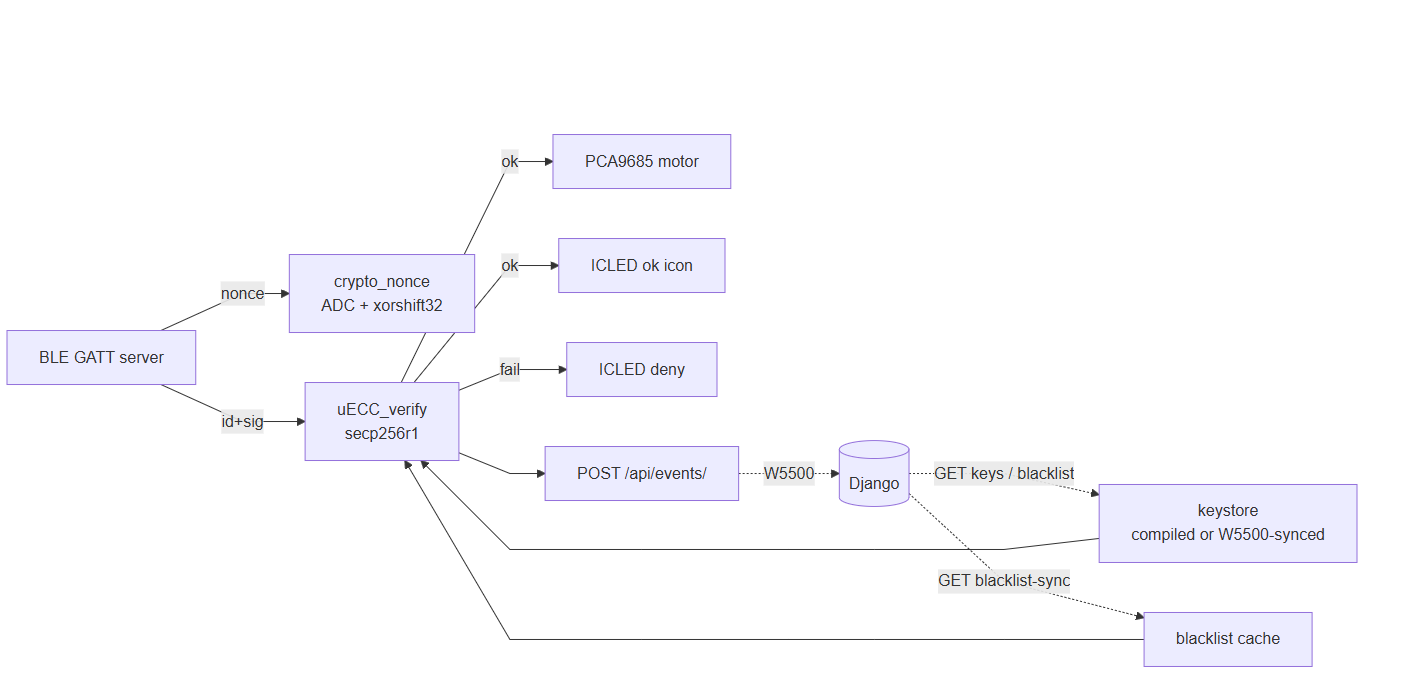
Here is the end-to-end flow with everything wired up. This is what actually runs now, I don't want to compare what i proposed and what i ended up with after the technical hurdles i had to go around as well as the occasional laziness.
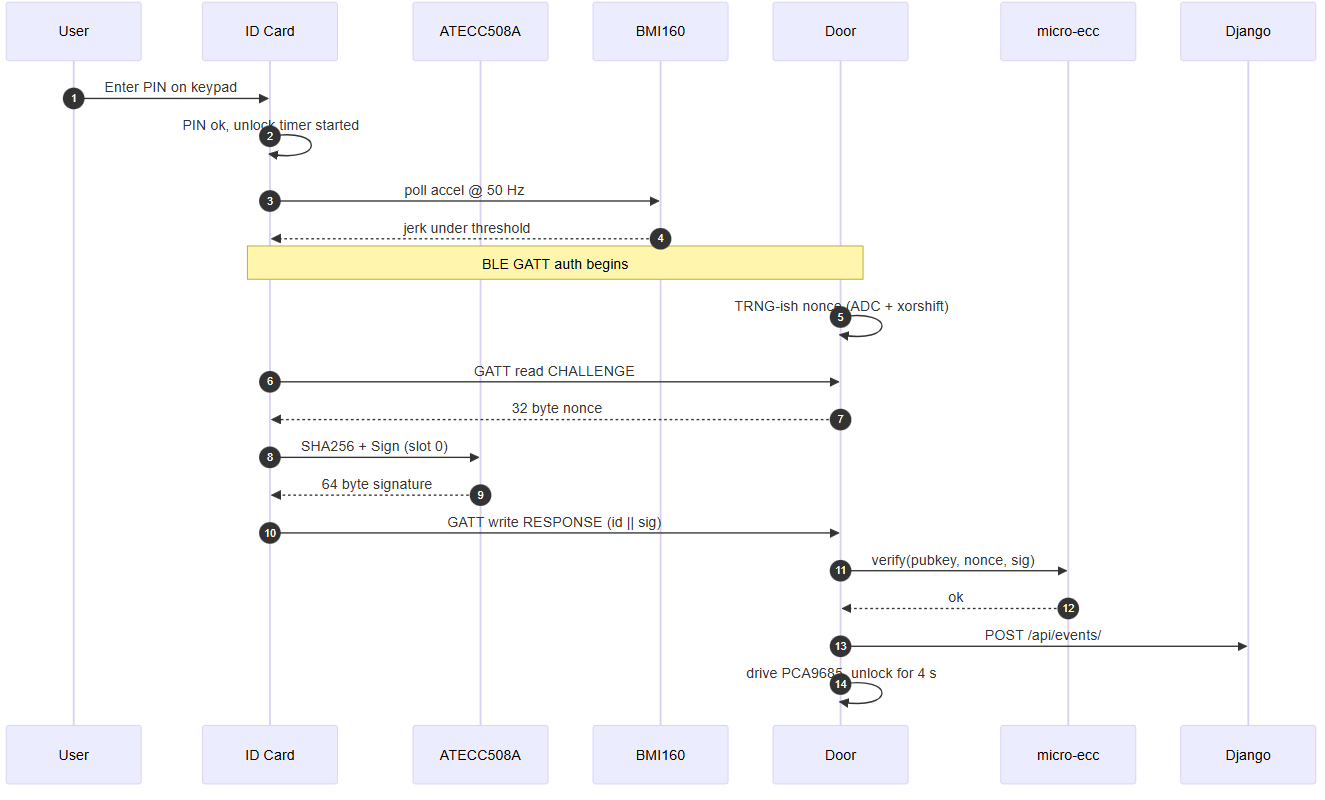
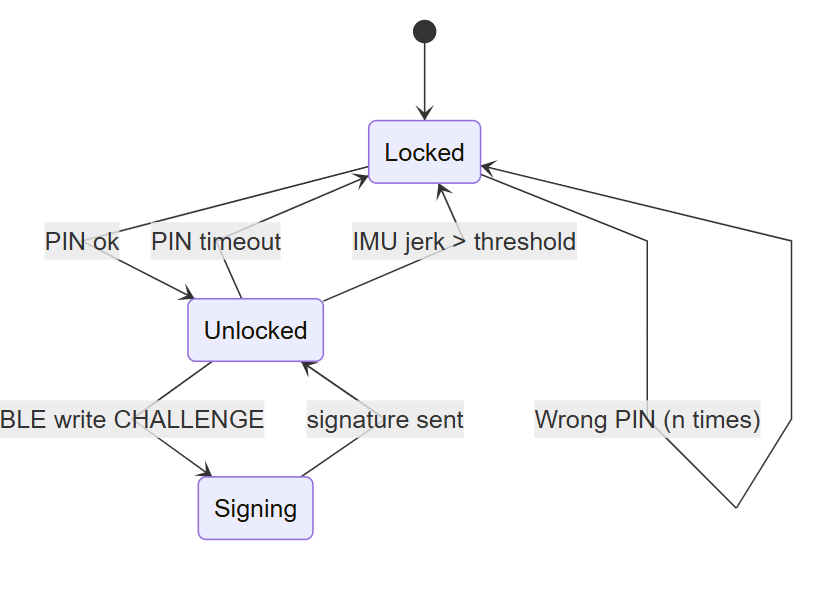
And the device states the ID card cycles through:
Knowledge I had and Knowledge Gained during this Challenge
I chose the project idea strategically in a way, i would use my past experience to quickly develop this but at the same time, keep a vital component involved in the security purpose. So ATTEC508A, W5500, Wurth LEDs were all well known to me. I had to just get used to the MAX32630LPSDK's function calls as well as BLE GATT for communication. BtStack made the latter easy for me because of their really good documentation and more importantly them providing a bundled board definition and micro-ecc making integration way more easier, but the MAX32630's proved to be a heavy anchor, it took hours to find the right function for seemingly simple fix. There was few many times where i had the urge to move to arduino IDE, i kept my cool. I did enjoy creating icons on the ICLED Featherwing. Infact, i remembered about a pixelated screen on a product i was researching - Yoto V3 player and decided to make a PCB for a 16x16 LED. Till i realized, that would be a heavy workload. I remembered Bitluni's journey - https://www.youtube.com/watch?v=yxVQkL01FD4&vl=en
Next, a little about my workflow, i worked from both my home desktop and my university desktop. Debian is my usual choice when coding, but LPSDK did not show up an version for Linux. https://www.analog.com/en/products/max32630.html lists only for windows and MAx. Ofcourse. I knew with a little bit of work, it can be made to work with debian, but i did not want to waste time on it, since there is a good chance this is the last time i will be working with LPSDK and with a NRND MAX32630 Chip.
Last but not least, i experimented with different ways to make my post more lively and engaging. I am now learning how to create some good videos using Kden Live. Took some time to carefully place camera, making sure lights are uniform and there are no distracting elements in the background. Getting help from ChatGPT to create some good Images, Perfecting code for the Mermaid charts,
What the final firmware tree looks like
Full Code - https://github.com/arvindsa/identity-protocol-e14-challenge
Basic shape of the firmware which you will find in the git. Both devices share the same fthr-board/ board support code (because EvKit_V1 hangs on the FTHR PMIC, as we found out in Part 3), and both pull in BTstack from third_party/btstack/.
firmware/
  fthr-board/                    # FTHR-correct Board_Init (PMIC on I2CM2, LDO2 on)
  sdk.local.mk(.example)         # per-machine LPSDK path
  id-device/
    src/
      id_device.c                # main loop + state machine
      keypad.c                   # row-drive/col-read, 10 ms debounce (Part 5)
      pin.c                      # PIN buffer, timeout, retry count
      imu.c                      # BMI160 init + jerk computation (Part 6)
      crypto.c                   # ATECC508A wake, sign, get serial (Part 8)
      auth.c                     # BLE GATT client: discover, read, sign, write (Part 9)
      btstack_link_key_db_stub.c # keeps Classic out of the link without source
    Makefile
  door-device/
    src/
      door_device.c              # main loop, supervisor
      auth_server.c              # BLE GATT server, nonce + verify (Part 9)
      crypto.c                   # micro-ecc verify + ADC/xorshift nonce (Part 8)
      ble.c                      # BTstack glue
      ethernet.c                 # W5500 socket abstraction + HTTP1 (Part 10)
      motor.c                    # PCA9685 latch control
      icled.c                    # PWM-driven WS2812B with idle-HIGH fix (Part 7)
      optical.c                  # reed switch close detection
      btstack_link_key_db_stub.c
    Makefile
id_device.c - basic layout
int main(void)
{
    Board_Init();                 // fthr-board, not EvKit_V1
    debug_uart_init();            // UART1 MAP_A, printf goes here
    led_init();
    keypad_init();
    pin_state_init();
    imu_init();                   // BMI160: soft reset, accel-normal, check 0xD1
    crypto_init();                // ATECC508A wake, read serial -> device_id
    auth_ble_init();              // BTstack: HCI up, start scanning Auth-Door

    for (;;) {
        int key = keypad_scan();
        if (key >= 0) pin_state_feed(key);

        if (imu_jerk() > JERK_LOCK_THRESHOLD) pin_state_force_lock();
        if (pin_state_timed_out()) pin_state_force_lock();

        led_show(pin_state_get()); // green / red / amber

        // BLE GATT state machine runs in BTstack callbacks:
        //   on CHALLENGE read complete -> SHA256 + atca_sign -> GATT write RESPONSE
        btstack_run_loop_execute_once();
    }
}
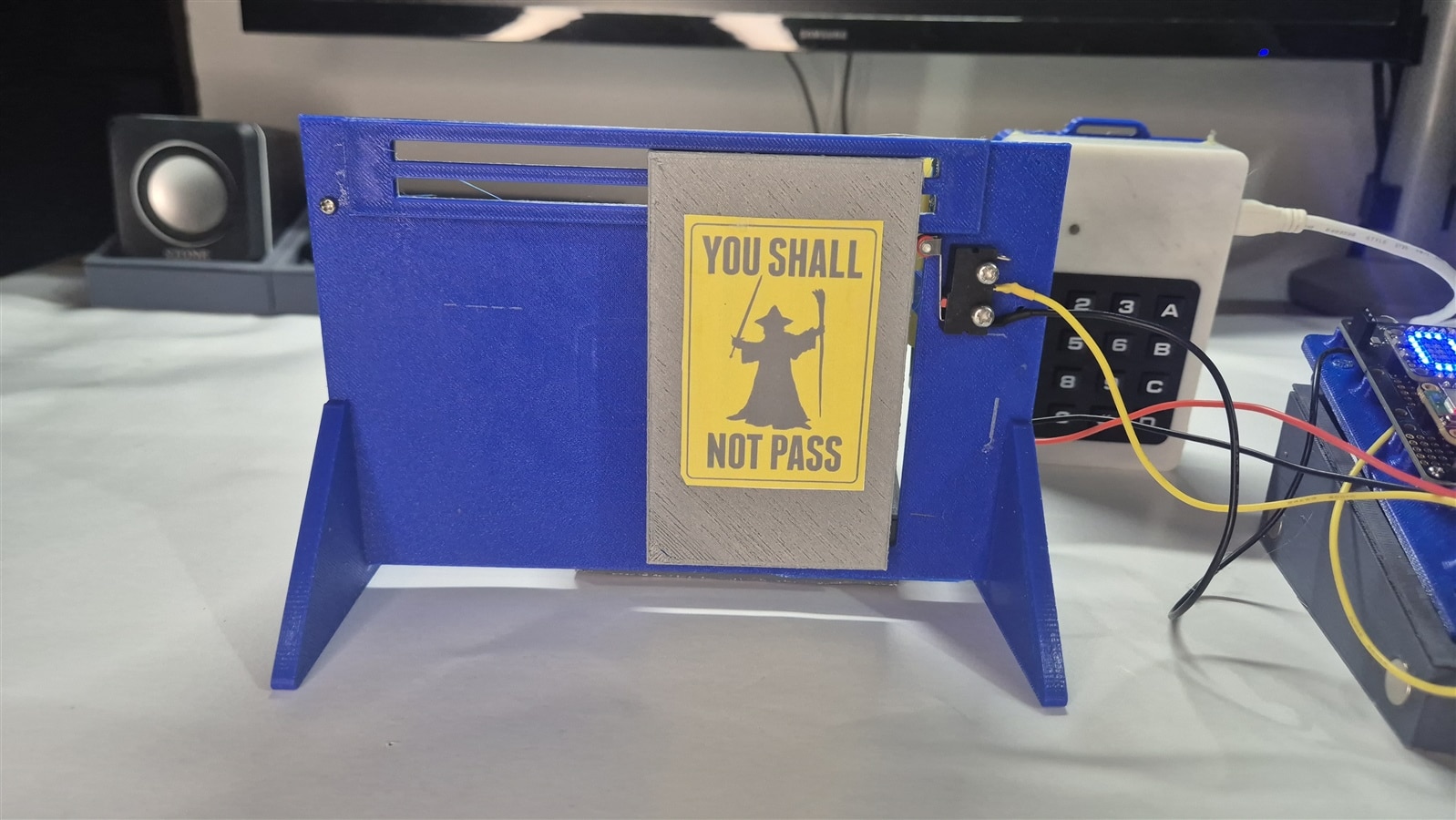
Nothing is purely electronics for me, i want some motion too. So i made a 3D printed Automatic door. Using a micro 90Deg Motor, A limit switch, pulley and a rubber band. It was not an very elegant setup but it works. I was trying to be an environmentalist to finish off filaments which was purchased over two years ago (Spring Clean!!!) and had gulped down moisture significantly. It had to dry them to get it to working.
The inside of the ID Device. It is messy,. Lots of Hot glue. Note the ATECC508A is on the top right corner. The moisture laden filament did cause dimension issue due to which i had to rely on hot glue.

Me using Leftover filaments.

and the result of the mix.



And on The Django Side
Dashboard

Door Device CRUD

Access Log

Device Keys

Analytics
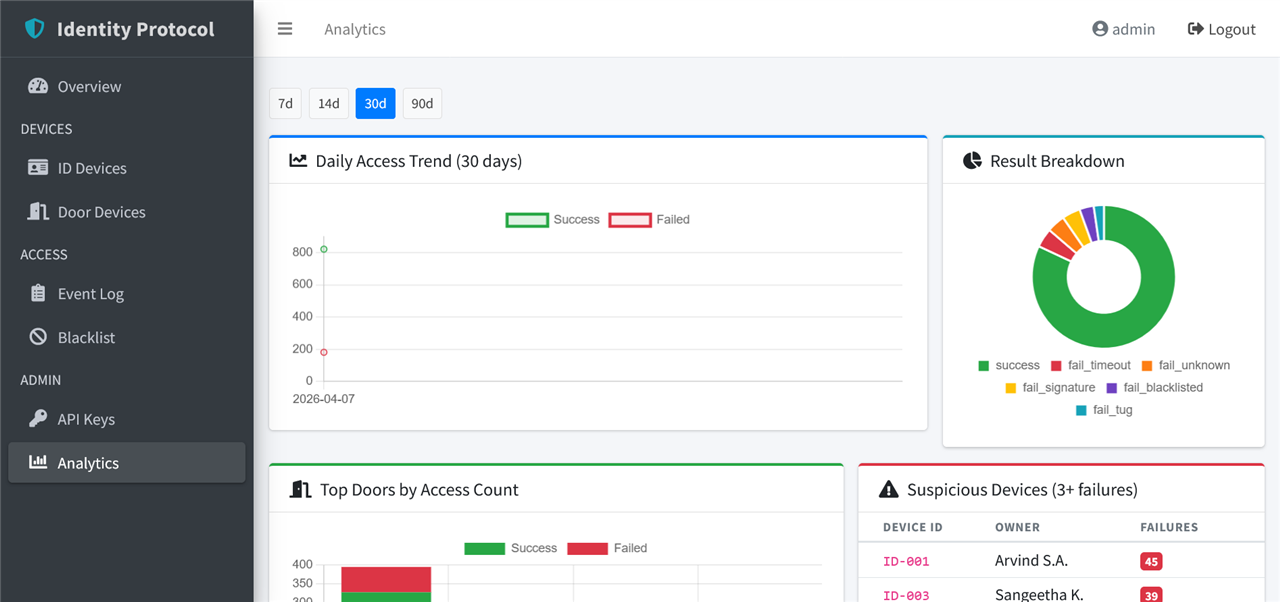
What works, what does not
What works:
- ID device boots, accepts PIN, locks on jerk, locks on timeout
- ATECC508A signs slot-0 data after PIN unlock, refuses otherwise
- Door device advertises Auth-Door, hands out a fresh nonce per connect
- micro-ecc verify on the door is also working
- Motor unlocks for 4 seconds, ICLED shows the right icon (except at boot)
- Django dashboard logs events with device id, door id, result
- Blacklist sync round-trip works (mark a card on the dashboard, door rejects on next attempt)
- Compiled-in keystore fallback when W5500 is unabvle to connect to my network
What does not
- W5500 fails about 1 in 5 attempts
- Door PRNG is ADC + xorshift, not a real TRNG
- ID-Device LED does not work when USB is not connected. Everything else works/ I realized this too late for me to find a solution
Demo Video
Code
In case you missed the link to my project in github i put early on in this blog post, here it is again - https://github.com/arvindsa/identity-protocol-e14-challenge
Credits
Of-course big thanks to BTStack team, Analog Device's ATECC508A library and SDK itself. But here are shoutout to people whose work helped me in my CAD Work.
- joednemesis - For 3D of switch https://grabcad.com/library/snap-action-switch-with-16-3mm-roller-lever-3-pin-spdt-5a-1
- ojsimpson - For 3D of the motor https://grabcad.com/library/tt-motor-dual-shaft-1/details?folder_id=14180381
- Video Music by AtlasAudio from Pixabay
Bonus: How to Create a good Cover Photo on blog post
Create a image (I use Photopea) in ratio 1440x400, in a way that the central 400x400 part becomes the thumbnail for the blog, and the full 1440x400 becomes the cover for the blog start without being cropped.