element14 Community
element14 Community
    Register Log In
  • Site
  • Search
  • Log In Register
  • Community Hub
    Community Hub
    • What's New on element14
    • Feedback and Support
    • Benefits of Membership
    • Personal Blogs
    • Members Area
    • Achievement Levels
  • Learn
    Learn
    • Ask an Expert
    • eBooks
    • element14 presents
    • Learning Center
    • Tech Spotlight
    • STEM Academy
    • Webinars, Training and Events
    • Learning Groups
  • Technologies
    Technologies
    • 3D Printing
    • FPGA
    • Industrial Automation
    • Internet of Things
    • Power & Energy
    • Sensors
    • Technology Groups
  • Challenges & Projects
    Challenges & Projects
    • Design Challenges
    • element14 presents Projects
    • Project14
    • Arduino Projects
    • Raspberry Pi Projects
    • Project Groups
  • Products
    Products
    • Arduino
    • Avnet & Tria Boards Community
    • Dev Tools
    • Manufacturers
    • Multicomp Pro
    • Product Groups
    • Raspberry Pi
    • RoadTests & Reviews
  • About Us
  • Store
    Store
    • Visit Your Store
    • Choose another store...
      • Europe
      •  Austria (German)
      •  Belgium (Dutch, French)
      •  Bulgaria (Bulgarian)
      •  Czech Republic (Czech)
      •  Denmark (Danish)
      •  Estonia (Estonian)
      •  Finland (Finnish)
      •  France (French)
      •  Germany (German)
      •  Hungary (Hungarian)
      •  Ireland
      •  Israel
      •  Italy (Italian)
      •  Latvia (Latvian)
      •  
      •  Lithuania (Lithuanian)
      •  Netherlands (Dutch)
      •  Norway (Norwegian)
      •  Poland (Polish)
      •  Portugal (Portuguese)
      •  Romania (Romanian)
      •  Russia (Russian)
      •  Slovakia (Slovak)
      •  Slovenia (Slovenian)
      •  Spain (Spanish)
      •  Sweden (Swedish)
      •  Switzerland(German, French)
      •  Turkey (Turkish)
      •  United Kingdom
      • Asia Pacific
      •  Australia
      •  China
      •  Hong Kong
      •  India
      • Japan
      •  Korea (Korean)
      •  Malaysia
      •  New Zealand
      •  Philippines
      •  Singapore
      •  Taiwan
      •  Thailand (Thai)
      • Vietnam
      • Americas
      •  Brazil (Portuguese)
      •  Canada
      •  Mexico (Spanish)
      •  United States
      Can't find the country/region you're looking for? Visit our export site or find a local distributor.
  • Translate
  • Profile
  • Settings
Safe and Sound
  • Challenges & Projects
  • Design Challenges
  • Safe and Sound
  • More
  • Cancel
Safe and Sound
Blog MSP432 and TI-RTOS: another I2C example - talk to a DAC
  • Blog
  • Forum
  • Documents
  • Polls
  • Files
  • Events
  • Mentions
  • Sub-Groups
  • Tags
  • More
  • Cancel
  • New
  • Share
  • More
  • Cancel
Group Actions
  • Group RSS
  • More
  • Cancel
Engagement
  • Author Author: Jan Cumps
  • Date Created: 28 Feb 2017 3:01 PM Date Created
  • Views 3952 views
  • Likes 6 likes
  • Comments 21 comments
  • safe and sound
  • i2c
  • sketch
  • dac8571
  • safe & sound
  • msp432
  • safe&sound
Related
Recommended

MSP432 and TI-RTOS: another I2C example - talk to a DAC

Jan Cumps
Jan Cumps
28 Feb 2017

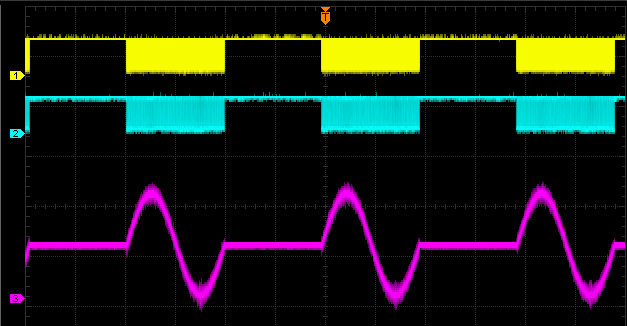
How to make an MSP432 LaunchPad talk i2c to a DAC.

image

This TI-RTOS program tells the DAC to output a sine wave. It could be something else but I reused an existing Arduino sketch.


In my previous i2c example, the focus was on reading data from a sensor. This one only writes data out. t's not intended to be a useful application, just a test bed to see if the DAC that I have here is listening properly.


The schema and code are derived from work of Robert Peter Oakes:

The Modular Bench Power Supply ++, Arduino UNO and precision ADC, DAC + MDO3000 I2C debugging

Raspberry PI 2, Fun with I2C DACs and ADC's


If you understand Arduino sketches, look there to understand how the program works. The code below is a fairly true port to TI-RTOS.


Schema

image

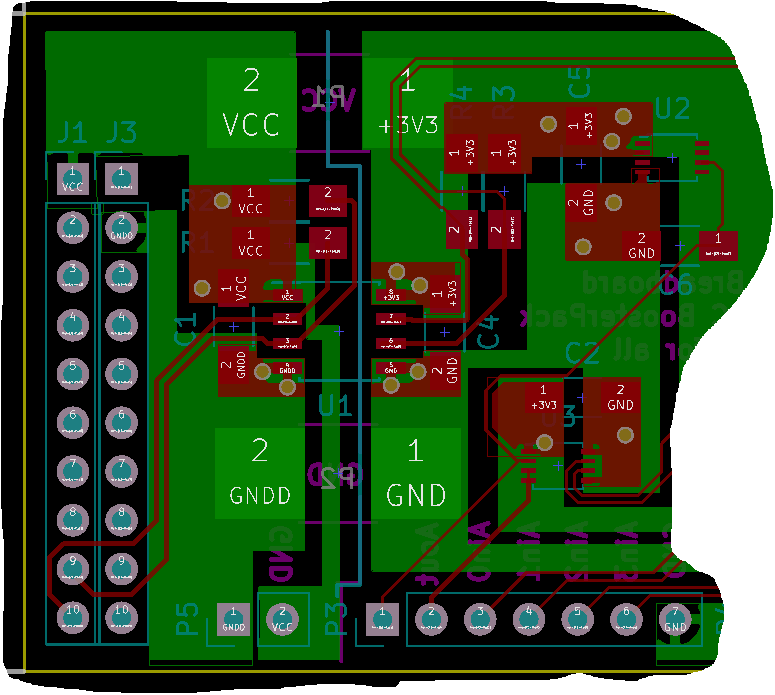
You can see a BoosterPack in the making here.

The difference with Peter's schema is that I'm using a single DAC (DAC8571). He uses a quad DAC in a single chip. Doesn't matter for this exercise.

Key take-aways from the schema is that we can use the MSP432 to set the output voltage of the DAC.

A voltage reference REF5020 helps the DAC to improve its performance. We don't talk to that chip, it just does its work by being there.

You can think away the i2c isolator ic (ISO1541). It's there to save the laptop's USB port when something happens downstream.
 

image


Firmware


I've copied my own project from the first i2c blog and replaced the part that talks to a temperature sensor with Peter's DAC Arduino code.


#define DAC_I2C_ADDR           (0x4C)
#define DAC_I2C               MSP_EXP432P401R_I2CB0

uint16_t Sin_tab[256] = {  32768,33572,34376,35178,35980,36779,37576,38370,39161,39947,40730,41507,42280,
                               43046,43807,44561,45307,46047,46778,47500,48214,48919,49614,50298,50972,51636,
                               52287,52927,53555,54171,54773,55362,55938,56499,57047,57579,58097,58600,59087,
                               59558,60013,60451,60873,61278,61666,62036,62389,62724,63041,63339,63620,63881,
                               64124,64348,64553,64739,64905,65053,65180,65289,65377,65446,65496,65525,65535,
                               65525,65496,65446,65377,65289,65180,65053,64905,64739,64553,64348,64124,63881,
                               63620,63339,63041,62724,62389,62036,61666,61278,60873,60451,60013,59558,59087,
                               58600,58097,57579,57047,56499,55938,55362,54773,54171,53555,52927,52287,51636,
                               50972,50298,49614,48919,48214,47500,46778,46047,45307,44561,43807,43046,42280,
                               41507,40730,39947,39161,38370,37576,36779,35980,35178,34376,33572,32768,31964,
                               31160,30358,29556,28757,27960,27166,26375,25589,24806,24029,23256,22490,21729,
                               20975,20229,19489,18758,18036,17322,16617,15922,15238,14564,13900,13249,12609,
                               11981,11365,10763,10174,9598,9037,8489,7957,7439,6936,6449,5978,5523,5085,4663,
                               4258,3870,3500,3147,2812,2495,2197,1916,1655,1412,1188,983,797,631,483,356,247,
                               159,90,40,11,1,11,40,90,159,247,356,483,631,797,983,1188,1412,1655,1916,2197,
                               2495,2812,3147,3500,3870,4258,4663,5085,5523,5978,6449,6936,7439,7957,8489,9037,
                               9598,10174,10763,11365,11981,12609,13249,13900,14564,15238,15922,16617,17322,
                               18036,18758,19489,20229,20975,21729,22490,23256,24029,24806,25589,26375,27166,
                               27960,28757,29556,30358,31160,31964};


Paste these lines of code in that previous i2c example, before the definition of the RTOS task.

The first two lines define the i2c address of the DAC ic and the i2c port f the MSP432 that we'll use.

The Sin_tab is an array with sine wave sample values. Try to paste these values in Excel and make a line graph. You'll see what's happening in there.


Then replace the existing RTOS task with this one:


Void taskFxn(UArg arg0, UArg arg1)
{
    unsigned int    i;

    uint8_t         txBuffer[3];
    uint8_t         rxBuffer[2];
    I2C_Handle      i2c;
    I2C_Params      i2cParams;
    I2C_Transaction i2cTransaction;


    /* Create I2C for usage */
    I2C_Params_init(&i2cParams);
    i2cParams.bitRate = I2C_400kHz;
    i2c = I2C_open(DAC_I2C, &i2cParams);
    if (i2c == NULL) {
        System_abort("Error Initializing I2C\n");
    }
    else {
        System_printf("I2C Initialized!\n");
    }

    i2cTransaction.slaveAddress = DAC_I2C_ADDR;
    i2cTransaction.writeBuf = txBuffer;
    i2cTransaction.writeCount = 3;
    i2cTransaction.readBuf = rxBuffer;
    i2cTransaction.readCount = 0;

    txBuffer[0] = 0x10;

    while (1) {
        for (i = 0; i< 256; i++) {
            txBuffer[1] = Sin_tab[i] >> 8;
            txBuffer[2] = Sin_tab[i];
            if (I2C_transfer(i2c, &i2cTransaction)) {
            }
            else {
                System_printf("I2C Bus fault\n");
                System_flush();
            }
        }
        Task_sleep(10);
    }

    /* Deinitialized I2C */
    I2C_close(i2c);
    System_printf("I2C closed!\n");
    System_flush();
}


The code iterates the array, sends each value to the DAC until it reaches the end.

Then we yield to the RTOS for a while to give other tasks (there aren't any image ) the chance to execute, and start all over.


Now pull out the datasheet of the DAC. The combination of code and specifications show the full picture of this example.

This translates to the address 0x4C:

image


#define DAC_I2C_ADDR           (0x4C)


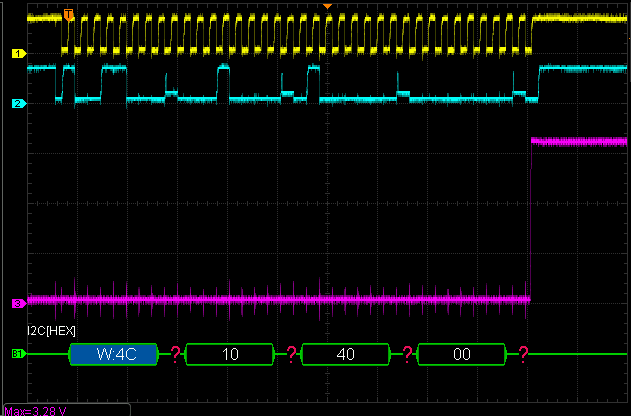
And these three bytes say: set the output value (byte 0 is the command, 1 the most significant byte of the 16 bit value, 2 the least significant one.

 

image


    txBuffer[0] = 0x10;

    while (1) {
        for (i = 0; i< 256; i++) {
            txBuffer[1] = Sin_tab[i] >> 8;
            txBuffer[2] = Sin_tab[i];


image


TI-RTOS Series
MSP432 and TI-RTOS: Getting Started Pt. 1 - Set Up and 1st RTOS Task
MSP432 and TI-RTOS: Getting Started Pt. 2 - Add an ADC Sample Task
MSP432 and TI-RTOS: Getting Started Pt. 3 - USB with Minimal CPU Use
MSP432 and TI-RTOS: PWM
MSP432 and TI-RTOS: I2C Configuration for Sensors BoosterPack
MSP432 and TI-RTOS: another I2C example - talk to a DAC
MSP432 and TI-RTOS: Sharp LCD BoosterPack
MSP432 and TI-RTOS: PID Library Part 1 - Intro
MSP432 and TI-RTOS: PID Library Part 2 - Real World Example
  • Sign in to reply

Top Comments

  • jc2048
    jc2048 over 8 years ago +2
    I don't understand why you're all fussing. The DAC doesn't have the drive that the processor does, but it's still registering an ACK successfully. Much more importantly, when are we going to hear it playing…
  • Jan Cumps
    Jan Cumps over 8 years ago in reply to jc2048 +2
    Answer:
  • Robert Peter Oakes
    Robert Peter Oakes over 8 years ago in reply to Jan Cumps +2
    That will do it lol
  • jc2048
    jc2048 over 8 years ago

    I don't understand why you're all fussing. The DAC doesn't have the drive that the processor does, but it's still registering an ACK successfully.


    Much more importantly, when are we going to hear it playing a tune?

    • Cancel
    • Vote Up +2 Vote Down
    • Sign in to reply
    • More
    • Cancel
  • Jan Cumps
    Jan Cumps over 8 years ago in reply to Robert Peter Oakes

    When the next batch of boards arrives, I'm going to build one up without the isolating IC and ADC, and R1 and R2 not populated - just bridging the SDA and SCL.

    - Test

    Then I'll populate the ADC part

    - Test again


    I may also do the tmp006 example again and see if there are similar artifacts - although my sensor boosterpack doesn't involve an isolator..


    And maybe sent a populated board to a volunteer here on the element14 forum that wants to have a look at it? Just for kicks?

    Side note: do you still have the setup used for your videos? Maybe worth checking what happens there?

    • Cancel
    • Vote Up +1 Vote Down
    • Sign in to reply
    • More
    • Cancel
  • Robert Peter Oakes
    Robert Peter Oakes over 8 years ago

    Well, I am happy to say it is not unique to your setup, here is what I am getting on the CPU side of the I2C bus using the MSP432, not so many spikes on the DAC output but still the runts etc on the data lines. it looks like there coinciding with the ack, the dac certainly is not being corrupted by it, and the scope is also ignoring it... thought ?

    image

    its on every 9th bit... more like the ACK, perhaps a higher value pull up would reduce the effect ?

    • Cancel
    • Vote Up 0 Vote Down
    • Sign in to reply
    • More
    • Cancel
  • Robert Peter Oakes
    Robert Peter Oakes over 8 years ago in reply to shabaz

    I also notice there is a lot of noise on the analog signal coinciding with the switching edges, I wonder if all the apparent issues are nothing more than environment / prototype spread of wires and boards kind of things. Tomorrow I will collect the same data on my board and publish so we can compare.

    • Cancel
    • Vote Up 0 Vote Down
    • Sign in to reply
    • More
    • Cancel
  • shabaz
    shabaz over 8 years ago in reply to Jan Cumps

    Hi Jan,


    If you're probing on J1 then that's the master side. The isolator can't tell which side is pulling on the SDA line, so it uses the trick of pulling low but only to ~0.7V. It senses if the J1 side Master pulls on the line lower, and then the isolator knows for sure that it is the J1 side in control of SDA.

    There is a diode in the block diagram in the datasheet, which limits the isolator to 0.7V, it cannot pull any lower (when the other side of the isolator is pulling on the SDA line)

    (i.e. it is expected behaviour, it is a valid I2C bus level but deliberately not as close to 0V as it could be).


    EDIT: Looking at the scope signal, it does appear at the end of the byte position, i.e. when you'd expect the master to relinquish control to the slave side for the Ack.

    • Cancel
    • Vote Up +1 Vote Down
    • Sign in to reply
    • More
    • Cancel
<>
element14 Community

element14 is the first online community specifically for engineers. Connect with your peers and get expert answers to your questions.

  • Members
  • Learn
  • Technologies
  • Challenges & Projects
  • Products
  • Store
  • About Us
  • Feedback & Support
  • FAQs
  • Terms of Use
  • Privacy Policy
  • Legal and Copyright Notices
  • Sitemap
  • Cookies

An Avnet Company © 2026 Premier Farnell Limited. All Rights Reserved.

Premier Farnell Ltd, registered in England and Wales (no 00876412), registered office: Farnell House, Forge Lane, Leeds LS12 2NE.

ICP 备案号 10220084.

Follow element14

  • X
  • Facebook
  • linkedin
  • YouTube