RoadTest: Test out the Raspberry Pi Compute Module 5 Development Kit!
Author: ralphjy
Creation date:
Evaluation Type: Development Boards & Tools
Did you receive all parts the manufacturer stated would be included in the package?: True
What other parts do you consider comparable to this product?: Raspberry Pi 5
What were the biggest problems encountered?: Frigate NVR software version was not compatible with Hailo-8L software version. This was not an issue with the CM5 kit, so it didn't affect my ratings.
Detailed Review:
I currently run a home automation system based on Home Assistant running on an RPi4 and use it with Frigate NVR to manage object detection and recording for IP cameras. I am using it with a Google Coral USB AI accelerator. The setup struggles with consistent detection with even 2 cameras if detection events are closely spaced. Recently, we’ve had multiple power outages due to winter storms, and I’ve had instances of SD card corruption which has brought down the system.
I would like to develop a more responsive and reliable system. The roadtest would allow me to configure an standalone setup using the CM5 and a Hailo-8L module from an RPi AI Kit. I would expect that the OS running on the eMMC in the CM5 setup would make it more tolerant to power failures and the Hailo accelerator should provide substantially better performance. The Hailo-8L is rated at 13 TOPs vs 2 TOPs for the Coral USB.
I documented the development and test processes in detail in a series of blog posts that are linked at the end of the review. I'll also reference the posts within the review.

The unboxing and assembly are covered in Raspberry Pi CM5 - Initial Assembly and Raspberry Pi CM5 - Frigate NVR Hailo-8L Integration.
There weren't any real issues with assembling the unit, just some inconvenience. The CM5 IO Board came preassembled in the metal case, but it needed to be removed to attach the CM5 module and heatsink because the screws inserted through the bottom of the board. The metal case is the second revision which corrects a problem with not being able to use the fan and the CM5 module heatsink simultaneously. It also improved the airflow over the M.2 slot.
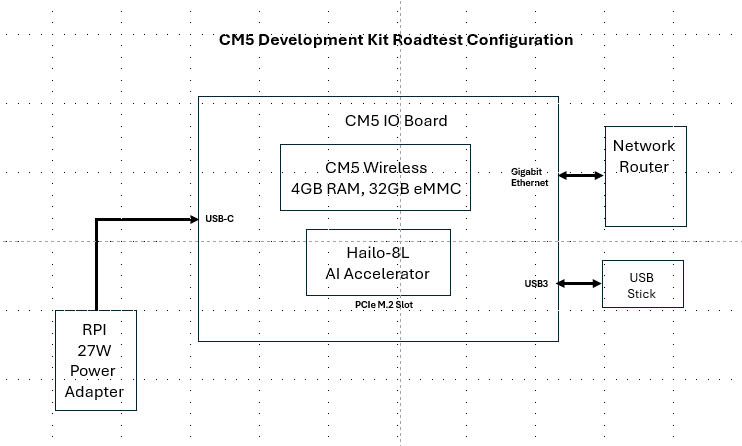
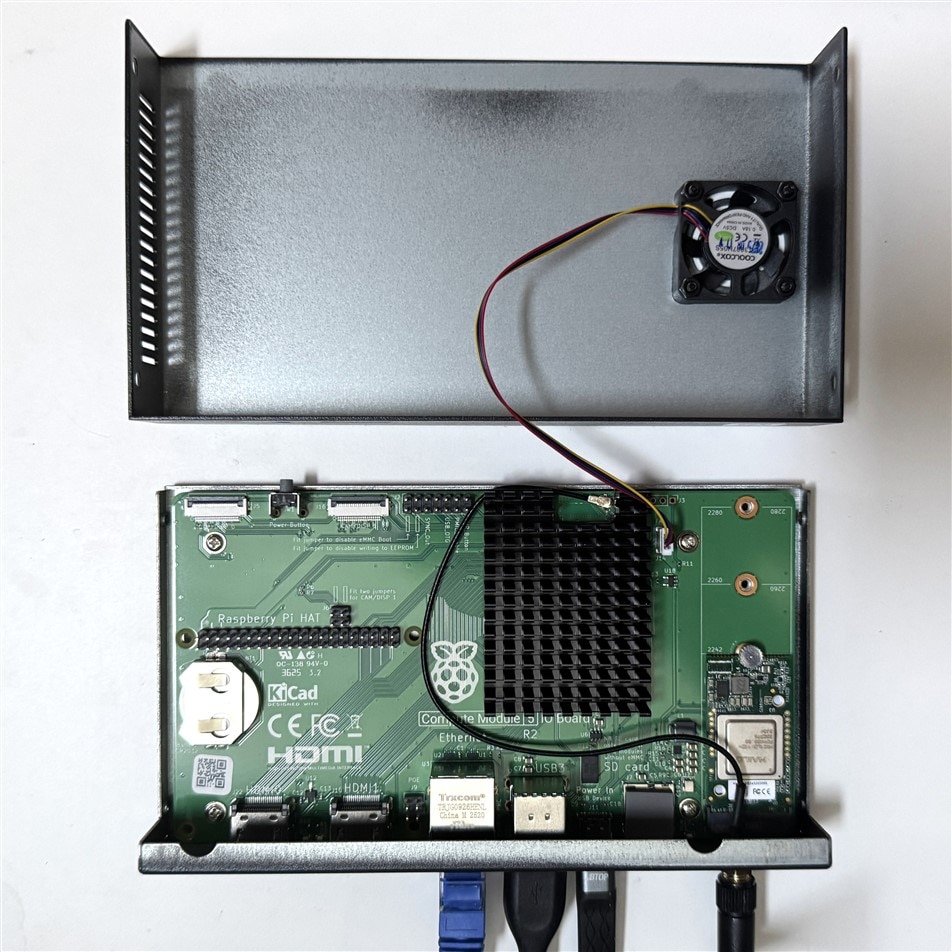
The Linux operating system and Frigate container installation are covered in Raspberry Pi CM5 - Firmware Installation and Configuration. The HailoRT software and drivers are covered in Raspberry Pi CM5 - Frigate NVR Hailo-8L Integration.
There weren't any issues with the OS installation. Because the CM5 module uses eMMC rather than SD card for the system storage there was a slight difference in how the OS is flashed. There is a Boot Disable jumper that has to be installed for the process so that the RPi Imager can recognize the eMMC as a USB drive. Minor inconvenience, but you do have to have the case open to do the initial installation in order to install and remove the jumper.
There was a significant issue installing Frigate. The process itself works seamlessly, but the latest versions of the Linux HailoRT (runtime) and the Frigate Hailo libraries have a version mismatch and and there weren't available packages to get them in sync. I ended up having to download the Frigate github repo and check out the version that I was using so that I could modify and build a local copy of Frigate that linked the correct version of the HailoRT. A bit painful, but it was caused by my application - so, I can't ding the CM5 kit for this issue.
I needed to create some logging programs so that I could capture parameters like power, temperature, processor and detection performance. I am using a FNIRSI FNB58 USB Power Meter to measure the voltage and current (power is computed) of the CM5 Kit. I adapted an open-source FNB58 logging program OpenFNB58 and added in temperature, fan, and processor data from the RPi OS. The program development details are covered in Raspberry Pi CM5 - Frigate NVR Benchmark Part 1 and Raspberry Pi CM5 - Frigate NVR Benchmark Preparation Part 2.
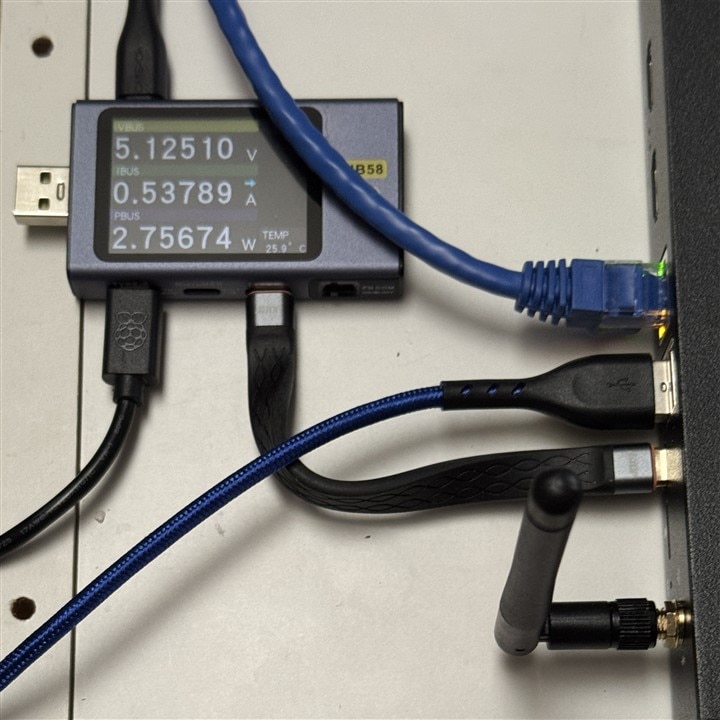
My first set of benchmarks uses only the CPU (CM5) for detection. The other tasks normally handled by the CPU (video processing, etc.) will be the same for both types of detectors).
My baseline is an Idle state where Frigate is running, but there are no cameras enabled.
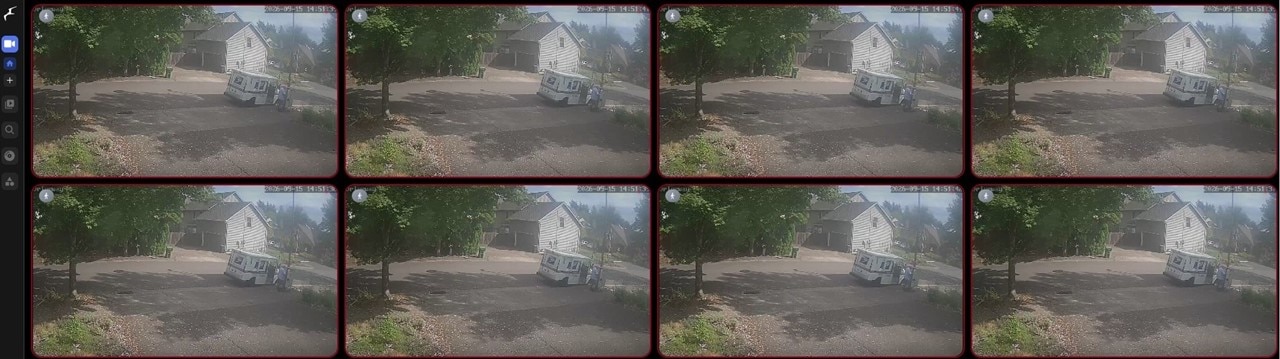
Then I run benchmarks on 1, 2, 4, and 8 cameras. In order to remove some of the variables in the benchmarks, I am not using "live" camera feeds. I have a video that I recorded from my primary camera of the mail carrier delivering the mail. This video is played in a loop to all enabled cameras using go2rtc.
Here is the 8 camera view in the Frigate UI.
The details are covered in Raspberry Pi CM5 - Frigate NVR Initial Benchmarks.
I ran the same set of benchmarks using the Hailo-8L for detection.
The details are covered in Raspberry Pi CM5 - Frigate NVR Hailo-8L Benchmarks.
So, I ended up with a ton of data and some anomalies that would require a pile of extra data to explain. I initially tried using the Linux 1 minute CPU load average to get a sense of when the system was getting overloaded and found that I could not get repeatable data once the 4 processor cores were fully utilized (load average above 4), but I'll admit to not fully understanding how asynchronous threads and process queueing are accounted for. The processor utilization numbers from Frigate which I believe decouple the Linux processor utilization were much more stable and I am using those in the comparisons below.
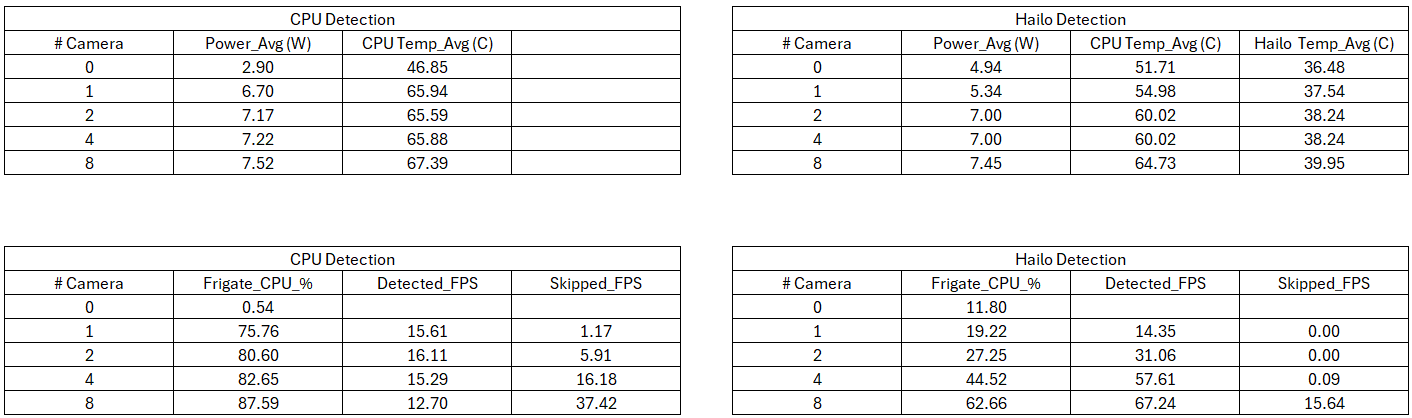
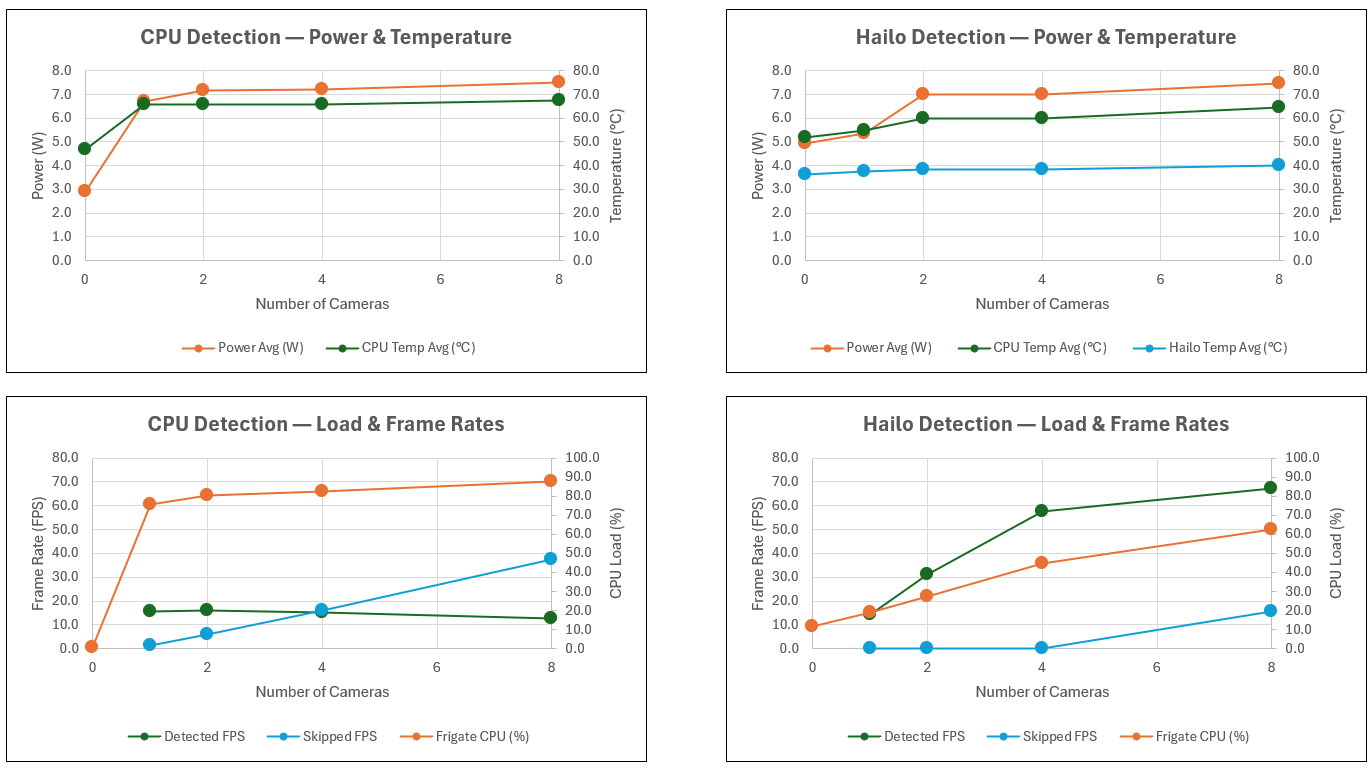
I found the power numbers to be interesting. Adding the Hailo-8L added about 2W when Frigate was at idle (no cameras enabled). However, when cameras were enabled there wasn't a significant difference in power and, in fact, the Hailo8L detection power numbers were slightly less - demonstrating that the Hailo-8L is substantially better at detection/inferencing (much higher performance at lower power). Temperatures were also interesting. The Hailo-8L average temperature change from idle to 8 cameras was less than 4C and the maximum that I've seen is about 41C.. The CPU temperatures reduced when the detection load was shifted to the Hailo, but not as much as I had expected. Both benchmark configurations have significant power and temperature margin with the CM5 development kit.
The Frigate CPU %utilization and Detected FPS provide some insight into limitations in total cameras used. For CPU Detection the processor utilization starts very high (76%) with just a single camera. And the Detection FPS does not increase with the number of cameras (we would expect this to scale). This matches my previous experience with the RPi5 where I could not reliably run 2 cameras with CPU Detection. The numbers are much better with Hailo Detections. The processor utilization and Detection FPS are able to scale up to 4 cameras, but not to 8 (I was only testing binary increments). The case for detection using more than 4 simultaneous cameras is probably not a real requirement for me (being able to selectively switch which cameras are used for detection would be sufficient).
I used the Linux Fio (Flexible I/O Tester) to get a measure of the performance of the USB3 SSD drive that I am going to use for Frigate storage of clips and recordings. Fio can generate custom workloads to test sequential or random reads and writes.
The drive is an SSK SD500 250 GB Type-C USB3.2 Gen 2 rated at 1050 MB/s write and 1000MB/s write speeds.
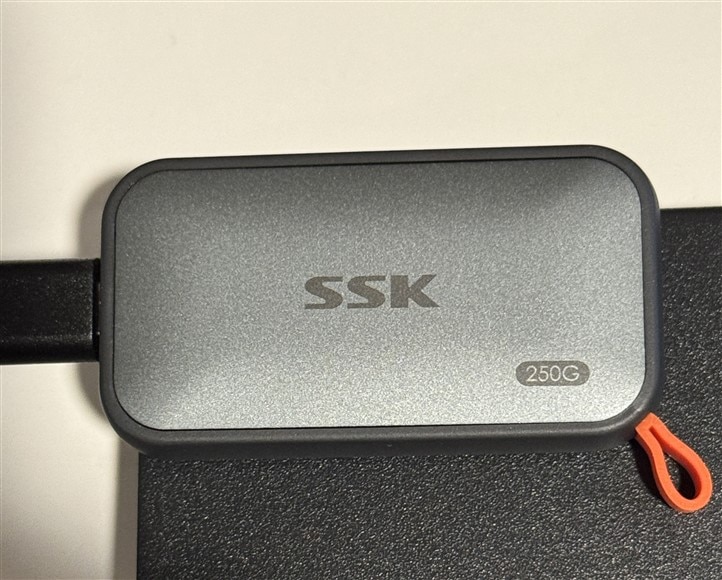

The SSK SSD is connected at USB 3.x SuperSpeed, 5,000 Mbit/s (5 Gbit/s) and is using the uas driver.
The SSD is negotiating the expected 5 Gbit/s connection. The theoretical link rate is 625 MB/s before protocol overhead, so the SSD's advertised 1,050 MB/s read and 1,000 MB/s write speeds won't be attainable and actual throughput will be lower than the 625 MB/s.
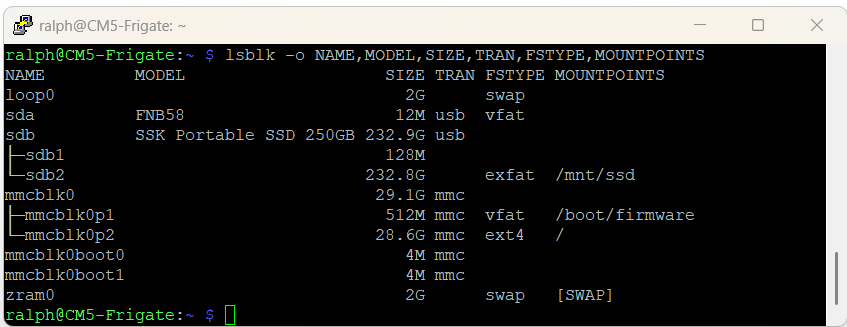
The SSK drive is /dev/sdb and the /dev/sdb2 exfat partition is mounted on /mnt/ssd. This drive has been formatted to exFat for Windows compatibility, but I may want to reformat it to ext4 for better Linux compatibility if I have any issues.
Test Result:
Sequential write, 60 s 326 MB/s
Sequential read, 60 s 381 MB/s
Random read, 4 KB, 60 s 8,983 IOPS
Random write, 4 KB, 60 s 3,855 IOPS
Sustained write, 300 s 324 MB/s
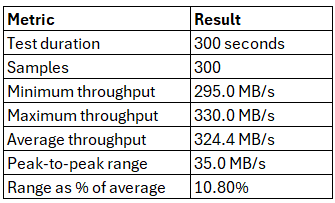
The 300 MB/s should be sufficient for detection recordings and snapshots. I have an 8 channel Amcrest NVR with a 4TB HDD for continuous recording (currently using only 5 channels).
Switch from benchmark mode to normal live camera configuration with 2 cameras.
Detected objects have unique color per class:
Person - Green
Car - Orange
Lost tracking - Blue
Stationary - White (Stop detection)
The lighting conditions are somewhat challenging for this particular camera to auto-adjust its exposure, so the model is struggling a bit with detection. I'm going to work on that in the future and also try to develop a custom model. I'd like to be able to distinguish between Amazon, UPS, Fedex, the Mail truck, etc.
The Raspberry Pi Compute Module 5 Development Kit is a nice combination of hardware. The form and fit are very good for general purpose SBC applications and the software and documentation support are very good. I like the robustness of the metal case and the layout of the IO board PCB and connectors. Accessibility to connections is very good. I like that the newer Pi SBC hardware include a power button.
A real plus was the overall thermal design. In the processor stress testing that I did, I never got the processor to reach the thermal throttling point (80C). The combination of the active PWM fan and CM5 module heatsink and the PCB/case layout provided very effective cooling. I would only worry about this unit if I were trying to run in a high temperature ambient environment.
It was a good fit for my Frigate NVR application with the added Hailo-8L AI accelerator. On my wish list for future enhancements (CM6?) would be a second M.2 slot and access to more PCIe lanes.
I did not get around to testing or using some of the functions (CSI/DSI, HDMI, WiFi/BLE), but I would expect them to be on par with the RPi5. The WiFi/BLE would probably be better with the eternal antenna.
Thanks to E14 for the opportunity to RoadTest this unit. I plan to use this setup as my primary surveillance camera monitor going forward. I hope to add a customized detection model and also optimize the mobile interface to my iPhone and iPad. Maybe content for future posts.


