element14 Community
element14 Community
    Register Log In
  • Site
  • Search
  • Log In Register
  • Community Hub
    Community Hub
    • What's New on element14
    • Feedback and Support
    • Benefits of Membership
    • Personal Blogs
    • Members Area
    • Achievement Levels
  • Learn
    Learn
    • Ask an Expert
    • eBooks
    • element14 presents
    • Learning Center
    • Tech Spotlight
    • STEM Academy
    • Webinars, Training and Events
    • Learning Groups
  • Technologies
    Technologies
    • 3D Printing
    • FPGA
    • Industrial Automation
    • Internet of Things
    • Power & Energy
    • Sensors
    • Technology Groups
  • Challenges & Projects
    Challenges & Projects
    • Design Challenges
    • element14 presents Projects
    • Project14
    • Arduino Projects
    • Raspberry Pi Projects
    • Project Groups
  • Products
    Products
    • Arduino
    • Avnet & Tria Boards Community
    • Dev Tools
    • Manufacturers
    • Multicomp Pro
    • Product Groups
    • Raspberry Pi
    • RoadTests & Reviews
  • About Us
    About the element14 Community
  • Store
    Store
    • Visit Your Store
    • Choose another store...
      • Europe
      •  Austria (German)
      •  Belgium (Dutch, French)
      •  Bulgaria (Bulgarian)
      •  Czech Republic (Czech)
      •  Denmark (Danish)
      •  Estonia (Estonian)
      •  Finland (Finnish)
      •  France (French)
      •  Germany (German)
      •  Hungary (Hungarian)
      •  Ireland
      •  Israel
      •  Italy (Italian)
      •  Latvia (Latvian)
      •  
      •  Lithuania (Lithuanian)
      •  Netherlands (Dutch)
      •  Norway (Norwegian)
      •  Poland (Polish)
      •  Portugal (Portuguese)
      •  Romania (Romanian)
      •  Russia (Russian)
      •  Slovakia (Slovak)
      •  Slovenia (Slovenian)
      •  Spain (Spanish)
      •  Sweden (Swedish)
      •  Switzerland(German, French)
      •  Turkey (Turkish)
      •  United Kingdom
      • Asia Pacific
      •  Australia
      •  China
      •  Hong Kong
      •  India
      •  Japan
      •  Korea (Korean)
      •  Malaysia
      •  New Zealand
      •  Philippines
      •  Singapore
      •  Taiwan
      •  Thailand (Thai)
      •  Vietnam
      • Americas
      •  Brazil (Portuguese)
      •  Canada
      •  Mexico (Spanish)
      •  United States
      Can't find the country/region you're looking for? Visit our export site or find a local distributor.
  • Translate
  • Profile
  • Settings
Azure Sphere Starter Kit
  • Products
  • Dev Tools
  • Avnet & Tria Boards Community
  • Azure Sphere Starter Kit
  • More
  • Cancel
Azure Sphere Starter Kit
Documents Home Is Where the Hack Is Challenge, with Avnet Azure Sphere
  • Blog
  • Forum
  • Documents
  • Events
  • Polls
  • Files
  • Members
  • Mentions
  • Sub-Groups
  • Tags
  • More
  • Cancel
  • New
Join Azure Sphere Starter Kit to participate - click to join for free!
Actions
  • Share
  • More
  • Cancel
Engagement
  • Author Author: danzima
  • Date Created: 11 Mar 2020 3:28 PM Date Created
  • Last Updated Last Updated: 24 Jun 2020 3:22 PM
  • Views 6870 views
  • Likes 19 likes
  • Comments 47 comments
Related
Recommended

Home Is Where the Hack Is Challenge, with Avnet Azure Sphere

image

Home Is Where the Hack Is

About Challenge | Requirements  | The Giveaway  | The Kit | Dates  | Prizes | Terms | Winners | Azure Sphere Kit | Azure Homepage image


SEE THE WINNERS OF THE CHALLENGE!


See all the great projects submitted here!


The Challenge


There are numerous smart home products on the market today, but why buy when you can D.I.Y.? We want you to use your electronics skills to build a smart home prototype based around the Avnet Azure Sphere MT3620 kit. This board is great for these kinds of applications, with built-in ambient light, temperature, and barometric pressure sensors, along with numerous expansion possibilities, including sockets for MikroElektronika click boards that open up a whole world of sensors, wireless connectivity options, and more.


Example applications for this challenge could include smart thermostats, systems that sense health hazards common to the home (carbon monoxide, VOCs, etc), smart devices to help care for your pet and plant friends, and many more.


So get cracking on your project ideas, because after all, home is where the hack is!


The Giveaway


We're hoping that we have many community members with MT3620 kits on hand, since we conducted our amazing Sensing the World Design Challenge last year, but we are also offering some free gear to help you get started.


APRIL 20th, 2020 UPDATE: ALL MT3620 KITS HAVE BEEN CLAIMED


We're offering 5 MT3620MT3620 kits to members who propose great project ideas. Just post your proposal in the comments below on this document, and each week we will review the submissions and, if we dig yours, we will reach out to you to arrange to ship a kit. These 5 kits are offered on a first come, first served basis, based on when the comments are posted and the quality of the proposals, so get your submissions in now! Each contestant may receive only one (1) Azure Sphere board.


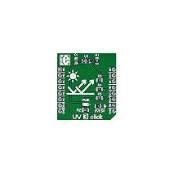
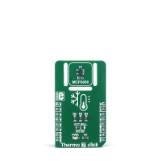
We are also offering the following MikroE click boards to upgrade your kit! You may choose one (1) from the following list, and you may receive it in addition to the MT3620 kit if you are chosen, but you may not receive multiple Azure Sphere boards or multiple click boards. Be sure to detail how you plan to use the click board in your project when you leave your comment!


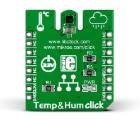
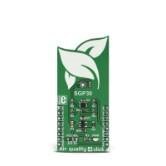
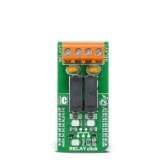
Temperature & Humidity ClickAir Quality 4 ClickRelay Click
imageimageimage
(ALL CLAIMED): Buy NowBuy Now(ALL CLAIMED): Buy NowBuy Now(ALL CLAIMED): Buy NowBuy Now


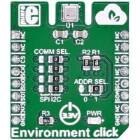
Environment ClickUV 3 ClickThermo 7 Click
imageimageimage
(ALL CLAIMED): Buy NowBuy Now(ALL CLAIMED): Buy NowBuy Now

(ALL CLAIMED): Buy NowBuy Now


The Kit


image


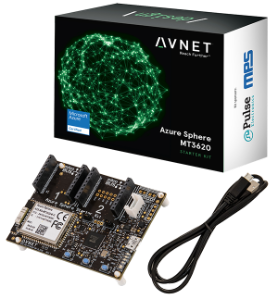
The Avnet Azure Sphere MT3620 Starter KitAzure Sphere MT3620 Starter Kit supports prototyping of secure, end-to-end IoT implementations using Microsoft’s Azure Sphere. The small form-factor carrier board includes a production-ready MT3620 Sphere module with WiFi connectivity, along with multiple expansion interfaces for easy integration of off-the-shelf sensors, displays, motors, relays, and more. The downloadable getting started tutorial guides developers through the development steps from board setup to application coding.


The production-ready Sphere MT3620 module is based on the MT3620 SoC, which includes built-in Microsoft security, WiFi connectivity, and the combined versatility and power of an Arm Cortex-A7 processor with the low overhead and real-time guarantees of two Arm Cortex-M4F microcontrollers. A suite of on-chip peripherals, real-time clock, Flash, and RAM are also available. In addition to the MT3620, the 33 x 22 mm module includes a dual-band WiFi chip antenna and system clock. Up to 27 configurable GPIOs and three configurable serial ports (UART, I2C, or SPI) are provided as I/Os on the module.


The carrier board connects the Sphere module I/Os to two MikroE Click sockets, an I2C Grove connector, a connector supporting the addition of a 128 x 64 OLED graphical display, a 3D accelerometer, 3D Gyro, temperature sensor, and an ambient light sensor. Debugging is accomplished through a USB-to-UART interface, which also provides the necessary 5V power for the board.


User applications for the embedded Sphere controller are developed in C using Microsoft’s Visual Studio IDE and the Azure Sphere SDK. Visual Studio provides a development environment for compiling and debugging application code. The combination of Visual Studio, the versatile carrier card, and the production ready Sphere module delivers a powerful starting point for IoT developers interested in learning, prototyping, and deploying Azure Sphere based solutions.


To help you get started with your Azure Sphere KitAzure Sphere Kit, we have three element14 bloggers who have written detailed instructions for startup: Brian Willess's Out-of-Box demo, Cabe Atwell's Getting Started guide, and Workshopshed's Blog Series.


Important Dates


Challenge BeginsApril 3, 2020
Free Kit Proposals ChosenWeekly
Projects DueJune 10, 2020
Winners AnnouncedJune 24, 2020


The Requirements


Contestants must use the Avnet MT3620 kit as the basis of their project, but they may add further components as they choose. They do NOT need to connect to Azure cloud services with their build. If contestants do choose to incorporate Azure cloud services in their project, it will add value to their submission in the eyes of the judges, but it is not required for their projects to be considered for prizes.


Contestants will be required to post a blog fully documenting their completed, working project in the Azure Sphere space.

Blogs must include:

  • bill of material
  • code
  • photos and/or video
  • clear instructions and other relevant information so that a user following along could recreate their project.

If they post additional high-quality blogs about their build process, that will add to the credibility of their project and the judges will review those blogs, but it is not required. Here are some examples of high-quality blogs written by previous design challenge winners: RFID Fingerprint Skeleton Key, Bluetooth Smart Doorbell, and Raspberry Pi IoT Alarm Clock.


There is no application process for this Design Challenge. However, members who need a kit will have the chance to win one of 5 free MT3620 kits if they propose an interesting project in the comments on this document. This offer will be on a first come, first served basis, based on the comments they leave on the contest page. The same will apply to the above-mentioned offer of free MikroE click boards to enhance their projects.


Challenge is now closed


Judging


The projects will be judged on their ingenuity, how well they achieve their stated purpose, and on how thoroughly the project is documented in your blog. Choose great project ideas that are also achievable within the allotted time frame, including the time you'll need to document what you've built. So maybe an Azure Sphere-based cold fusion reactor isn't the best idea, for multiple reasons?


The challenge judges will include element14 staff, top members of element14 who are not participating in the challenge, and guest judges from Avnet.


Prizes


image

1 Grand PrizeMicrosoft Surface Laptop 3, 13.5" screen, Intel Core i7 Processor, 16GB RAM, 512GB SSD OR
Keysight DSOX1204A Digital OscilloscopeKeysight DSOX1204A Digital Oscilloscope AND Keysight 34450A Bench Digital MultimeterKeysight 34450A Bench Digital Multimeter OR
DJI Mavic 2 Pro Quadcopter with Fly More Combo Kit
2 Runner-Up PrizesMicrosoft Surface Pro 7, Intel Core i5, 8GB RAM, 128GB SSD AND Sonos One Smart Speaker


See attached Terms and Conditions below

Attachments:
imageHIWTHI Challenge Terms and Conditions 3-30-20.pdf
  • home is where the hack
  • azure sphere design challenge
  • Share
  • History
  • More
  • Cancel
  • Sign in to reply

Top Comments

  • wanfp97
    wanfp97 over 6 years ago +5
    I would like to propose for a Smart Pet Home and hoping that I would get sponsored a Avnet Azure Sphere MT3620 Starter Kit and a MIKROE-2467- Environment Click. Below is my proposal for Smart Pet Home…
  • soleakun
    soleakun over 6 years ago +5
    Every home should do home composting and i want to do a smart home composter that can optimize the process with IoT measurement with MT3620 I would like to equip my home composting machine with temperature…
  • divyalekha
    divyalekha over 6 years ago +5
    Great pleasure for being part of this challenge! Name of the program - SMART INCUBATOR. Prerequisites - Microsoft's Asure sphere - Temperature and humidity click (OR) -Air quality 4 click - glass or wood…
  • jissdeodates
    jissdeodates over 6 years ago

    danzima. For this challenge and giveaway, I would like to propose an extension of my project here: Energy Monitoring System. I would use the Azure Sphere Starter Kit and the Relay Click as an energy monitoring system that will ease the inspection, monitoring, analysis, and fare calculation of energy.  The power consumption will be monitored with the help of an ACS712 Current Sensor interfaced with the Azure Sphere kit using the Relay Click.


    -Jiss

    • Cancel
    • Vote Up +4 Vote Down
    • Sign in to reply
    • More
    • Cancel
  • danzima
    danzima over 6 years ago in reply to milosrasic98

    Awesome proposal, please check your direct messages!

    • Cancel
    • Vote Up +3 Vote Down
    • Sign in to reply
    • More
    • Cancel
  • danzima
    danzima over 6 years ago in reply to wanfp97

    This is a great proposal, please check your direct messages!

    • Cancel
    • Vote Up +4 Vote Down
    • Sign in to reply
    • More
    • Cancel
  • danzima
    danzima over 6 years ago in reply to Attila Tőkés

    Very cool idea, please check your direct messages!

    • Cancel
    • Vote Up +1 Vote Down
    • Sign in to reply
    • More
    • Cancel
  • danzima
    danzima over 6 years ago in reply to cmelement14

    Great proposal, please check your direct messages!

    • Cancel
    • Vote Up +1 Vote Down
    • Sign in to reply
    • More
    • Cancel
  • danzima
    danzima over 6 years ago in reply to fyaocn

    I love this proposal, please check your direct messages!

    • Cancel
    • Vote Up +1 Vote Down
    • Sign in to reply
    • More
    • Cancel
  • skruglewicz
    skruglewicz over 6 years ago

    HI.

    I'm going to start a blog to enter the challenge but I thought to send a post because I always enjoy getting FREE STUFF. I'm a hobbyist and don't have the funds to purchase material for My IOT experiments. So I enter challenges like this one and Get FREE components to Build projects around. I've been focusing on Health data gathering and visualization.


    I have an MT3620 from last years challenge and have been experimenting ever since.The Azure Sphere has a steep learning curve so I was unable to complete my project in that challenge. With many Upgrades in the SDK From version 18.0 now to 20.1., it is very frustrating at times to keep things working but I have gained a ton of knowledge on this device. I've used and implemented some of the interesting  Post on this Element14 blog to run some very interesting project with all the Sensor supplied in the kit.


    I will proposing a project that I have working on the Raspberry Pi ( That I got FREE from The Hackster.io Challenge to ping the Server), This project is using a heart rate sensor that I purchased for another IOT project 2 years ago. he circuit is using the RasPI, required a ADC unit and I plan on connecting the sensor to the MT3620 ADC.


    There are 2 click boards for Heart sensor monitoring on the MIKROE site , Either of these would make the connection cleaner and great to use as alternative to Heart Rate Sensor that I have, however they are not listed in you Click giveaway away section..


    I'm not sure if I qualify for another MT3620 and Any of your offered Click boards.  Which I could use in my Health Project with the Heart Sensor. I have yet to explore the Click Socket on The MT3260, But would love to get FREE stuff To use with my IOT Experimenting.

    • Cancel
    • Vote Up +3 Vote Down
    • Sign in to reply
    • More
    • Cancel
  • redcharly
    redcharly over 6 years ago

    The project I would like to carry out is a control system that can protect against UV radiation.

    We all know that UV rays can create serious damage to human and animal skin. "The effects of UV-B radiation on human skin are varied and widespread. UV-B induces skin cancer by causing mutation in DNA and suppressing certain activities of the immune system. The United Nations Environment Program estimates that a sustained 1 percent depletion of ozone will ultimately lead to a 2-3 percent increase in the incidence of non-melanoma skin cancer".

         image

    This is what is reported by https://earthobservatory.nasa.gov/.


    The system I intend to implement allows the measurement and sending of information on UV radiation to the cloud. It could have many applications:

    • create small wearable devices with the sensor and a small bluetooth or wifi transmitter that allows, via a smartphone, to warn when the intensity of UV rays exceeds a certain threshold or the product between exposure time and quantity of absorbed UV rays exceeds a certain value .

    image


    • create a detection system to be applied on the back of horses, cattle or sheep, to monitor the amount of UV rays absorbed. Each, which could also have a GPS for the continuous detection of the position of the cattle, thanks to a WiFi transmitter or a 433MhZ TX, interfaces with a base station that collects data and allows you to decide what actions to take.

    image


    • implement an environmental control system for a greenhouse. We all know that, in the management of a greenhouse, the values of temperature, humidity, brightness and concentration of the food dissolved in the water are of great importance. However, very few measure the intensity of UV rays which can, especially in countries with very hot climates, cause injury and actual burns on the leaves of plants. If our market is that of green ornamental plants, the damage produced by UV rays on the leaves could cause the production of plants not suitable for marketing.

      (From: Sensitivity of yellow passion fruit to ultraviolet-B radiation, 2012)image


       image

    (Typical symptoms of exposure to UV-B radiation on control leaves of cotton plants: (a) No symptoms, (b) Initial chlorotic patches, and (c) Necrotic patches after prolonged exposure).


    In short, the applications would be really numerous. The possibility of having cloud support via Azure could only make control more effective and complete, especially in the last two cases. Remotely monitoring a flock of sheep grazing on Etna or managing the environmental situation of 10 or more greenhouse remotely on a sunny Sicilian morning in August, could be really useful.

    Another big advantage of using the cloud could be to collect and study the data received from the various sensors in order to perform analysis with AI techniques in order to optimize production processes.

    • Cancel
    • Vote Up +3 Vote Down
    • Sign in to reply
    • More
    • Cancel
  • milosrasic98
    milosrasic98 over 6 years ago

    I would like to use the Azure Sphere MT3620 Starter Kit as a central Hub for my home automation project, it would provide a secure connection between the user - mobile app, or other forms of control like remotes, etc to all of the hardware in the house - custom made edge devices


    What I've done in the past

    A little bit over a year ago, for Home Automation Project14 I posted about what I've done to automate my room a bit, here is the blog where I talked about it: The Smart Room Project - Current Phase . I used an Arduino with a WiFi connection and an 8 channel relay board to control lights and blinds in my room with either an Android App or a small IR remote. I'm still using that setup and it has honestly worked without any issues. While the setup is working, its really minimal, with only one way communication, in other words, I didn't have any feedback I could just send commands to control different stuff. Here are a couple of videos of how that stuff is working:


    You don't have permission to edit metadata of this video.
    Edit media
    x
    image
    Upload Preview
    image


    You don't have permission to edit metadata of this video.
    Edit media
    x
    image
    Upload Preview
    image


    You don't have permission to edit metadata of this video.
    Edit media
    x
    image
    Upload Preview
    image


    image


    As I've already said, the system is really reliable, and works without any issues, but with minimal capabilities, where the greatest drawback is that because of security concerns, I made all of the things controllable only if the user is logged on to my home network.


    Idea

    Here is how I would take this setup to the next step. I would love to use the Azure Sphere MT3620 Starter Kit as a central hub for controlling everything. I would keep all of the features that I have now installed in my room, but using the Azure Sphere I could enable a secure connection and 2 way communication wherever I am, where now, I had to be connected to the home WiFi to control stuff. I would make a modular system, where at the center we have the Azure Sphere that is connected to edge devices over WiFi or BLE so that I can get all kind of sensor data and actuators distributed around the house and outside the house. For example, LED lights with a custom ESP8266 RGB controller, here is an Arduino Nano compatible RGB controller, which can also be altered to be used with the ESP8266


    image

    And here is a lamp I made a while back which I would like to control in this way:

    image

    Since all of the controllers will communicate with the Azure Sphere, this gives me the possibility to have all of them synchronized or do other kinds of effects. And as I was saying, I would have 2 way communication, so I could check if stuff is turned on, and turn it off remotely if I have to.

    Things I would set up control over:

    1. lights - main light, lamps, etc

    2. Blinds - controlling their movement

    3. Radiator forced air flow - I have a radiator in my room for heating up the room, but one thing I always wondered is, how efficient it actually is, because it is close to the wall with a lot of air stuck inside, depending only on      the natural movement of air to heat up the room. So I took a small PC fan, placed it inside, and it really showed promising results for heating up the room faster and more evenily.

    4. Window opening - using a motor mounted to one of the windows to open it a bit and close it, to control the fresh air coming in

    5. Smart outlets - Outlets which can be turned off or on, here is one I made when I wrote the last blog:

    image

    6. Raspberry Pi media hub - playing music or different radio stations, I will get to this later on

    7. Rolling the sunblinds


    That would be it for the things I would like to control, I've done some of those in their most basic form, but with 2 way communication and looking at different sensor data, it can made much better.

    Here are all of the things I would like to track:


    1. Ambient temperature, humidity

    2. Air quality in the room - different gasses, dust

    3. Radiator temperature

    4. Current state of all of the lights

    5. Current state of all of the smart outlets

    6. Blinds position - This is one thing I wanted to do for a while, to get the position of the blinds, it doesn't have to be continuous, it can be discrete in 10 points or something similar.

    7. Light level in the room

    8. Outside weather - temperature, wind, rain - Why I would like this, I will explain in the last part

    9. Door opening sensors

    10. PIR sensors for turning off the lights to save energy


    Having track and being able to control everything is cool, but connecting some of those things together can get everything to the next levels, here are some of my ideas:


    1. Blinds connected to the alarm - Keeping the blinds and sunblinds closed during the night and opening them in the morning when the alarm rings, while I can also turn on the radio for example

    2. Automatic window opener - Opening the windows automatically, when the air quality inside isn't good or when it's too hot inside, or let's say for example it's raining outside, that's the freshest air, but with help of the outside      small weather station It can automatically open or close to blinds depending if the wind would bring the rain in, or if it's a hot summer day, you would want for your windows to be open, but for your blinds to adjust so it      keeps a cool shade in the room.

    3. Voice assistant - a voice assistant like Alexa or Google Home can be setup on the Raspberry and then connected further on


    Expanding through the house, this continue with automatically boiling the water for coffee and other similar stuff which would ease up the morning routine.


    Having a system that would be modular from the beginning like this, would enable me to slowly spread the edge devices all over the home, controlling all of the lights, fire and hazardous gas sensors, water heater control, burglar alarm and so on. But I would start with making the small edge devices I've already described and making them easy to connect and use. This of course would mean developing a small app which would help with monitoring and controlling everything. Here is the shell of the app I've already developed, I would probably continue building on top of it or keep the style as it is, because I'm already used to using it on the daily basis:


    image

    image


    To summarize everything, I would start by establishing a communication with Azure Sphere using an Android phone, and establishing communication between the Azure Sphere and devices like the ESP8266, after that I would start developing and making the small edge and the app with it, slowly expanding it and interconnecting them, making new features.


    Milos

    • Cancel
    • Vote Up +4 Vote Down
    • Sign in to reply
    • More
    • Cancel
  • soleakun
    soleakun over 6 years ago

    Every home should do home composting and i want to do a smart home composter that can optimize the process with IoT measurement with MT3620

    I would like to equip my home composting machine with temperature, humidity and VOC (Volatile Organic compounds gases)- feature of the environment click,

    i have a 2 home composting machine, both are Naturemill compost bin DIY Botanical Garden - WEIMAR (screenshot below) . i believe it has obsolete. only one of my machine is working

    the home composting machine convert food waste into fertilizer for our garden. it save land fill and it also saves us fertilizer, in fact it is organic fertilizer.

    image


    These are my two NatureMill, while the working one is able to use temperature to increase the composting speed, i have no clue which settings are the best under different weather or humidity and i don't even know what is the temperature, as it lacks an indicator. The environment click temperature and humidity will be used for me to monitor the temperature under different temperature settings and humidity condition, and the the output is by the VOC

    image

    These are the setup. i will use cable to extend the click module to place inside the chamber for accurate measurement. I will use an OLED to indicate the operation parameter


    image


    Operation

    control input: temperature control on the NatureMill -> high , medium , low

    control input: what are the food waste placed inside, and weight --> this itself need extra thought on how do i want to incorporate into the system (use a load cell to weight the waste and some sort of data entry to capture the food waste type : vege, fruit skin...etc)

    measuremant: temperature, humidity, VOC

    VOC and physical examination of the composting output (in term of speed of creation) , over different temperature settings and weather condition (put indoor, put outdoor, rain) can be analyzed after data is collected by Azure sphere


    the VOC output provide a quantifiable measurand for the creation of compost. according to BME680, which is the Bosch sensor onboard the environment click, here are the output

    i will need to collect the IAQ index based on my compost output to determine how to relate my output to the input control parameters. But for sure, during composting, there are change of odour which i in fact sometimes smell if go near to the machine.


    imageimage

    Composting Process

    i put some research about the relationship temperature and gas measurement during composting

    typical greenhouse gas output from composting is methane,1,3 Butadiene and the latter seems a targeted gas in BME680

    imageimage

    source: researchgate 1 & researchgate 2


    Data Analytic

    all this data can be uploaded by Azure Sphere MT3620 to cloud like Azure or home network storage like NAS for post processing and analysis.

    it serve and condition monitoring and operational optimization


    picture below shows a all the chart possible (source: Microsoft)

    image


    stretch goal

    -> expert system or machine learning algorithm  to automatically determine optimum temperature for operating the NatureMill

    although only one click is provided (which i prefer the environment click), i can make use of the relay click to turn off/off the entire machine under different optimum operation need.


    Once this optimization is successful, i plan to apply them to my bigger composting machine project in the video below.

    You don't have permission to edit metadata of this video.
    Edit media
    x
    image
    Upload Preview
    image

    i also talk about it at Food composting machine model with Arduino Yun

    • Cancel
    • Vote Up +5 Vote Down
    • Sign in to reply
    • More
    • Cancel
<>
element14 Community

element14 is the first online community specifically for engineers. Connect with your peers and get expert answers to your questions.

  • Members
  • Learn
  • Technologies
  • Challenges & Projects
  • Products
  • Store
  • About Us
  • Feedback & Support
  • FAQs
  • Terms of Use
  • Privacy Policy
  • Legal and Copyright Notices
  • Sitemap
  • Cookies

An Avnet Company © 2026 Premier Farnell Limited. All Rights Reserved.

Premier Farnell Ltd, registered in England and Wales (no 00876412), registered office: Farnell House, Forge Lane, Leeds LS12 2NE.

Follow element14

  • X
  • Facebook
  • linkedin
  • YouTube