element14 Community
element14 Community
    Register Log In
  • Site
  • Search
  • Log In Register
  • Community Hub
    Community Hub
    • What's New on element14
    • Feedback and Support
    • Benefits of Membership
    • Personal Blogs
    • Members Area
    • Achievement Levels
  • Learn
    Learn
    • Ask an Expert
    • eBooks
    • element14 presents
    • Learning Center
    • Tech Spotlight
    • STEM Academy
    • Webinars, Training and Events
    • Learning Groups
  • Technologies
    Technologies
    • 3D Printing
    • FPGA
    • Industrial Automation
    • Internet of Things
    • Power & Energy
    • Sensors
    • Technology Groups
  • Challenges & Projects
    Challenges & Projects
    • Design Challenges
    • element14 presents Projects
    • Project14
    • Arduino Projects
    • Raspberry Pi Projects
    • Project Groups
  • Products
    Products
    • Arduino
    • Avnet & Tria Boards Community
    • Dev Tools
    • Manufacturers
    • Multicomp Pro
    • Product Groups
    • Raspberry Pi
    • RoadTests & Reviews
  • About Us
    About the element14 Community
  • Store
    Store
    • Visit Your Store
    • Choose another store...
      • Europe
      •  Austria (German)
      •  Belgium (Dutch, French)
      •  Bulgaria (Bulgarian)
      •  Czech Republic (Czech)
      •  Denmark (Danish)
      •  Estonia (Estonian)
      •  Finland (Finnish)
      •  France (French)
      •  Germany (German)
      •  Hungary (Hungarian)
      •  Ireland
      •  Israel
      •  Italy (Italian)
      •  Latvia (Latvian)
      •  
      •  Lithuania (Lithuanian)
      •  Netherlands (Dutch)
      •  Norway (Norwegian)
      •  Poland (Polish)
      •  Portugal (Portuguese)
      •  Romania (Romanian)
      •  Russia (Russian)
      •  Slovakia (Slovak)
      •  Slovenia (Slovenian)
      •  Spain (Spanish)
      •  Sweden (Swedish)
      •  Switzerland(German, French)
      •  Turkey (Turkish)
      •  United Kingdom
      • Asia Pacific
      •  Australia
      •  China
      •  Hong Kong
      •  India
      •  Japan
      •  Korea (Korean)
      •  Malaysia
      •  New Zealand
      •  Philippines
      •  Singapore
      •  Taiwan
      •  Thailand (Thai)
      •  Vietnam
      • Americas
      •  Brazil (Portuguese)
      •  Canada
      •  Mexico (Spanish)
      •  United States
      Can't find the country/region you're looking for? Visit our export site or find a local distributor.
  • Translate
  • Profile
  • Settings
FPGA
  • Technologies
  • More
FPGA
Blog Add Pynq-Z2 board to Vivado
  • Blog
  • Forum
  • Documents
  • Quiz
  • Events
  • Polls
  • Files
  • Members
  • Mentions
  • Sub-Groups
  • Tags
  • More
  • Cancel
  • New
Join FPGA to participate - click to join for free!
  • Share
  • More
  • Cancel
Group Actions
  • Group RSS
  • More
  • Cancel
Engagement
  • Author Author: Jan Cumps
  • Date Created: 31 May 2021 7:47 PM Date Created
  • Views 34972 views
  • Likes 12 likes
  • Comments 40 comments
  • zynq
  • xilinx
  • jupyter
  • fpga
  • vivado
  • pynq
Related
Recommended

Add Pynq-Z2 board to Vivado

Jan Cumps
Jan Cumps
31 May 2021

Instructions on how to add the Pynq-Z2Pynq-Z2 board to Vivado.

This allows you to create projects and custom FPGA bit streams for it.
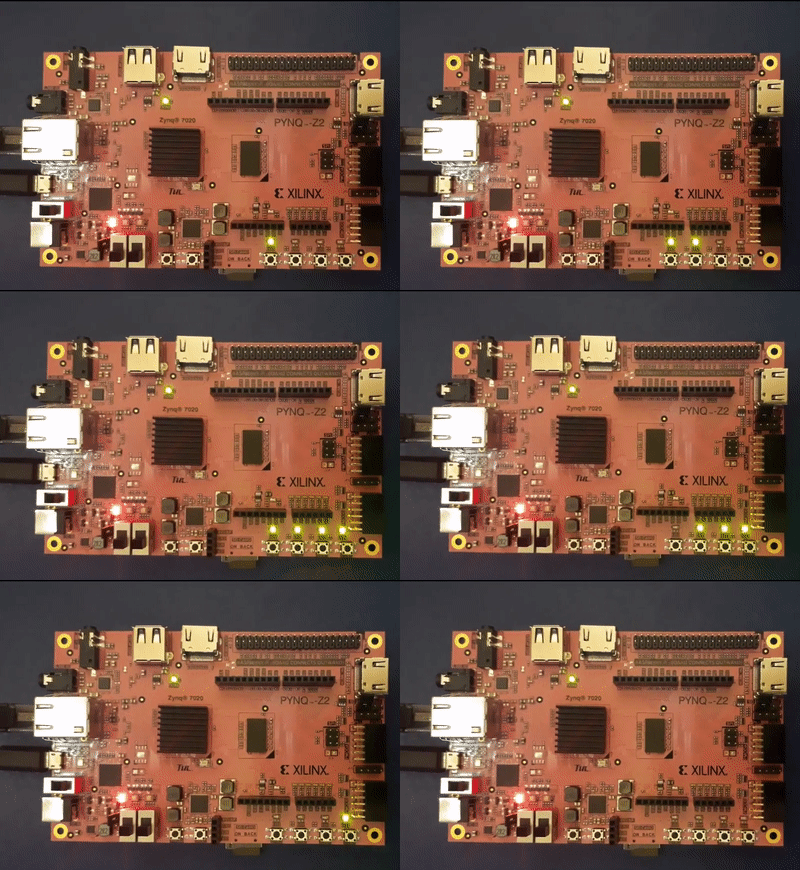
 

image

image source: customer action video after completing the instruction video of Cathal McCabe listed at the end of this post.


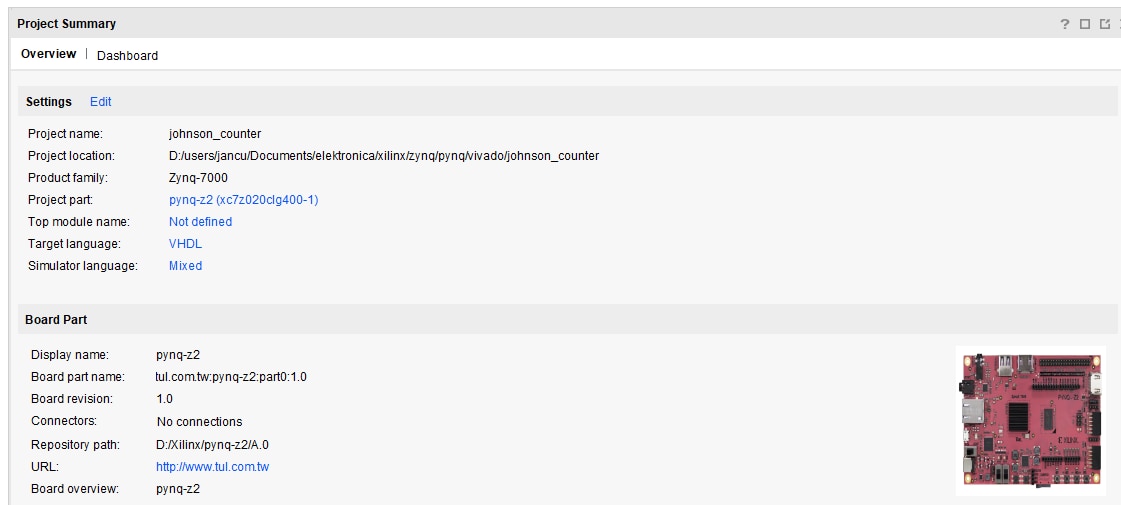
In the Vivado project creation wizard, there is a possibility to prime your design from a board definition.

You don't need to find out what the exact FPGA is, and what hardware is available.

There are more project preparation tools. Constraint files and TCL files that fully define the board with all possibilities enabled.

This post focuses on the board definition.
image


Get the board file


The files listed on pync.io are not available. I found them here.

image


Install and register the board in Vivado


Then there are two options.

  • (deprecated) Directly put the files in the Vivado boards folder: <Xilinx installation directory>\Vivado\<version>\data\boards\board_files.
  • Or (preferred)  put them at a location you decide, and add a line to the Vivado init file, %APPDATA%/Xilinx/Vivado/init.tcl (create it if it does not exist)
    set_param board.repoPaths [list "D:/Xilinx/pynq-z2/A.0"]

I used the 2nd option. You have to restart the editor.


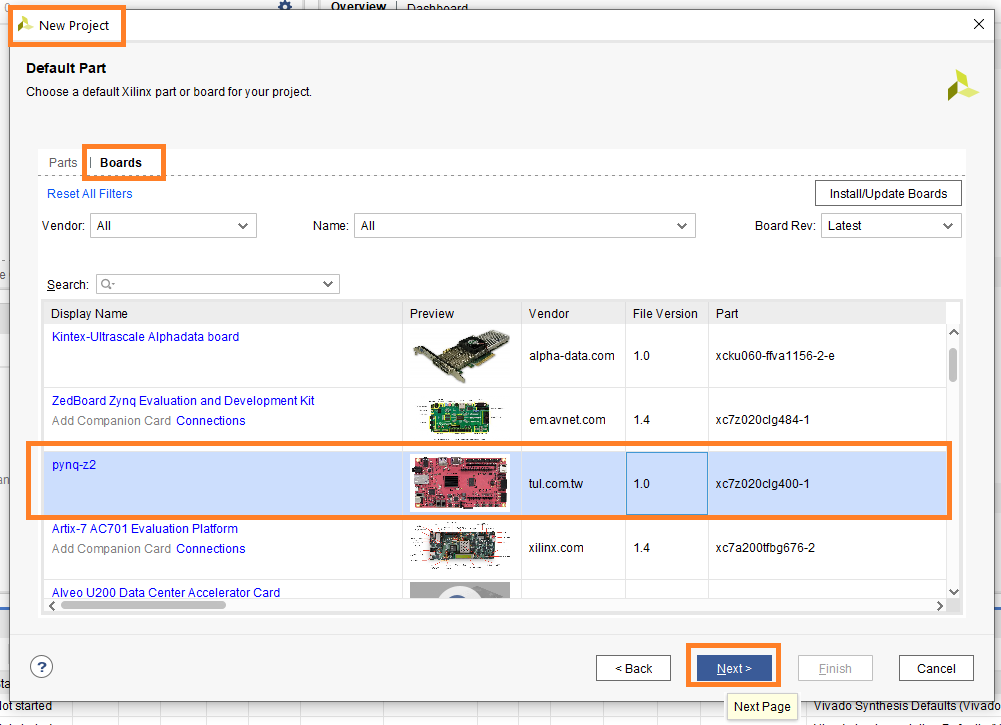
The result is that you can now create projects that have the right FPGA info for the Pynq-Z2:
image


My goal for this week is to replicate this exercise from Cathal McCabe from the Pynq community:

You don't have permission to edit metadata of this video.
Edit media
x
image
Upload Preview
image


I attached the project to this post, and the jupyter notebook.

I changed some things:

32 bit GPIO instead of 64

A reset input for the Johnson Counter module

Translated the Verilog Counter code to VHDL.


Pynq - Zync - Vivado series
Add Pynq-Z2 board to Vivado
Learning Xilinx Zynq: port a Spartan 6 PWM example to Pynq
Learning Xilinx Zynq: use AXI with a VHDL example in Pynq
VHDL PWM generator with dead time: the design
Learning Xilinx Zynq: use AXI and MMIO with a VHDL example in Pynq
Learning Xilinx Zynq: port Rotary Decoder from Spartan 6 to Vivado and PYNQ
Learning Xilinx Zynq: FPGA based PWM generator with scroll wheel control
Learning Xilinx Zynq: use RAM design for Altera Cyclone on Vivado and PYNQ
Learning Xilinx Zynq: a Quadrature Oscillator - 2 implementations
Learning Xilinx Zynq: a Quadrature Oscillator - variable frequency
Learning Xilinx Zynq: Hardware Accelerated Software
Automate Repeatable Steps in Vivado
Learning Xilinx Zynq: Try to make my own Accelerated OpenCV Function - 1: Vitis HLS
Learning Xilinx Zynq: Try to make my own Accelerated OpenCV Function - 2: Vivado Block Design
Learning Xilinx Zynq: Logic Gates in Vivado
Learning Xilinx Zynq: Interrupt ARM from FPGA fabric
Learning Xilinx Zynq: reuse and combine components to build a multiplexer
PYNQ version 2.7 (Austin) is released
PYNQ and Zynq: the Vitis HLS Accelerator with DMA training - Part 1: Turn C++ code into an FPGA IP
PYNQ and Zynq: the Vitis HLS Accelerator with DMA training - Part 2: Add the Accelerated IP to a Vivado design
PYNQ and Zynq: the Vitis HLS Accelerator with DMA training - Part 3: Use the Hardware Accelerated Code in Software
PYNQ and Zynq: the Vitis HLS Accelerator with DMA training - Deep Dive: the data streams between Accelerator IP and ARM processors
Use the ZYNQ XADC with DMA part 1: bare metal
Use the ZYNQ XADC with DMA part 2: get and show samples in PYNQ
VHDL: Convert a Fixed Module into a Generic Module for Reuse
Attachments:
johnson_counter.zip
johnson_counter_jupyter_notebook.zip
  • Sign in to reply

Top Comments

  • Jan Cumps
    Jan Cumps over 4 years ago +2
    So far so good ...
  • narrucmot
    narrucmot over 4 years ago in reply to Jan Cumps +2
    Very cool! Glad you got this working! --Tom
  • drozwood90
    drozwood90 over 4 years ago in reply to Jan Cumps +2
    Hi Jan, Can I offer a suggestion? Please bold " set_param board.repoPaths [list "D:/Xilinx/pynq-z2/A.0"]" That is something that so many people miss. That is really the proper way that Xilinx suggests…
Parents
  • kk10
    kk10 over 4 years ago

    I am having trouble in installing the board in Vivado. The directory mentioned above, I have not been able to locate. Please can anyone help how to do as per the second solution mentioned above.

    • Cancel
    • Vote Up 0 Vote Down
    • Sign in to reply
    • More
    • Cancel
  • Jan Cumps
    Jan Cumps over 4 years ago in reply to kk10

    I mentioned 2 directories. Which one do you not find?

    • Cancel
    • Vote Up 0 Vote Down
    • Sign in to reply
    • More
    • Cancel
  • kk10
    kk10 over 4 years ago in reply to Jan Cumps

    I have changed as you suggested. Yet the board is not getting appeared in Vivado. I will try once again

    • Cancel
    • Vote Up 0 Vote Down
    • Sign in to reply
    • More
    • Cancel
  • Jan Cumps
    Jan Cumps over 4 years ago in reply to kk10

    Krishna, I suggested 6 points of data to provide, so that I could check.

    You gave 4, and the 4th one was wrong.


    Please take a step back, and go methodically over each step.

    Then, provide feedback on the steps. All of them, not some of them.


    Whenever you type "the directory" or "a file", take as step back and type the actual values. It will help you.

    • Cancel
    • Vote Up 0 Vote Down
    • Sign in to reply
    • More
    • Cancel
  • Jan Cumps
    Jan Cumps over 4 years ago in reply to Jan Cumps

    Jan Cumps  wrote:


    Krishna, I suggested 6 points of data to provide, so that I could check.

    You gave 4, and the 4th one was wrong.


    Please take a step back, and go methodically over each step.

    Then, provide feedback on the steps. All of them, not some of them.


    Whenever you type "the directory" or "a file", take as step back and type the actual values. It will help you.

    Also, if you get this working and point out where my instructions are confusing, I will adapt them.

    • Cancel
    • Vote Up 0 Vote Down
    • Sign in to reply
    • More
    • Cancel
  • kk10
    kk10 over 4 years ago in reply to Jan Cumps

    imageimage

    • Cancel
    • Vote Up 0 Vote Down
    • Sign in to reply
    • More
    • Cancel
  • kk10
    kk10 over 4 years ago in reply to kk10

    image

    • Cancel
    • Vote Up 0 Vote Down
    • Sign in to reply
    • More
    • Cancel
Comment
  • kk10
    kk10 over 4 years ago in reply to kk10

    image

    • Cancel
    • Vote Up 0 Vote Down
    • Sign in to reply
    • More
    • Cancel
Children
  • Jan Cumps
    Jan Cumps over 4 years ago in reply to kk10

    What files are here:

    ?image


    (I still suggest to take a step back, read the 6 questions, and feed-back on all 6 questions.)

    • Cancel
    • Vote Up 0 Vote Down
    • Sign in to reply
    • More
    • Cancel
  • kk10
    kk10 over 4 years ago in reply to Jan Cumps

    Ok I will look into it again. Thank you

    • Cancel
    • Vote Up 0 Vote Down
    • Sign in to reply
    • More
    • Cancel
  • Jan Cumps
    Jan Cumps over 4 years ago in reply to kk10

    I can do a screen share if you want, tomorrow.

    I'll connect to you here on e14. If you accept, we can exchange Zoom or Skype connection via PM.

    I think you are close to a solution, hard to see where it's going wrong.

    • Cancel
    • Vote Up 0 Vote Down
    • Sign in to reply
    • More
    • Cancel
  • kk10
    kk10 over 4 years ago in reply to Jan Cumps

    I had vivado 2015 version with license. I downloaded 2020.3 version but i forgot to activate it. Is that the problem?

    • Cancel
    • Vote Up 0 Vote Down
    • Sign in to reply
    • More
    • Cancel
  • kk10
    kk10 over 4 years ago in reply to kk10

    I installed a 2020.1 webpack version after uninstalling 2020.3 version. Kindly let me know when u would be free so that we could connect and get my problem resolved

    • Cancel
    • Vote Up 0 Vote Down
    • Sign in to reply
    • More
    • Cancel
element14 Community

element14 is the first online community specifically for engineers. Connect with your peers and get expert answers to your questions.

  • Members
  • Learn
  • Technologies
  • Challenges & Projects
  • Products
  • Store
  • About Us
  • Feedback & Support
  • FAQs
  • Terms of Use
  • Privacy Policy
  • Legal and Copyright Notices
  • Sitemap
  • Cookies

An Avnet Company © 2026 Premier Farnell Limited. All Rights Reserved.

Premier Farnell Ltd, registered in England and Wales (no 00876412), registered office: Farnell House, Forge Lane, Leeds LS12 2NE.

ICP 备案号 10220084.

Follow element14

  • X
  • Facebook
  • linkedin
  • YouTube