element14 Community
element14 Community
    Register Log In
  • Site
  • Search
  • Log In Register
  • Community Hub
    Community Hub
    • What's New on element14
    • Feedback and Support
    • Benefits of Membership
    • Personal Blogs
    • Members Area
    • Achievement Levels
  • Learn
    Learn
    • Ask an Expert
    • eBooks
    • element14 presents
    • Learning Center
    • Tech Spotlight
    • STEM Academy
    • Webinars, Training and Events
    • Learning Groups
  • Technologies
    Technologies
    • 3D Printing
    • FPGA
    • Industrial Automation
    • Internet of Things
    • Power & Energy
    • Sensors
    • Technology Groups
  • Challenges & Projects
    Challenges & Projects
    • Design Challenges
    • element14 presents Projects
    • Project14
    • Arduino Projects
    • Raspberry Pi Projects
    • Project Groups
  • Products
    Products
    • Arduino
    • Avnet & Tria Boards Community
    • Dev Tools
    • Manufacturers
    • Multicomp Pro
    • Product Groups
    • Raspberry Pi
    • RoadTests & Reviews
  • About Us
    About the element14 Community
  • Store
    Store
    • Visit Your Store
    • Choose another store...
      • Europe
      •  Austria (German)
      •  Belgium (Dutch, French)
      •  Bulgaria (Bulgarian)
      •  Czech Republic (Czech)
      •  Denmark (Danish)
      •  Estonia (Estonian)
      •  Finland (Finnish)
      •  France (French)
      •  Germany (German)
      •  Hungary (Hungarian)
      •  Ireland
      •  Israel
      •  Italy (Italian)
      •  Latvia (Latvian)
      •  
      •  Lithuania (Lithuanian)
      •  Netherlands (Dutch)
      •  Norway (Norwegian)
      •  Poland (Polish)
      •  Portugal (Portuguese)
      •  Romania (Romanian)
      •  Russia (Russian)
      •  Slovakia (Slovak)
      •  Slovenia (Slovenian)
      •  Spain (Spanish)
      •  Sweden (Swedish)
      •  Switzerland(German, French)
      •  Turkey (Turkish)
      •  United Kingdom
      • Asia Pacific
      •  Australia
      •  China
      •  Hong Kong
      •  India
      •  Japan
      •  Korea (Korean)
      •  Malaysia
      •  New Zealand
      •  Philippines
      •  Singapore
      •  Taiwan
      •  Thailand (Thai)
      •  Vietnam
      • Americas
      •  Brazil (Portuguese)
      •  Canada
      •  Mexico (Spanish)
      •  United States
      Can't find the country/region you're looking for? Visit our export site or find a local distributor.
  • Translate
  • Profile
  • Settings
Test & Tools
  • Technologies
  • More
Test & Tools
Documents Programmable Electronic Load
  • Blog
  • Forum
  • Documents
  • Files
  • Members
  • Mentions
  • Sub-Groups
  • Tags
  • More
  • Cancel
  • New
Join Test & Tools to participate - click to join for free!
Actions
  • Share
  • More
  • Cancel
Engagement
  • Author Author: Jan Cumps
  • Date Created: 23 Dec 2016 1:09 PM Date Created
  • Last Updated Last Updated: 11 Oct 2020 8:05 AM
  • Views 18697 views
  • Likes 20 likes
  • Comments 401 comments
Related
Recommended

Programmable Electronic Load

Peter, Jon and Jan are building a programmable electronic load. This document is the common design sheet.

It's obviously work in progress. And fun.


image


We're building a programmable DC load. The focus is on making a real world working instrument.

Hardware and firmware are open source.

  • 20 V, 6 A
  • SCPI controlled


To keep this document readable, this main post gives an overview of the design.

All detailed explanations are broken out in separate posts.


Hardware

The load design is modular.


image


Two out of box modules:

  • MSP432 LaunchPad
  • LCD Shield (optional)

3 new designs

  • DAC-ADC module
  • Analog control module
  • Power module


DAC-ADC BoosterPack

image

This module is a generic, isolated DAC / ADC boosterpack. It's the interface between the analog controller and the microcontroller.

It can also be used outside this project, for your other analog - digital conversion needs.

The board design is broken out in a separate post: Programmable Electronic Load - DAC / ADC BoosterPack.


Analog Controller and Driver Board

This is the core of the analog constant current block. Here lives the circuit that will translate desired constant current into the driver signal for the power MOSFET.

It integrates the feedback coming from that power board. This is a closed analog control loop.

There are also components to provide the on-off functionality and buffers/amplifiers for the analog data-points that fly back to the ADC module.

image

The board, schematics and BOM are documented in Programmable Electronic Load - Analog Controller and Driver Board.


Power Module - the MOSFET Board with Fan


image


For details  of the design of the power stage, check Programmable Electronic Load - Power Stage.


BoosterPack Header Use and Pin Allocation

This info is broken out in a separate post: Programmable Electronic Load - BoosterPack Header Use.


Firmware


Prerequisites:

  • CCS 8 with MSP432 compiler TI v 16.12.0.STS or >
  • TI-RTOS for MSP43X, any SimpleLink version
  • MSP432 LaunchPad (not the black pre-prod because it's out of support)


The firmware is for the MSP432 microcontroller. But the harware can be driven from any controller, processor, PSoC or computer that can deliver i2c and power between 3V3 and 5V.

That includes Arduino, Raspberry Pi, BeagleBone, Warp7, IOT20xx, the ST Neo family, ... As long as they match that voltage range and have I2C master, it 'll work.

The ADC/DAC board takes care that the logic side is galvanicaly isolated from the power side (that is, if you leave the P1 and P2 jumpers open).


The only requirement is that you have a positive supply between 3V3 and 5V, a ground, and I2C signals (the board has I2C pull-ups that connect to the positive supply that you provide. If you don't want that (maybe your dev board already has 'm), leave R1 and R2 off.

ADC, DAC and Enable are all I2C driven.


GITHUB location: https://github.com/jancumps/msp432/tree/master/MSP432_SCPI_ElectronicLoad

download latest source files as a zip : https://github.com/jancumps/msp432/archive/master.zip

doxygen generated API documentation: https://jancumps.github.io/msp432

GIT artifacts don't contain CCS project files, only sources - get a zip with CCS project from the attachments at the end of this document.

image


SCPI interface and Error Handling

The SCPI commands are documented in this breakout post: SCPI interface.


UART Configuration

Together with SCPI, UART is the programming interface of this instrument.

The approach, and how to compile for USB or TTL, is documented in this breakout: UART.


RTOS and Posix Configuration

The TI-RTOS documentation is in breakout post RTOS Config.


LCD Display

Check here for a detailed explanation: LCD Display

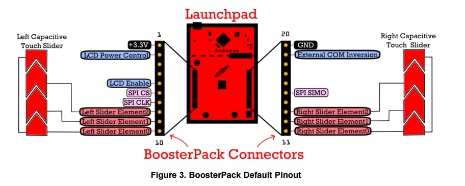
The firmware supports SHARP LCD display,


image

image


ADC


I've broken out the ADC description to a separate post, because I'm working on improvements:

Programmable Electronic Load - ADC Firmware


DAC


DAC output is set on command, using RTOS MailBox and messaging.

The payload for a DAC message contains the DAC channel that needs to be set, and the value.


typedef struct MsgDAC {
    uint8_t module;
    uint16_t value;
} MsgDAC;


The DAC task is started by RTOS. It inialises the DAC settings, then waits until it receives a message.


void *threadDAC(void *arg0) {


    MsgDAC d_msg;
    d_daci2cTransaction.writeBuf = d_dactxBuffer;
    d_daci2cTransaction.readBuf = d_dacrxBuffer;
    d_daci2cTransaction.slaveAddress = DAC_I2C_ADDR;
    d_daci2cTransaction.writeCount = 3;
    d_daci2cTransaction.readCount = 0;


    mqd_t mq;
    struct mq_attr attr;


    attr.mq_flags = 0;
    attr.mq_maxmsg = 1;
    attr.mq_msgsize = MSGDAC_SIZE;
    attr.mq_curmsgs = 0;
    mq = mq_open(QUEUE_NAME_DAC, O_CREAT | O_RDONLY, 0644, &attr);


    while (1) {
        ssize_t bytes_read;
        bytes_read = mq_receive(mq, (char *)&d_msg, MSGDAC_SIZE, NULL);


        /* wait for mailbox to be posted by writer() */
        if (bytes_read) {
// ...


The waiting doesn't take processor time. RTOS takes care that it will only get a slice of clock cycles when there is a message.

Two things in the RTOS configuration make this happen:

The mailbox with room for exactly one message, and a receive event.


Because there is usually no message in the mailbox, the execution of the DAC logic becomes inactive at this line:


        bytes_read = mq_receive(mq, (char *)&d_msg, MSGDAC_SIZE, NULL);


When we send a DAC message somewhere else in the code (e.g.: when the user requests a new setting of the electronic load), RTOS reactivates the process and hands over the payload message.

The DAC task sets the output of the requested channel and returns to the point where it waits for a new message.


   while (1) {
        ssize_t bytes_read;
        bytes_read = mq_receive(mq, (char *)&d_msg, MSGDAC_SIZE, NULL);


        /* wait for mailbox to be posted by writer() */
        if (bytes_read) {
            d_dactxBuffer[0] = getAddressFromModule(d_msg.module); // set value direct
            d_dactxBuffer[1] = d_msg.value >> 8; // MSB
            d_dactxBuffer[2] = d_msg.value; // LSB
            if (! I2C_transfer(i2c_implGetHandle(), &d_daci2cTransaction)) {
//                System_printf("I2C Bus fault\n");
//                System_flush();
            }
        }
    }


You select the DAC channel by setting bit 2 and 1 in the control byte (tx_buffer[0]). There's a helper function that gives a correct control record.


// address 7 - 6: 0, load mode 5 - 4: 01 direct from i2c, 3: reserved 0, 2 - 1: channel select, 0: pwr down 0
#define DAC857X_CFG_H0 0b00010000
#define DAC857X_CFG_H1 0b00010010
#define DAC857X_CFG_H2 0b00010100
#define DAC857X_CFG_H3 0b00010110


static const uint8_t array_DAC857X_CFG_H[4] = {DAC857X_CFG_H0, DAC857X_CFG_H1, DAC857X_CFG_H2, DAC857X_CFG_H3};

/**
 * get the hex address for the requested DAC module
 */
uint8_t getAddressFromModule(uint8_t module) {
    return array_DAC857X_CFG_H[module];
}


Bits 7 - 3 and 0 are all fixed.


image

image


Input Enable


The functionality to activate and deactivate the load is documented here: Programmable Electronic Load - Input Enable Functionality .


Control Strategies


The firmware uses strategies to handle the different types of load operation (e.g. constant current, constant, voltage, ...).


A strategy is a set of functions that you can plug in, and that together run that particular operation type (this is a c version of the Gang of Four's Strategy Design Pattern).

The goal is to avoid that the firmware is riddled with if or switch statements whenever different behaviour is needed depending on the instrument's mode.

Each operation strategy will have the same set of functions that run the instrument in that mode.

The price to pay is not expensive - speed and memory burden is low. It is a little more complex to understand than the c++ version. Once you step trough it with a debugger, things become clear.

The code also tries to hide that we're using strategies


Currently starting to implement constant current strategy. The more difficult operation types can be added later, one by one, with not too much impact on the existing code across the firmware.

. Only the eload API (see below) knows about it. All code goes via that eload API.

API for the stategies is minimal now:


    controlFunction;
    getMode;
    getChar;


eload API


The eload API offers an abstraction layer for the strategies, so that the rest of the firmware doesn't have to know about it. It simplifies switching operation mode and driving the instrument.


Example: The eload API offers a simple function eloadGetMode() to check what the instrument's current mode is.


eload_mode eloadGetMode() {

    return getControlStrategy()->getMode();

}


In the background, it uses the strategy mechanism to fetch the mode from the currently active strategy and call the implementation function.


return getControlStrategy()->getMode();


The eload API also has the common eload functions that don't need a strategy because they are always valid, regardless of mode.


Calibration and Configuration Data


The functionality to store calibration and configuration data in Flash is described in a separate article: Programmable Electronic Load - Calibration Data in Flash.

The calibration and configuration procedures are documented in Programmable Electronic Load - Calibration Steps


Changes To Standard MSP_EXP432P401R.c


The standard file generated by the TI-RTOS application wizard has defaults for peripherals.

The following has changed: none - I removed this section because with the external ADC/DAC board and the SimpleLink RTOS version, everything is kept standard.


Remote Software


Teminal


Serial communication to the USB UART port.

9600/8/1/None

image

SCPI is a non-echoing protocol. To make the characters you type show in the Terminal, set Local echo to Force on.

If you also set Local line editing to Force on, you have the opportunity to correct characters in the current line before they are sent to the serial port.

image


Test:

*IDN?;SYST:ERR:COUN?

Should return

THEBREADBOARD,ELECTRONICLOAD,0,01.00;0


Windows GUI


There are two image. A .NET made by Peter, a Java version made by Jan.


The .net GUI supports reading the 4 ADCs, setting one of the DACs abd shoot any SCPI command.

There's a window for SCPI output and a status window that shows SCPI errors.

image

Source and binary available from https://github.com/thebreadboard/SCPI_DC_LOAD_WIN


You don't have permission to edit metadata of this video.
Edit media
x
image
Upload Preview
image


The Java GUI is made as a POC that cross-platform instrument GUIs are possible.

It allows for switching the load on and off, set constant current and replicate the LCD values.

Additionally, you can requesst error status and run arbitrary SCPI commands.

Programmable Electronic Load - Java GUI Part 1: Basic Functionality


image


LabVIEW


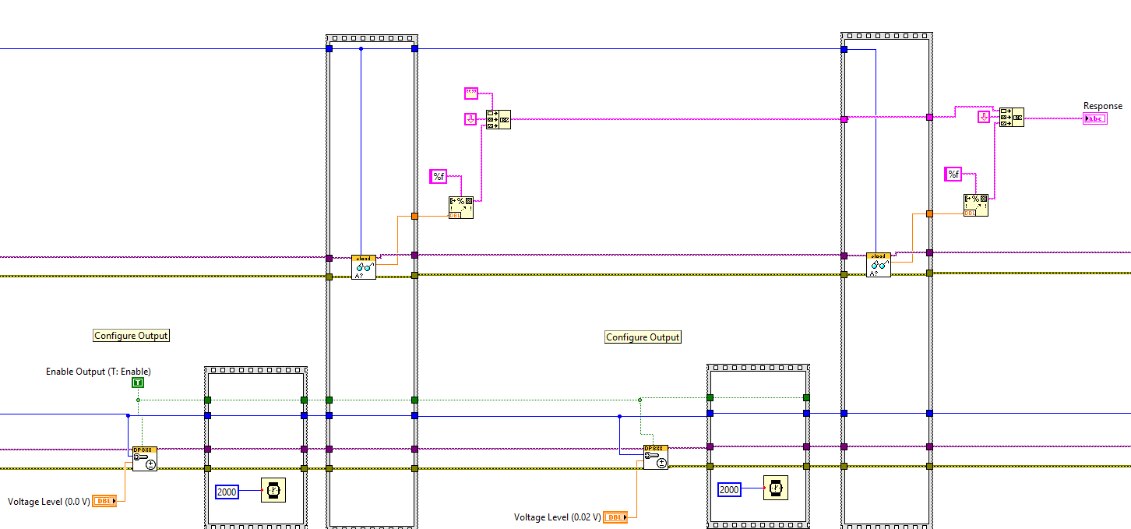
The instrument comes with a LabVIEW library: Programmable Electronic Load - Write a LabVIEW Library part 1: Initialise Block
image


You don't have permission to edit metadata of this video.
Edit media
x
image
Upload Preview
image


Related blog

Programmable Electronic Load - Input Enable Functionality
Programmable Electronic Load - Power Stage
Programmable Electronic Load - Temperature Protection
Programmable Electronic Load - DAC / ADC BoosterPack
Programmable Electronic Load - Analog Controller and Driver Board
Programmable Electronic Load - SCPI interface and Error Handling
Programmable Electronic Load - UART
Programmable Electronic Load - RTOS Config
Programmable Electronic Load - Calibration Data in Flash
Programmable Electronic Load - Calibration Steps
Programmable Electronic Load - LCD Display
Programmable Electronic Load - ADC Firmware
Programmable Electronic Load - Current Sense Circuit
Programmable Electronic Load - BoosterPack Header Use
Programmable Electronic Load - ToDo and Done
Robert Peter Oakes articles:
Electronic DC Load - Design and Build to test PSU Project
youtube: Electronic DC Load Design and Testing
youtube: Full Build Analogue DC Load
youtube: Electronic DC Load - Performance Improvements
Raspberry PI 2, Fun with I2C DACs and ADC's
jc2048 articles:
Programmable Electronic Load: Dynamic Behaviour: Part 1 Overview
Programmable Electronic Load: Dynamic Behaviour: Part 2 The Servo Loop
Programmable Electronic Load: Dynamic Behaviour: Part 3 Effect of Output Inductance
Programmable Electronic Load: Dynamic Behaviour: Part 4 Effect of Output Voltage Change
Programmable Electronic Load: Dynamic Behaviour: Part 5 Stability
Programmable Load Build
Jan Cumps articles:
Programmable Electronic Load - ADC and DAC BoosterPack test
Programmable Electronic Load - Analyse the Summing Node Zero Point
Programmable Electronic Load - Measurements Part 1: Control Circuit
Java GUI
Programmable Electronic Load - Java GUI Part 1: Basic Functionality
Programmable Electronic Load - Java GUI Part 2: Support for Current Mode, Input On/Off, Error Log
LabView
Programmable Electronic Load - Write a LabVIEW Library part 1: Initialise Block
Programmable Electronic Load - Write a LabVIEW Library part 2: Read Output Block
Programmable Electronic Load - Write a LabVIEW Library part 3: Close Block
Programmable Electronic Load - Write a LabVIEW Library part 4: Function Set Block
Programmable Electronic Load - Write a LabVIEW Library part 5: Input Control Block
Programmable Electronic Load - Write a LabVIEW Library part 6: Raw DAC Block
Programmable Electronic Load - Write a LabVIEW Library part 7: Raw ADC Block
Programmable Electronic Load - Automating a DC Switcher Efficiency Test with LabVIEW
Programmable Electronic Load - LabVIEW Test Automation: Characterise the Instrument
Programmable Electronic Load - LabVIEW Test Automation: Characterise the Instrument Pt 2: Oscilloscope Measurements
Example LabVIEW Scenario: test a design with a Rigol PSU and a Keithley DMM
TI-RTOS: Switching to the SimpleLink Distribution
Switch from TI-RTOS to SimpleLink POSIX: Threads and Semaphores
Switch from TI-RTOS to SimpleLink POSIX: EEPROM API
Switch from TI-RTOS to SimpleLink POSIX: From MailBox to Message Queue
Switch from TI-RTOS to SimpleLink POSIX: LCD Display Driver
Switch from TI-RTOS to SimpleLink POSIX: Sleep when Idle
Attachments:
pcb_proto.zip
eload_v1_20170227.zip
eload_1_2a.zip
https://community.element14.com/cfs-file/__key/communityserver-wikis-components-files/00-00-00-00-21/bom.ods
MSP432_SCPI_ElectronicLoad_20180102.zip
eload_power_20180104.zip
eload.zip
eload_examples.zip
MSP432_SCPI_ElectronicLoad_20180514.zip
measureefficiency.zip
measureefficiency_5V_10V_600mA_RAW.zip
MSP432_SCPI_ElectronicLoad_v_00_0_0_1_20180914.zip
MSP432_SCPI_ElectronicLoad_20190706.zip
  • load_cell
  • metrology
  • msp432
  • ti-rtos
  • launchpad
  • laboratory
  • instrument
  • Share
  • History
  • More
  • Cancel
  • Sign in to reply

Top Comments

  • Jan Cumps
    Jan Cumps over 5 years ago +4
    Revisiting the eLoad design - there's definitely room for approval. The very low currency (minus 3 mA) is awful. And the calibration is off. I've set it to 0.5 A- and it thinks it's drawing that current…
  • Jan Cumps
    Jan Cumps over 8 years ago in reply to Jan Cumps +3
    All components are now in and soldered. Time to test. I'll first check out the power rails in isolation. If they are ok. I'll mount LaunchPad, LCD and and DAC board and do measurements. Hang on
  • Jan Cumps
    Jan Cumps over 8 years ago +3
    good news: I finally got persistent saving of calibration/setup sorted out. At first I had issues getting the in-ROM Flash api recognised by the compiler when using it with RTOS. That turned out to be…
Parents
  • Jan Cumps
    Jan Cumps over 7 years ago

    I have a more precise meter now. Also with more resolution, something that will help me with measuring little changes.


    image


    One of the first things that I checked is the minimum current with input enabled and input voltage 4 V. That's 1.01 mA after some stabilisation. It starts close to 1.15 mA.

    • Cancel
    • Vote Up +1 Vote Down
    • Sign in to reply
    • More
    • Cancel
  • Jan Cumps
    Jan Cumps over 7 years ago in reply to Jan Cumps

    Load current vs raw DAC setting.

    image

    there is some linearity from 70 mA on. Thefirst at least 100 values of the DAC have no impact on the current.

    • Cancel
    • Vote Up 0 Vote Down
    • Sign in to reply
    • More
    • Cancel
  • Robert Peter Oakes
    Robert Peter Oakes over 7 years ago in reply to Jan Cumps

    What is the actual output of the DAC doing while you plot this. Can you please add it to the graph. We will then know if is a DAC issue or analogue circuit issue

    • Cancel
    • Vote Up 0 Vote Down
    • Sign in to reply
    • More
    • Cancel
Comment
  • Robert Peter Oakes
    Robert Peter Oakes over 7 years ago in reply to Jan Cumps

    What is the actual output of the DAC doing while you plot this. Can you please add it to the graph. We will then know if is a DAC issue or analogue circuit issue

    • Cancel
    • Vote Up 0 Vote Down
    • Sign in to reply
    • More
    • Cancel
Children
  • Jan Cumps
    Jan Cumps over 7 years ago in reply to Robert Peter Oakes

    I’ll try to make a setup that logs DAC input, DAC output and load current for a given voltage.

    Is there any other value you’re interested in? I can log three extra values from anywhere in the control circuit with the tools I have.

    • Cancel
    • Vote Up 0 Vote Down
    • Sign in to reply
    • More
    • Cancel
  • Jan Cumps
    Jan Cumps over 7 years ago in reply to Robert Peter Oakes

    I'm adding raw DAC and ADC read/write blocks to the LabVIEW driver. They will help to characterise the instrument without relying on internal firmware assumptions.

    If we can set the DAC to a given level, then record the relevant ADCs and some key measure points, we'll get a finer view into the behaviour.


    I can get the current from my power supply. It's got a good current precision that I can get at. Four measure points I can get by adding an oscilloscope to the mix and use its 4 channels as volt meters.

    Then log all to a spreadsheet for further investigation.

    • Cancel
    • Vote Up 0 Vote Down
    • Sign in to reply
    • More
    • Cancel
  • Jan Cumps
    Jan Cumps over 7 years ago in reply to Robert Peter Oakes

    I have the initial setup working.

    image


    PSU, scope and eload are controlled by the flow.


    PSU voltage goes from 0.5 V to 10.5 V in steps of 0.5 V.

    For each of the steps, the DAC A is set from 0 to 65535.

    ADC A, B and C are read

    The voltage and current of the PSU are captured.

    All logged into a spreadsheet.


    At this moment, no scope measurements are done. The scope is initialised and ready but I haven't included measurements yet...

    • Cancel
    • Vote Up 0 Vote Down
    • Sign in to reply
    • More
    • Cancel
  • Jan Cumps
    Jan Cumps over 7 years ago in reply to Jan Cumps

    Runtime capture of a first real run.


    image


    The PSU ramp is the outer loop.

    For each step of 0.5 V, the eload runs an inner loop of stepping the DAC from 0 to 65535. Then returns control to the outer loop.

    Until the 20 steps of the outer loop are taken. Then the process exits.

    It 'll take loads of time. I can finetune this by taking larger DAC steps and by playing with the wait times (1.5 seconds per inner loop image ).

    • Cancel
    • Vote Up 0 Vote Down
    • Sign in to reply
    • More
    • Cancel
  • Jan Cumps
    Jan Cumps over 7 years ago in reply to Jan Cumps

    Overview of running the DAC from 0 to 1046 with an input voltage of 0.5 V


    ADC A current sense

    ADC B sense voltage at device under test or load terminals

    ADC C temperature


    The X axis is the DAC value.

    image

    The usable measurements start off at a DAC setting of 100.


    Zooming in on the temperature ADC:

    image

    • Cancel
    • Vote Up 0 Vote Down
    • Sign in to reply
    • More
    • Cancel
  • Jan Cumps
    Jan Cumps over 7 years ago in reply to Robert Peter Oakes

    Robert Peter Oakes  wrote:


    What is the actual output of the DAC doing while you plot this. Can you please add it to the graph. We will then know if is a DAC issue or analogue circuit issue

    I don't have DAC output yet - but we can derive it from the DAC setting.


    Here's a graph from the DAC setting (x-axis) vs the  ADC sample of the current at load point (over the sense resistor),

    for the first 1046 bits of DAC, with the load voltage set to 0.5 V.

    I've stepped over the DAC range from 0 to 1046 in single steps. Each one is plotted on the graph.


    image

    This isn't too bad actualy. As soon as the circuit starts to kick in, it's linear (at eye sight).


    The offset of the graph isn't an ADC issue.

    My load always has a little current when the input is enabled. It doesn't switch down to 0 mA. (it does when I engage the output switch-off transistor).

    The ADC measures it as 8-9 on a range of 65535. I guestimate 2 mV.

    • Cancel
    • Vote Up +1 Vote Down
    • Sign in to reply
    • More
    • Cancel
  • Robert Peter Oakes
    Robert Peter Oakes over 7 years ago in reply to Jan Cumps

    It certainly  does not have that flat spot at the low end you showed with the current so I suspect something in the analog side of things. Any thoughts ??

    • Cancel
    • Vote Up 0 Vote Down
    • Sign in to reply
    • More
    • Cancel
  • Jan Cumps
    Jan Cumps over 7 years ago in reply to Robert Peter Oakes

    That flat end was recorded by hand.  The last measurements here are done automatically. I trust them more.

    Because the ADC measurement is the result after the whole analog part, it seems to tell that it is lineair as soon as it kicks in.

    We may have to look at why the circuit doesn’t go lower than 2 mA. The FET can do it because there’s almost no current when the output is pulled shut by the switching circuit.

    As soon as that switching circuit hands over to the controller, I have a current flow of 2 mA.


    Edit - I looked at the graph again, and the flat spot in that current graph is the same one as the one where I do the raw measurement of the voltage over the sense resistor with the ADC.

    It's just because that first graph doesn't start at 0, does not have linear X scale and does not show a measurement at or near 100, that it has a different form. The measurements seem consistent.

    Both show that starting current of just above 2 mA.

    • Cancel
    • Vote Up 0 Vote Down
    • Sign in to reply
    • More
    • Cancel
  • Jan Cumps
    Jan Cumps over 7 years ago in reply to Robert Peter Oakes

    Robert Peter Oakes, I've attached a spreadsheet with 5366 measurements.

    That's the behaviour of the eLoad with 0.5 V input, up to just above 600 mA. Single stepping the DAC from 0 to 5365


    https://www.element14.com/community/servlet/JiveServlet/download/83867-154-265891/measureefficiency.zip


    image

    (ignore the first voltage from the PSU on line 1. I sampled it too fast)


    You can validate the values - linearity is good. That same offset to start with:


    Here's a graph of the ADC A (sample of sense resistor):

    image

    Here's a graph of the current draw (in A)  reported by the PSU (fairly precise):

    image

    • Cancel
    • Vote Up +1 Vote Down
    • Sign in to reply
    • More
    • Cancel
  • Jan Cumps
    Jan Cumps over 7 years ago in reply to Jan Cumps

    I've also attached the spreadsheet for the following test:


    Input voltage from 5 V to 10 V, in 1 volt steps.

    Then step the DAC from 0 to 6000, in steps of 10

    The maximum current is 0.6953 A when the DAC is 6000.


    https://www.element14.com/community/servlet/JiveServlet/download/83867-155-265892/measureefficiency_5V_10V_600mA_RAW.zip


    More than 3600 steps, each with 6 measurements, can give a good insight into the instrument's behaviour in the below - 1  A range.

    Due to the PSU I have here, I can measure up to 3 A (maybe to 6 A if I learn how to turn on tracking via LabVIEW).

    • Cancel
    • Vote Up +1 Vote Down
    • Sign in to reply
    • More
    • Cancel
element14 Community

element14 is the first online community specifically for engineers. Connect with your peers and get expert answers to your questions.

  • Members
  • Learn
  • Technologies
  • Challenges & Projects
  • Products
  • Store
  • About Us
  • Feedback & Support
  • FAQs
  • Terms of Use
  • Privacy Policy
  • Legal and Copyright Notices
  • Sitemap
  • Cookies

An Avnet Company © 2026 Premier Farnell Limited. All Rights Reserved.

Premier Farnell Ltd, registered in England and Wales (no 00876412), registered office: Farnell House, Forge Lane, Leeds LS12 2NE.

ICP 备案号 10220084.

Follow element14

  • X
  • Facebook
  • linkedin
  • YouTube