element14 Community
element14 Community
    Register Log In
  • Site
  • Search
  • Log In Register
  • Community Hub
    Community Hub
    • What's New on element14
    • Feedback and Support
    • Benefits of Membership
    • Personal Blogs
    • Members Area
    • Achievement Levels
  • Learn
    Learn
    • Ask an Expert
    • eBooks
    • element14 presents
    • Learning Center
    • Tech Spotlight
    • STEM Academy
    • Webinars, Training and Events
    • Learning Groups
  • Technologies
    Technologies
    • 3D Printing
    • FPGA
    • Industrial Automation
    • Internet of Things
    • Power & Energy
    • Sensors
    • Technology Groups
  • Challenges & Projects
    Challenges & Projects
    • Design Challenges
    • element14 presents Projects
    • Project14
    • Arduino Projects
    • Raspberry Pi Projects
    • Project Groups
  • Products
    Products
    • Arduino
    • Avnet & Tria Boards Community
    • Dev Tools
    • Manufacturers
    • Multicomp Pro
    • Product Groups
    • Raspberry Pi
    • RoadTests & Reviews
  • About Us
    About the element14 Community
  • Store
    Store
    • Visit Your Store
    • Choose another store...
      • Europe
      •  Austria (German)
      •  Belgium (Dutch, French)
      •  Bulgaria (Bulgarian)
      •  Czech Republic (Czech)
      •  Denmark (Danish)
      •  Estonia (Estonian)
      •  Finland (Finnish)
      •  France (French)
      •  Germany (German)
      •  Hungary (Hungarian)
      •  Ireland
      •  Israel
      •  Italy (Italian)
      •  Latvia (Latvian)
      •  
      •  Lithuania (Lithuanian)
      •  Netherlands (Dutch)
      •  Norway (Norwegian)
      •  Poland (Polish)
      •  Portugal (Portuguese)
      •  Romania (Romanian)
      •  Russia (Russian)
      •  Slovakia (Slovak)
      •  Slovenia (Slovenian)
      •  Spain (Spanish)
      •  Sweden (Swedish)
      •  Switzerland(German, French)
      •  Turkey (Turkish)
      •  United Kingdom
      • Asia Pacific
      •  Australia
      •  China
      •  Hong Kong
      •  India
      •  Japan
      •  Korea (Korean)
      •  Malaysia
      •  New Zealand
      •  Philippines
      •  Singapore
      •  Taiwan
      •  Thailand (Thai)
      •  Vietnam
      • Americas
      •  Brazil (Portuguese)
      •  Canada
      •  Mexico (Spanish)
      •  United States
      Can't find the country/region you're looking for? Visit our export site or find a local distributor.
  • Translate
  • Profile
  • Settings
Project Videos
  • Challenges & Projects
  • element14 presents
  • Project Videos
  • More
  • Cancel
Project Videos
Documents From Snooze to Launch: The Arduino-Powered LEGO Alarm Clock Inspired by Artemis 2 -- Episode 701
  • Documents
  • Members
  • Mentions
  • Sub-Groups
  • Tags
  • More
  • Cancel
  • New
Join Project Videos to participate - click to join for free!
  • +Documents
  • 3D Object Rendering Using an FPGA -- Episode 558
  • A DIY Test and Programming Rig Built for Small-Batch Electronics Production -- Episode 695
  • A DJ Harrigan Video: Homemade Retro Digital Wristwatch
  • A Noise-Free DIY Switching Power Supply - How Hard Can It Be? -- Episode 542
  • A Smart Youtube Counter With An Audio Analyzer - Episode - 658
  • A Smart, Safe 3D Printer Cabinet Using Raspberry Pi and Node-RED -- Episode 697
  • Adding a Parallel Printer Port to an Android Phone -- Episode 553
  • Affordable DIY Robot Arm: A Deep Dive into 3D Printing and Servo Motors -- Episode-628
  • All-Purpose Debugging: A Practical Universal Screen with LCD Displays -- Episode-631
  • Arduino and LEDs Make Solitaire Easier to Solve -- Episode 605
  • Arduino Uno Mini Limited Edition LED Necklace -- Episode 554
  • Avoid Conflict with this ESP32 Defcon Task Tracker -- Episode 675
  • Backpack Splash: Mark's Water Gun Upgrade for Epic Outdoor Water Wars! -- Episode-629
  • Bee-Saving Electronics Prototype -- Episode 581
  • Build a Larson Scanner with Sound Using an ESP32 -- Episode 670
  • Build a Phonograph Preamplifier - How Hard Can It Be? -- Episode 537
  • Build a VU Meter with LED Pixelated Nixie Tubes -- Episode 564
  • Build your Own Bat Detector with Analog Parts -- Episode 578
  • Build Your own ESP32 Fitness Heart Rate Monitor / Tracker -- Episode 692
  • Build your own Underwater Drone with 3D Printed Parts -- Episode 576
  • Build Your Own USB Looper for Serial Debugging and File Transfer -- Episode 702
  • Building A Bluetooth Speaker in 5 Minutes - How Hard Can It Be? -- Episode 591
  • Building a Circuit Sculpture with LED Filament -- Episode 707
  • Building a Customisable Handheld Arduino Thermal Imaging Camera
  • Building a DIY PLC with PocketBeagle 2: Finding Out Why Industrial Controllers Cost So Much
  • Building a Magic Wand Talking Sound Board -- Episode 613
  • Building a Practical Electronics Workbench for Makers and Engineers -- Episode 698
  • Building a Privacy-First Workshop Security Camera with PocketBeagle 2
  • Building a Super Smooth Z-Scale Train Controller with Arduino -- Episode 705
  • Building a True Power-On Multiturn Position Sensor with the ADMT4000 and MicroPython
  • Building a Unique USB Card Reader: From Idea to Prototype -- Episode 615
  • Building an Arduino UNO Q Cyberdeck Inside a Puppet
  • Building an Audio Reactive LED Matrix with a micro:bit and NeoPixels -- Episode 684
  • Building an Autonomous LEGO Train with CircuitPython and LIDAR -- Episode 672
  • Building an ESP32 Powered Warhammer 40k Rhino with Dynamic LED Effects! -- Episode 673
  • Building an Open Source Blood Pressure & Heart Signal Monitor -- Episode 674
  • Building an Open-Source Tool for Cave Surveying -- Episode-647
  • Building and Programming a SCARA Industrial Robot Arm – An Introduction to Robotics
  • Building My Dream Digital Clock: DIY 7 Segment Display with a Cute Robot Twist! -- Episode 600
  • Building Spooky Fun: Halloween Sound Pranks with nRF 5340 BLE Audio -- Episode 622
  • Building the Cylon Pumpkin: Combining a Larson Scanner and Vocoder for Halloween -- Episode 688
  • Building the Foundations of Your First Robot - An Introduction to Robotics
  • Can We Rebuild a 1930s Accounting Machine? -- Episode 551
  • Catching you Up on Bonesnapper Ridge - Off-Grid Maker Shop -- Episode-626
  • Charlieplexing Buttons and LEDs at the Same Time - How Hard Can It Be? -- Episode 604
  • Clem's Workbench Upgrade to Automated Lab with Programmable Instruments and Python
  • CNC Router Remote Control -- Episode 526
  • Color Sensor-Based Water Quality Tracker: DIY Environmental Monitoring -- Episode 621
  • Craft a Festive LED Christmas Sweater Featuring the ATtiny416 -- Episode-634
  • Create a Magic Makeup Mirror with Pose Detection -- Episode 559
  • Create Your Own Air Hockey Table with Arduino Scoring -- Episode 603
  • Create your own Handheld Serial Monitor for Project Debugging -- Episode 557
  • Create Your Own Talking Stress Indicator -- Episode 587
  • Creating a Digital Roulette Table with an ESP32 DevKit -- Episode-646
  • Creating a Multi-Function ESP32 Desk Pet with Custom PCB and Audio Processing
  • Creating a “Mummy” Wake Word Detector with Raspberry Pi and Edge Impulse -- Episode 547
  • Creating an ESD (Or Lightning!) Detector! -- Episode 669
  • Creating an IMU based 3D Mouse with an ESP32-S3 -- Episode-636
  • Creating Augmented Reality Circuits with Meta Quest 2 and Unity -- Episode 563
  • Creating sudostick - From Prototype to Product -- Episode-627
  • Creepy Motion-Activated Painting You Can Build Yourself -- Episode 686
  • Dance Central Pose Estimation Game with Tensorflow and Raspberry Pi -- Episode 555
  • Design for Manufacturing - Project to Product by Modifying Off-the-Shelf Cases -- Episode-651
  • Designing a Custom PCB for Microsoft Jacdac -- Episode 545
  • Designing a Mobile Robot Platform with Differential Drive, PID Control and Wireless Mapping
  • Designing a Mobile Robot Platform with Inverse Kinematics and Wireless Control
  • Designing a More Capable Dual Motor Driver Beyond the L298N (What worked and what didn't)
  • Designing a Smarter Workbench: Inside Mark’s 8-Channel Power Monitoring System
  • Designing an Arduino PID Controlled Micro Drone -- Episode 668
  • DIY AC Dimmer Circuit: Control Your Lights with a Raspberry Pi Pico -- Episode 602
  • DIY Electronic Controlled Motorized Wheelchair -- Episode 550
  • DIY Hot Plate for SMD Soldering Using Raspberry Pi Pico -- Episode 655
  • DIY Jig for your Laser Cutter with Custom Arduino Automation -- Episode-656
  • DIY Low Cost Capacitance Meter Using a 555 Timer -- Episode 580
  • DIY Open Source Bluetooth Headphones -- Episode 586
  • DIY RF Modulator + Raspberry Pi Pico = Gaming on a Sony Watchman FD-10A CRT -- Episode 682
  • DIY Single Board Computer with ESP32 and Raspberry Pi Pico -- Episode-659
  • Earn Your Fitness Reward with a Smart Cookie Jar Using Strava and ESP32 -- Episode 694
  • Edge-lit 7-Segment Display Clock Using Raspberry Pi Pico -- Episode-653
  • Electronic Fidget Cube, Building Your Ideas! -- Episode 548
  • Emulate an EPROM - How Hard Could it Be? -- Episode 517
  • Emulating a Speech Synthesis Chip with an ESP32 -- Episode 667
  • Enhancing a Magnifying Headband with Auto Sensing Light -- Episode 585
  • Epic Neopixel Birthday Cake -- Episode 583
  • Episode 623: How to Run Linux on an ESP32
  • Episode 624: Modding A Smoke Machine to Add Motion Detection
  • ESP32 + RFID = Smart Access Control in a Simple DIY Build -- Episode 706
  • ESP32 Duolingo Owl Project: Never Miss a Lesson Again -- Episode 679
  • Find EMI Fast with a Low‑Cost, Automated Way to See Where Your PCB Radiates
  • From Kit to Custom Design: Building a Tube-Based FM Radio -- Episode 680
  • From Snooze to Launch: The Arduino-Powered LEGO Alarm Clock Inspired by Artemis 2 -- Episode 701
  • From Strava to Motion: Creating an Arduino-Powered Arcade Game with Running Data -- Episode 607
  • Game Guy - The Unportable Game Boy -- Episode 531
  • Ghost Rider Halloween Costume -- Episode 574
  • Giant Retro Gaming Magic Mirror with a Raspberry Pi 5! -- Episode-649
  • GimmeGPIO: A Simple Way to Get GPIO on Laptops and Desktops -- Episode 699
  • Going Beyond Periodic Wakes: Using WiFi to Revive a Sleeping Device -- Episode 584
  • Hacking a Hotel POS Tablet - How Hard Can it Be? -- Episode 556
  • Hacking an IKEA Desk into a Programmable Electric Workstation -- Episode 704
  • Handheld BASIC computer in Badge Format with the Arduino Uno -- Episode 612
  • Highlights from element14 presents 2022 -- Episode 588
  • Home AI Image Generation Server with LattePanda and Stable Diffusion -- Episode-648
  • How a Pulse Metal Detector Works, and How to Build One
  • How Accurate Is Bluetooth Channel Sounding? A Deep Dive with the nRF54L15 -- Episode 691
  • How Clem Built a Handheld Sci-Fi Communicator That Really Works -- Episode 689
  • How Do BattleBots Work? In the Pit with HyperShock -- Episode 654
  • How Far Can I2C Go? -- Episode 666
  • How to Automate Industrial Welding Positioners with Arduino -- Episode 566
  • How To Build a Portable, Solar-Charged Off-Grid Power Station -- Episode 598
  • How to Build a Quadruped Robot - NO MATH! -- Episode 538
  • How to Build a Reaction-Based Catch Game Using Arduino and Relays
  • How to Build a Robot that Celebrates Good Grades with Arduino -- Episode 597
  • How to Build a Spectrum Analyzer with Lego Bricks & Discrete Electronics -- Episode 599
  • How to Build an Open Source Bluetooth Mechanical Keyboard -- Episode 619
  • How to Build Your Own Voice Assistant with MyCroft AI - How Hard Can It Be? -- Episode 596
  • How to Control a LEGO Mindstorms kit with AI and Raspberry Pi 5 -- Episode 657
  • How to Embroider with Circuits and Conductive Thread -- Episode 610
  • How to Make a Basketball Auto Score Keeper Using Colour Sensing -- Episode 579
  • How to Make a Custom Soundboard with the STM32F4 using FreeCAD -- Episode 568
  • How to Make a Portable Emergency Radio with an Arduino Nano in a Mint Tin -- Episode 683
  • How to Make a Secured Parcel Pickup Box with Arduino -- Episode 575
  • How to Make an LED Sculpture React to Sound with micro:bit
  • How to Reverse Engineer Electronics: Building a Developer Board for a Coding Class -- Episode 601
  • How to Run the Distance to the Moon with Strava Data and a Pico W Board -- Episode 611
  • How to Set Up the Raspberry Pi 5: Complete Beginner Step-by-Step Guide -- Episode 703
  • How to Use an ESP32 & Camera to Know You've Got Mail! -- Episode 572
  • How to Use LoRaWAN to Launch Model Rockets Wirelessly -- Episode 606
  • How Voice Recognition Works on Raspberry Pi (and Why It’s Easy to Break) -- Episode 700
  • I Tried Building 16 ATtiny Robots with Vibration Motors – It Was a Disaster -- Episode 676
  • Interactive Light Up Window using a Raspberry Pi and micro:bit -- Episode 527
  • +Interactive Light-Up Window with Pose Detection using a Raspberry Pi and Micro: bit -- Episode 536
  • Interactive Magic: Creating an Enchanted Cauldron -- Episode-625
  • Jumbo DIY LED -- Episode 533
  • Lamptopus: Spinning LED Desk Lamp -- Episode 592
  • Learn how to Make a Photo Booth with the ESP32 and Telegram Automation! -- Episode 664
  • Lego Spike Prime Weather Station with Raspberry Pi -- Episode 543
  • Let's Build an Electronic Fidget Cube! -- Episode 528
  • LoFi Beats to Solder To -- Episode-660
  • Magical Potion Bottle Rack -- Episode 552
  • Make your own LED Wrist Watch -- Episode 661
  • Make Your Own Vocoder with Teensy 4.0 - Voice of a Cylon?! -- Episode 677
  • Make Your Own Ye Olde Book Nook Diorama with Arduino -- Episode 519
  • Making a Stronger Affordable DIY Robot Arm with 3D Printing with Raspberry Pi Pico -- Episode 662
  • Making a Time-lapse Camera with a Raspberry Pi 5 -- Episode 642
  • Making a Tribble that Detects Klingons -- Episode-643
  • Making a WiFi Connected Audio Spectrum Analyzer with ESP32 -- Episode 570
  • Making Music with a Lego Guitar and Capacitive Touch -- Episode-637
  • Making the Simplest DIY Wind Energy Generator - How Hard Could it Be? -- Episode 608
  • Mastering Oven Control: Precision Resin Curing with DIY Modifications - How Hard Can it Be? -- Episode 616
  • Measuring Destructive Testing Force with a 20 Ton Hydraulic Press -- Episode 565
  • Meet the PlatypusBot: Now Powered by Raspberry Pi & ROS -- Episode 690
  • Mega IIe: First Fully Functional Computer built around the Apple Mega-II Chip -- Episode-630
  • Member Challenge Accepted - Universal LANC Controller for DSLR cameras -- Episode 595
  • Modern Edge AI on Raspberry Pi 5 for an Animatronic Tracker: Vision Acceleration with AI Hat+ and AI Camera
  • Moon Phase Display with Raspberry Pi Pico -- Episode-641
  • MQTT controlled LED Christmas Baubles with Raspberry Pi Pico -- Episode 530
  • Multi-Spectrum UV Resin Curing Station with Würth Elektronik LEDs -- Episode 569
  • Object Detection for Smart Recycling -- Episode 540
  • Off-Grid Remote Generator Starter -- Episode-639
  • Open Source ATtiny3226 Arduino Calculator – Hardware, Case & Code Build -- Episode 678
  • Open Source Inventory Warehousing System -- Episode 534
  • Open-Source Multicolour 3D Printing Upgrade: Clem’s 3D Chameleon Remix -- Episode 693
  • Pi Home Temperature Monitoring System -- Episode 562
  • PID Control, Motion Profiles and ROS Explained - An Introduction to Robotics
  • PlatypusBot - Scavenging for Robotics Parts -- Episode 671
  • Playing 3D Famicom Games Wirelessly on the NES - How Hard Could It Be? -- Episode 593
  • Practical DIY Pi Pico Current Load Circuits -- Episode-645
  • Raspberry Pi AI Tracking Eye of Sauron - AI AL Barad Dur - Episode 665
  • Raspberry Pi Controlled Lego Train with Build HAT -- Episode 560
  • Repair a Sega Game Gear - How Hard Can It Be? -- Episode 535
  • Repairing a Neewer 660 Studio light - How Hard Can It Be? -- Episode 594
  • Revamping Old School Pinball with an ESP32 -- Episode-632
  • Reviving a Vintage LED Sign with Arduino and PS/2 Control -- Episode 708
  • Reviving the 1984 IBM 5155 - How Hard Can It Be? -- Episode 544
  • RP2040 PCB: Design, Turn-On, and Debug - How Hard Could It Be? -- Episode-638
  • Seven Kingdoms Open Source Bartop Arcade -- Episode 590
  • Simplify Network Monitoring: Building an ESP32-Powered Solution -- Episode 617
  • Simulating Prey Vision with Raspberry Pi 5: A Dual Camera Perception Experiment
  • Smart Christmas Decoration with Raspberry Pi Pico and MQTT -- Episode 582
  • Smart Windows and Blinds with Arduino and Raspberry Pi Pico -- Episode-652
  • Spying Under the Christmas Tree with an Arduino-powered Ornament -- Episode-633
  • Stey-by-Step Guide to Creating your own Speaking Animatronic Hat -- Episode 620
  • Synced NeoPixel Mickey Mouse Ears -- Episode 567
  • The Game Guy Mini, Upgrading the Unportable Game Boy! -- Episode 577
  • Tinkering vs Engineering: Can You Build a Laptop from Scratch? -- Episode-640
  • Training a Machine to Recognize Objects - How Hard Can It Be? -- Episode 539
  • Turn anything into an Arduino Module: Reusing Everyday Electronics -- Episode 681
  • Turning a $10 Air Fryer into an Arduino powered Filament Dryer -- Episode 687
  • Turning a Broken Robot Vacuum into a Network-Controlled Raspberry Pi 5 Rover
  • Turning a Raspberry Pi Pico into a GPU! -- Episode-644
  • Upcycling a Vintage Microphone into an Emergency Radio System -- Episode 663
  • Updating a Fujitsu N860-2500-T111 Keyboard to Work with a PS2 Standard -- Episode 609
  • UPDI Program for new ATTiny -- Episode 529
  • Upgrading My Racing Sim with a Force-Sensitive Keyboard -- Episode 618
  • Upgrading the iMac G4 With a NUC -- Episode 589
  • Using a Pi Pico to Convert Keyboard Input to Morse Code -- Episode 573
  • Using a Teletype Machine as a USB Printer with Arduino -- Episode 549
  • Using Dead Batteries to Test for Dead Batteries -- Episode 571
  • Using Nordic's nRF7002, My Dehumidifier Tells Me When It's Full! -- Episode-650
  • Using PID (Proportional-Integral-Derivative) in Robotics - How Hard Could It Be? -- Episode 614
  • Vintage Electronics Exploration with a Bally Cypress Gardens Bingo Machine - Episode 635
  • Vintage Laptop Battery Replaced with USB Power - How Hard Can It Be? -- Episode 541
  • Was that my Number!? Fixing Café Order Chaos with a Raspberry Pi Announcer
  • When Your Body Becomes the Instrument: Clem Builds the “Dröne” Synth -- Episode 685
  • WiFi to Parallel Port Ascii Art Dot-Matrix Printer -- Episode 561
  • World’s First Single-Chip Apple II Boots! -- Episode 532
  • Your First Real PCB in KiCad : An Arduino Compatible Board Designed from Scratch

You are currently comparing revision 5 and the current version.

  • History View current version

From Snooze to Launch: The Arduino-Powered LEGO Alarm Clock Inspired by Artemis 2 -- Episode 701

arduino alarm clock tutorial, arduino nema 17 stepper tutorial, arduino web server project example, lego motorised rocket arduino, arduino stepper motor project tutorial, diy loud alarm clock project, arduino uno r4 wifi projects, arduino relay control tutorial, diy arudino clock with wifi, arduin projects for beginners and makers, lego arduino integration project, led matrix clock arduino tutorial, hot to control megaphone with arduino, lego alarm clock project, diy smart alarm clock arduino, friday_release

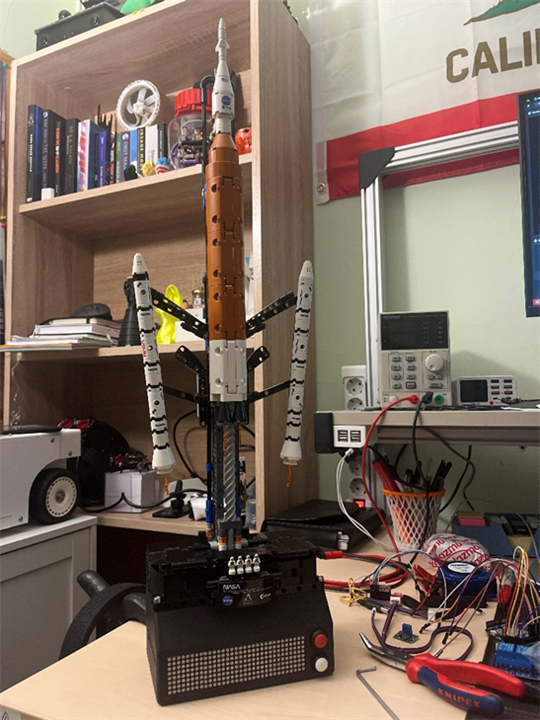
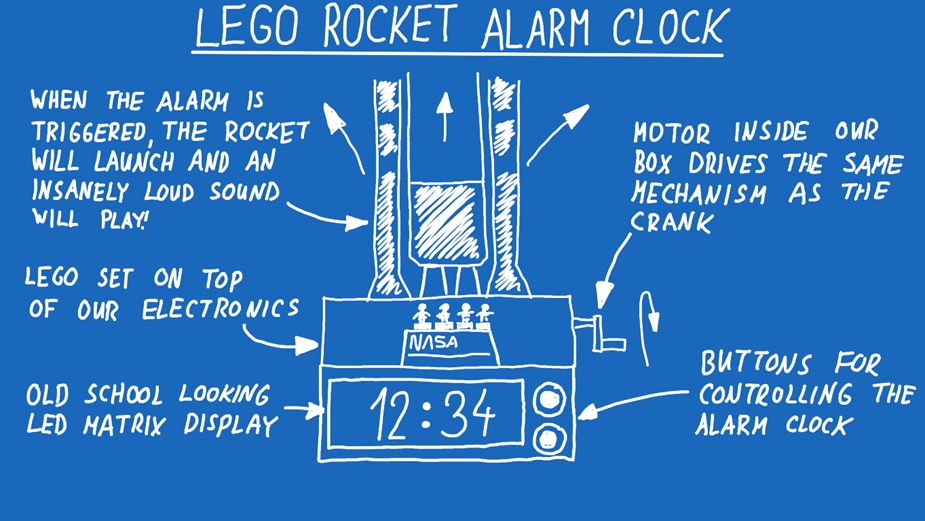
What if your alarm clock launched a rocket instead of playing a gentle tone? In this project, Milos turns the LEGO NASA Artemis SLS into a motorised, Arduino-powered alarm clock that raises the rocket and blasts a megaphone when it’s time to wake up. The build combines a NEMA 17 stepper motor, relays to hack a megaphone, an LED matrix display, Wi-Fi control, and a custom web interface so you can configure everything from your browser.

Watch the Lift-Off!

You don't have permission to edit metadata of this video.
Edit media
x Small Medium Large Custom
Visible Hidden
From Snooze to Launch: The Arduino-Powered LEGO Alarm Clock Inspired by Artemis 2 -- Episode 701
Upload Preview

Building the World’s Loudest LEGO Alarm Clock

When Milos set out to build a new alarm clock, he did not start with typical design constraints like size, comfort, or subtlety. Instead, he started with a simple premise: rockets are among the loudest human-made machines ever created. That idea quickly evolved into a LEGO NASA Artemis rocket that would not just look the part, but behave like a launch sequence every morning.

The result is a project that blends mechanical LEGO engineering, Arduino automation, reverse-engineered consumer electronics, and a web-based control interface.

image

image

From Rocket Inspiration to Alarm Clock Concept

The project began with the LEGO NASA Artemis Space Launch System set. While assembling it, Milos discovered a mechanical detail that set the tone for the entire build: a tiny internal gear designed to rattle during operation to mimic the sound of launch vibration. That detail pushed the concept from a simple motorised display to a full alarm clock experience.

In the transcript, Milos reflects on how the idea escalated beyond a simple novelty:

“I wanted something that would actually force me to wake up… something you cannot ignore.”

The design goals quickly became clear:

  • Motorise the LEGO launch mechanism

  • Add a display and controls

  • Create an alarm that is impossible to sleep through

The third requirement became the defining challenge of the project.

imageimage

imageimage

Solving the Sound Problem: The Megaphone Hack

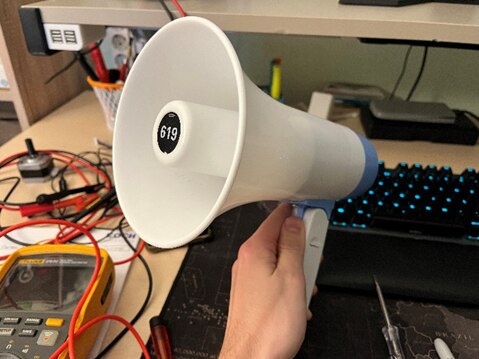
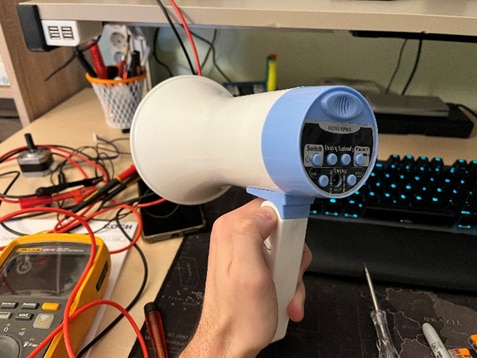
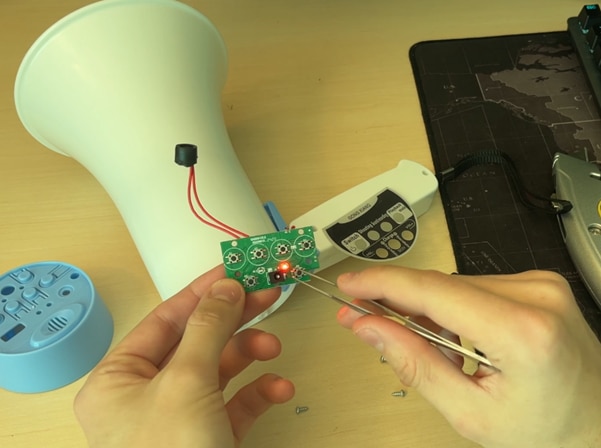
Originally, the plan was to use a megaphone capable of playing MP3 files via USB. The delivered device did not match expectations. Instead of USB playback, it only supported record and playback through a microphone. What initially looked like a setback became one of the project’s most interesting design decisions.

The limitation actually made the system more flexible and tactile. Any sound could be recorded directly into the megaphone and replayed as the alarm. This gave the clock a unique personality and avoided the complexity of integrating audio playback electronics.

But controlling the megaphone electronically introduced a major obstacle: it was designed for manual button presses.

Milos explains the workaround clearly:

“The megaphone is designed to be used by pressing the buttons… so I soldered wires in parallel with the buttons and used relays to simulate the presses.”

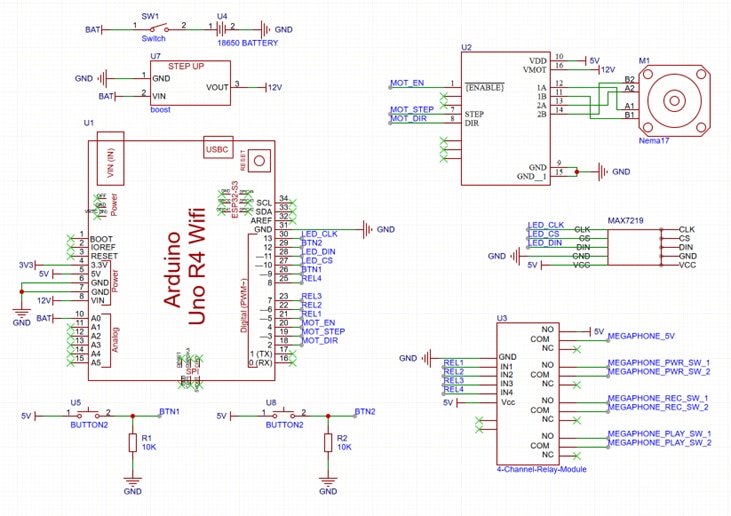
This approach essentially turned the megaphone into a remotely controlled device. The Arduino does not generate audio; it triggers the megaphone’s existing circuitry in the correct sequence. It is a clean example of hardware hacking that avoids reinventing functionality already present in consumer electronics.

image

image

Electronics Architecture and Control Strategy

At the center of the build sits an Arduino Uno R4 WiFi. The choice of board was deliberate: the project requires multiple GPIO pins, relay control, motor control, Wi-Fi connectivity, and a web interface.

From the code, the relay pins controlling the megaphone buttons are defined explicitly:

#define RECORD 3
#define PLAY 4
#define TRIGGER 5
#define STOP 6

These outputs allow the Arduino to emulate the physical button presses required to operate the megaphone.
image
image

The firmware also defines a complete stepper motor configuration:

#define STEP_PIN 9
#define DIR_PIN 8
#define ENABLE_PIN 7
#define LIMIT_SWITCH_MIN 11
#define LIMIT_SWITCH_MAX 12

The presence of limit switches is a key safety and reliability feature. The mechanism cannot overrun its physical bounds. This is critical for a device that operates unattended every morning.

Milos notes in the transcript how important reliability was:

“This has to work every day without me touching it, otherwise it defeats the purpose of an alarm clock.”

image

image

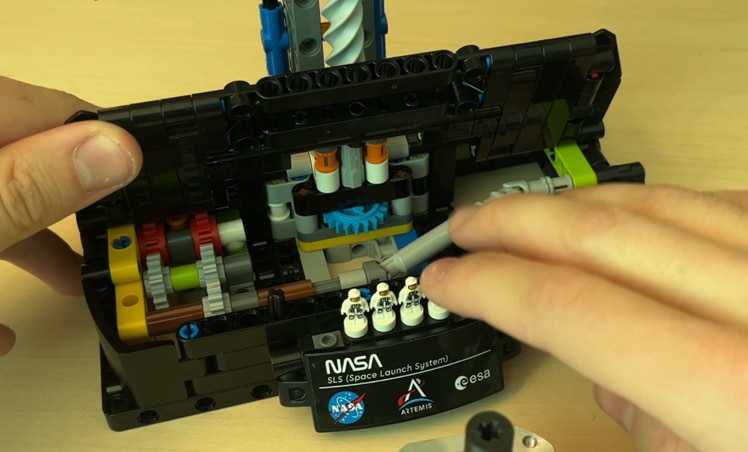
Mechanical Integration: Driving LEGO from Below

One of the most thoughtful aspects of the build is how the motor integrates with the LEGO model.

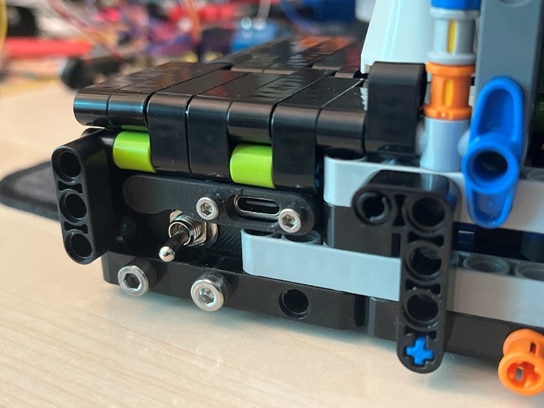
Rather than mounting the stepper motor visibly on the side, Milos redesigned the drive path so the motor sits beneath the rocket base. He created a 3D-printed coupler that connects a NEMA 17 stepper motor to the LEGO gear train.

image

image

This preserves the visual integrity of the LEGO set while still using the original gearing. It also highlights a recurring theme in the project: keep the LEGO aesthetic intact while embedding real engineering underneath.

He explains this design decision in the transcript:

“I didn’t want the motor visible anywhere… everything had to stay hidden under the model.”

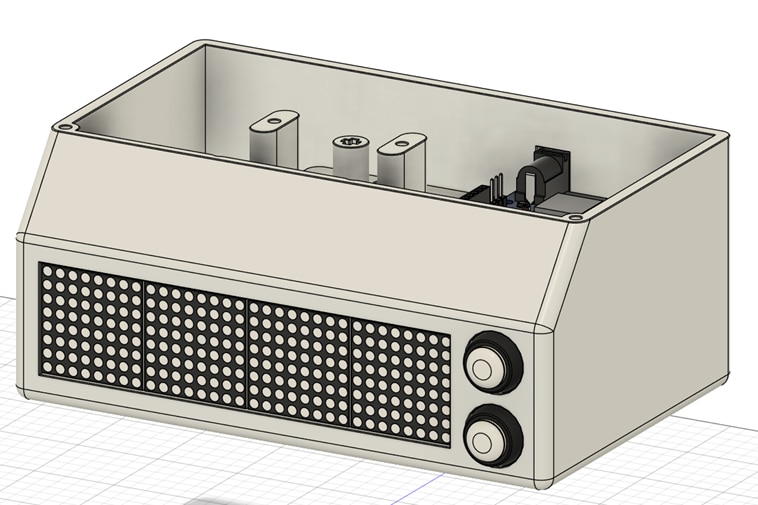
The enclosure itself was printed in black PLA and dimension-ed using LEGO’s standardised spacing, making the mechanical alignment straightforward.

Software Design and Web Interface

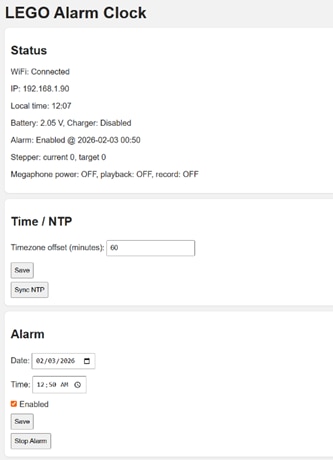
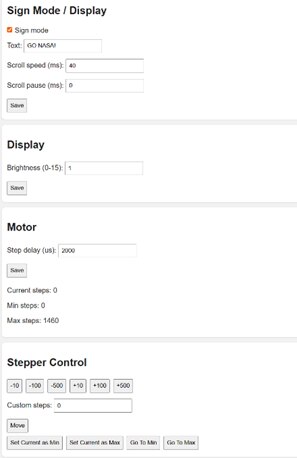
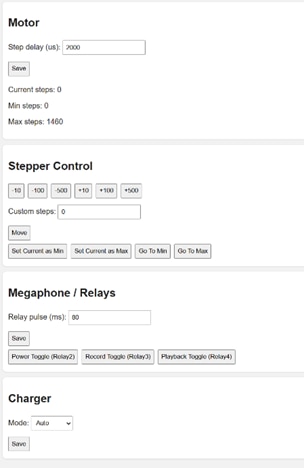
The software side of the project is far more sophisticated than a typical Arduino alarm clock. The firmware includes Wi-Fi connectivity and a full web interface.

imageimageimage

imageimageimage

Key features of the firmware include:

  • Static IP configuration for easy access

  • Web-based alarm scheduling

  • Time synchronisation via internet

  • Relay testing and calibration tools

  • Stepper motor min/max configuration

  • LED matrix brightness control

From the code:

#define NTP_SERVER "pool.ntp.org"
#define GMT_OFFSET_SEC 0
#define DAYLIGHT_OFFSET_SEC 3600

This enables automatic time updates using NTP, eliminating the need to manually set the clock.

The web interface is designed to complement physical controls rather than replace them. Physical buttons remain available for emergency silence when the megaphone begins blasting in the morning.

Sequencing the Wake-Up Routine

The firmware reveals how the alarm sequence is orchestrated.

Timing constants define the startup behaviour:

#define RECORD_DELAY 2000
#define PLAY_DELAY 2000
#define MOTOR_RUN_TIME 15000

This suggests a carefully choreographed sequence:

  1. Trigger megaphone playback via relay sequence

  2. Run the stepper motor to animate the rocket mechanism

  3. Maintain motion for a fixed duration

  4. Allow manual stop if needed

The combination of mechanical motion and amplified audio turns the wake-up routine into a full launch event.

imageimage

imageimage

Challenges and Lessons Learned

As the real Artemis mission prepares for launch, Milos discovered that the biggest challenge in building his own morning “launch system” wasn’t the mechanics or the code, it was the wiring. Packing everything neatly into the enclosure turned into the most time-consuming part of the build. As he admits, “The wiring was definitely the most tedious part of the whole project.” That challenge reflects the wider balance he was aiming for: something bold and loud enough to wake you instantly, but reliable enough to run every single day.

The decision to control the megaphone using relays captures that mindset perfectly. Instead of redesigning the megaphone electronics, Milos focused on a practical solution that works consistently and keeps the build approachable for others to recreate.

This isn’t a finished idea either. Milos already sees the project as something to keep evolving. “There are definitely more things I want to add later,” he says, with plans to keep experimenting with the web interface, motion behaviour, sounds, and general refinements to the enclosure and wiring.

Even now, the project works exactly as intended: a dramatic, over-the-top alarm clock inspired by a real rocket launch. With the Artemis mission on the horizon, it feels fitting that this LEGO SLS now delivers its own daily countdown and liftoff on the desk.

Supporting Links and Downloads

-  Episode 701 Resources  

You don't have permission to edit metadata of this video.
Edit media
x Small Medium Large Custom
Visible Hidden
From Snooze to Launch: The Arduino-Powered LEGO Alarm Clock Inspired by Artemis 2 -- Episode 701
Upload Preview

Bill of Materials

Product Name Manufacturer Quantity Buy Kit
Arduino Uno R4 WiFi Arduino 1 Buy Now
4 Channel Relay Module SEEED Studio 1 Buy Now
NEMA 17 Stepper Motor - FIT0278 DFROBOT 1 Buy Now
Black PLA - MP010755 MULTICOMP PRO 1 Buy Now
 

Additional Parts

Product Name Manufacturer Quantity
SLS LEGO Set - https://www.lego.com/en-us/product/nasa-artemis-space-launch-system-rocket-42221 
Battery Powererd Megaphone
Quad LED Matrix Module - MAX7219
A4988 Stepper Motor Driver
A4988 Adapter Board
Push buttons
Wires
Screws M3 and M4

element14 Community

element14 is the first online community specifically for engineers. Connect with your peers and get expert answers to your questions.

  • Members
  • Learn
  • Technologies
  • Challenges & Projects
  • Products
  • Store
  • About Us
  • Feedback & Support
  • FAQs
  • Terms of Use
  • Privacy Policy
  • Legal and Copyright Notices
  • Sitemap
  • Cookies

An Avnet Company © 2026 Premier Farnell Limited. All Rights Reserved.

Premier Farnell Ltd, registered in England and Wales (no 00876412), registered office: Farnell House, Forge Lane, Leeds LS12 2NE.

Follow element14

  • X
  • Facebook
  • linkedin
  • YouTube